[OpenLayers] 가시권 분석(WPS Plugin RadialLineOfSight)
DEM데이터로 GeoServer의 WPS Plugin RadialLineOfSight으로 가시권 분석을 하는 예제입니다.
* 데모버젼 : "FirstGIS/Professional Education Version 1.0"
(위 링크를 PC용[IE에서는 흑백모드버튼 제거됨]이고, 모바일에서 실행하셔야 모바일용 UI모드로 실행합니다.
단, 모바일 기종에 따라 WebGL 사용한 함수지원여부로 브이월드3D가 구동 안될수도있습니다)
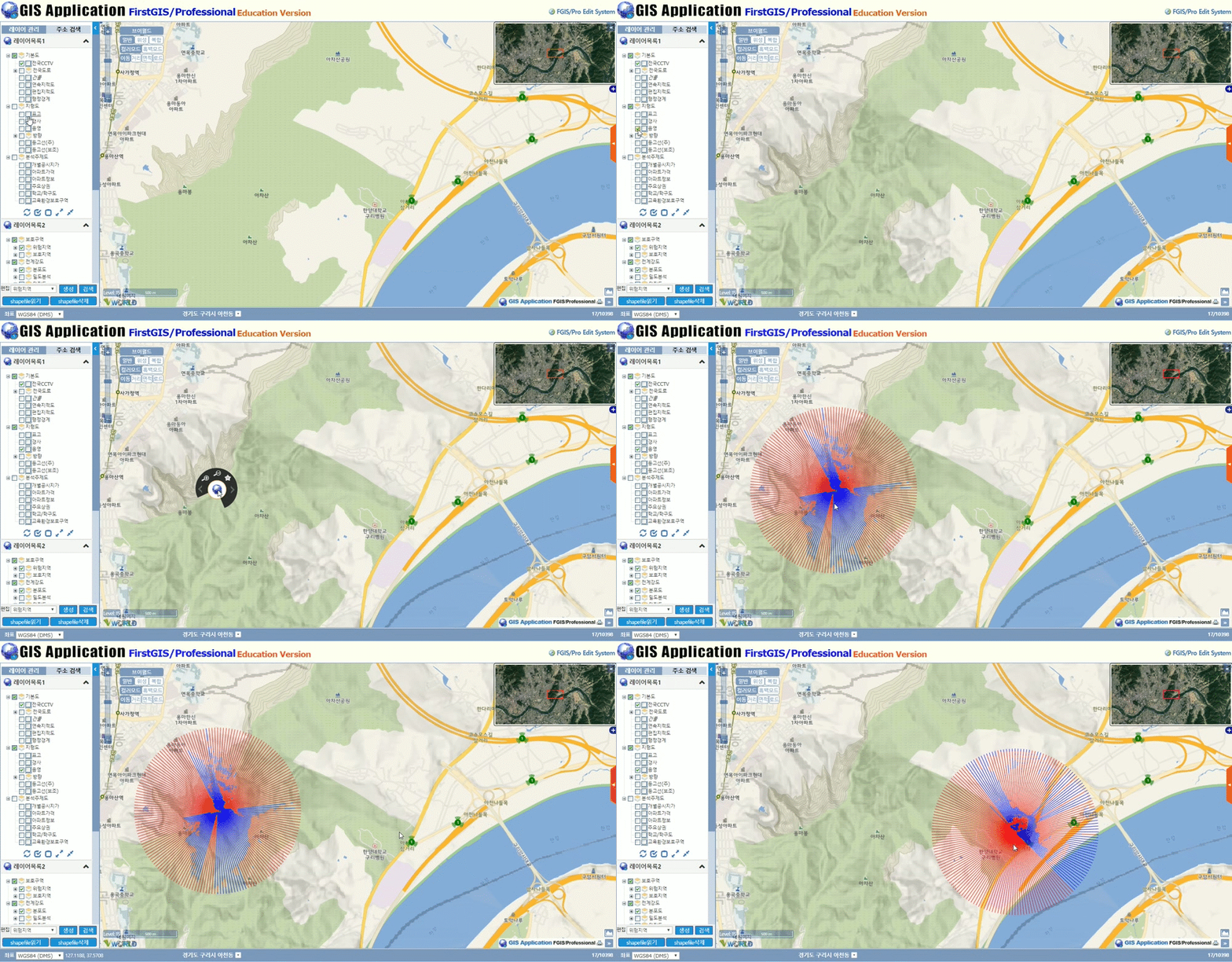
* 주요소스
- WPS문에서 "BoundingBox"을 넣어야 속도가 난다.
- 결과값을 Json으로 가져온다, 단 결과의 "features"은 JSON형식이라 OpenLayers의 features로 바꾸고 스타일도 준다.
function RadialLineOfSight(myMapPoint){ var sText = '<wps:Execute version="1.0.0" service="WPS"' + ' xmlns:ows="http://www.opengis.net/ows/1.1" xmlns:gml="http://www.opengis.net/gml"' + ' xmlns:xlink="http://www.w3.org/1999/xlink"' + ' xsi:schemaLocation="http://www.opengis.net/wps/1.0.0 http://schemas.opengis.net/wps/1.0.0/wpsAll.xsd">' + '<ows:Identifier>statistics:RadialLineOfSight</ows:Identifier>' + '<wps:DataInputs>' + '<wps:Input>' + '<ows:Identifier>inputCoverage</ows:Identifier>' + '<wps:Reference mimeType="image/tiff" xlink:href="http://geoserver/wcs" method="POST">' + '<wps:Body>' + '<wcs:GetCoverage service="WCS" version="1.1.1">' + '<ows:Identifier>FGIS:K_DEM</ows:Identifier>' + '<wcs:DomainSubset>' + '<ows:BoundingBox crs="http://www.opengis.net/gml/srs/epsg.xml#3857">' + '<ows:LowerCorner>'+ (myMapPoint[0]-1010).toFixed()+' '+ (myMapPoint[1]-1010).toFixed()+'</ows:LowerCorner>' + '<ows:UpperCorner>'+ (myMapPoint[0]+1010).toFixed()+' '+ (myMapPoint[1]+1010).toFixed()+'</ows:UpperCorner>' + '</ows:BoundingBox>' + '</wcs:DomainSubset>' + '<wcs:Output format="image/tiff"/>' + '</wcs:GetCoverage>' + '</wps:Body>' + '</wps:Reference>' + '</wps:Input>' + '<wps:Input>' + '<ows:Identifier>observerPoint</ows:Identifier>' + '<wps:Data>' + '<wps:ComplexData mimeType="application/wkt"><![CDATA[' + 'POINT(' + myMapPoint[0].toFixed() + ' ' + myMapPoint[1].toFixed() + ')' + ']]></wps:ComplexData>' + '</wps:Data>' + '</wps:Input>' + '<wps:Input>' + '<ows:Identifier>observerOffset</ows:Identifier>' + '<wps:Data>' + '<wps:LiteralData>1.8</wps:LiteralData>' + '</wps:Data>' + '</wps:Input>' + '<wps:Input>' + '<ows:Identifier>radius</ows:Identifier>' + '<wps:Data>' + '<wps:LiteralData>1000</wps:LiteralData>' + '</wps:Data>' + '</wps:Input>' + '</wps:DataInputs>' + '<wps:ResponseForm>' + '<wps:RawDataOutput mimeType="application/json">' + '<ows:Identifier>result</ows:Identifier>' + '</wps:RawDataOutput>' + '</wps:ResponseForm>' + '</wps:Execute>'; MapControlMode("MOVE"); MagBox_overlayShow(undefined, ""); Drawsketch_VectorLayer.getSource().clear(); LoadingWithMask(); var urlstring = geoserverURL + "ows"; CALL_XMLHTTP_XML(urlstring, sText, Call_back, onFault); function Call_back (item_data){ try{ var New_Features = []; var _features = item_data.features; if(_features && _features.length >0){ for(var i=0; i< _features.length; i++) { var _feature = _features[i]; var _Visible = _feature.properties["Visible"]; var _color = (_Visible=="0")?"#FF0000":"#0000FF"; var _Style = new ol.style.Style({ stroke: new ol.style.Stroke({ color: _color, width: 1, opacity: 0.7 }) }); var New_feature = (new ol.format.GeoJSON()).readFeature(_feature.geometry); New_feature.id = _feature.id; New_feature.setStyle(_Style); New_Features.push(New_feature); } } Drawsketch_VectorLayer.getSource().addFeatures(New_Features); }catch (e){ } closeLoadingWithMask(); } function onFault(e){ closeLoadingWithMask(); } } |
다음검색