● 리절트의 개요와 종류
: 리절트는 액션이 실행된 이후에 사용자에게 어떠한 결과를 보여주어야 하는지를 결정한다. 예를 들어, 성공적으로 실행이 완료되었다면 사용자 응답을 생성해야하고, 에러가 발생하였다면 사용자 입력 화면으로 되돌아가도록 하는등의 설정을 리절트에서 한다.
1. 리절트 설정을 위한 방법
: 액션이 반환하는 특정한 문자열을 사용하는데 이는 리절트를 식별하기 위한 용도로 사용되며 이를 리절트 코드라한다. 리절트 코드에 따른 리절트 설정은 <result /> 요소에 의해서 이루어진다.
==== <result /> 요소의 속성 ====

2. 리절트 타입
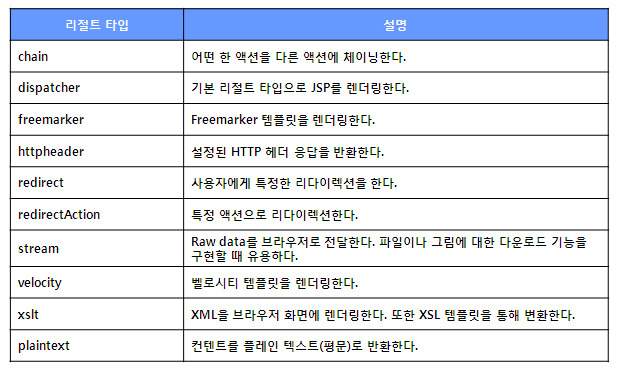
==== strutsd-default.xml에서 제공되는 다양한 리절트 타입
<package name="struts-default" abstract="true">
<result-types>
<result-type name="chain" class="com.opensymphony.xwork2.ActionChainResult"/>
<result-type name="dispatcher" class="org.apache.struts2.dispatcher.ServletDispatcherResult" default="true"/>
<result-type name="freemarker" class="org.apache.struts2.views.freemarker.FreemarkerResult"/>
<result-type name="httpheader" class="org.apache.struts2.dispatcher.HttpHeaderResult"/>
<result-type name="redirect" class="org.apache.struts2.dispatcher.ServletRedirectResult"/>
<result-type name="redirectAction" class="org.apache.struts2.dispatcher.ServletActionRedirectResult"/>
<result-type name="stream" class="org.apache.struts2.dispatcher.StreamResult"/>
<result-type name="velocity" class="org.apache.struts2.dispatcher.VelocityResult"/>
<result-type name="xslt" class="org.apache.struts2.views.xslt.XSLTResult"/>
<result-type name="plainText" class="org.apache.struts2.dispatcher.PlainTextResult" />
<!-- Deprecated name form scheduled for removal in Struts 2.1.0. The camelCase versions are preferred. See ww-1707 -->
<result-type name="redirect-action" class="org.apache.struts2.dispatcher.ServletActionRedirectResult"/>
<result-type name="plaintext" class="org.apache.struts2.dispatcher.PlainTextResult" />
</result-types>
--> default 속성이 true로 정의된 result-type은 <result />요소 선언시 type을 명시하지 않을 경우 적용되는 디폴트 리절트 타입이된다. 따라서 디폴트 리절트 타입은 dispatcher이다. dispatche로 정의된 요소는 컨트롤러에서 뷰로 요청을 포워딩 해주는 일을 한다.
=== 리절트 타입 정리 ====
● 체인 리절트를 활용한 액션 체인
: 보통 액션을 실행한 후에는 리절트 페이지로 포워딩하도록 구성한다. 이렇게 구성하면 하나의 액션이 실행한 후 하나의 요청이 종료된다. 그 후에 다른 액션을 요청하면 이전 액션에 사용되었던 자원이 제거되어 다시 사용할 수 없게된다.
그러나 경우에 따라서는 액션을 실행한 후에 다른 액션에서 이전 요청의 정보와 액션의 상태값을 유지하여 계속해서 사용해야 할 경우가 생긴다. 이러한 경우에는 액션 체인을 사용하여 다른 액션을 호출할 수 있다. 액션을 다른 액션과 체인을 형성하도록 하기 위해서는 체인 리절트가 사용된다.
1. 체인 리절트를 활용하는 방법
: 특정 액션이 다른 액션을 호출하기 위해서는 리절트 설정 시 체인 리절트를 사용한다. 이러한 리절트를 사용하면 먼저 실행한 액션의 프로퍼티를 현재 실행중이 액션에 세팅할 수 있게 된다는 장점이 있다.
==== 회원 등록 페이지가 성공적으로 수행되었다면 바로 로그인 처리를 하도록 하는 예제.
==== UserRegAction.java ====
package action;
import com.opensymphony.xwork2.ActionSupport;
public class UserRegAction extends ActionSupport
{
private String userId;
private String userPW;
private String userName;
private String message;
public void setUserId(String userId)
{
this.userId = userId;
}
public void setUserPW(String userPW)
{
this.userPW = userPW;
}
public String getUserPW()
{
return userPW;
}
public void setUserName(String userName)
{
this.userName = userName;
}
public String getUserId()
{
return userId;
}
public String getMessage()
{
return message;
}
public String execute() throws Exception
{
message = userId + " 님 정보가 성공적으로 등록되었습니다. ";
return SUCCESS;
}
}
==== LoginAction.java ====
package action;
import com.opensymphony.xwork2.Action;
public class LoginAction implements Action
{
private String userId;
private String userPW;
private String userName;
private String message;
public String getUserId()
{
return userId;
}
public void setUserId(String userId)
{
this.userId = userId;
}
public String getMessage()
{
return message;
}
public void setMessage(String message)
{
this.message = message;
}
public void setUserPW(String userPW)
{
this.userPW = userPW;
}
public void setUserName(String userName)
{
this.userName = userName;
}
public String execute() throws Exception
{
if(message == null)
{
message = "";
}
else
{
message = message;
}
message += userId + "로 로그인하셨습니다.";
return SUCCESS;
}
}
==== userRegForm.jsp ====
<%@ page language="java" contentType="text/html; charset=UTF-8"
pageEncoding="UTF-8"%>
<!DOCTYPE html PUBLIC "-//W3C//DTD HTML 4.01 Transitional//EN" "http://www.w3.org/TR/html4/loose.dtd">
<html>
<head>
<meta http-equiv="Content-Type" content="text/html; charset=UTF-8">
<title>회원가입</title>
</head>
<body>
<center>
<h2>회원가입</h2>
<form method="post" action="UserRegLoginAction.action">
<table cellspacing="10">
<tr>
<td>아이디</td>
<td>
<input type="text" name="userId" value="${userId }"/>
</td>
</tr>
<tr>
<td>패스워드</td>
<td>
<input type="password" name="userPW" value="${userPW }"/>
</td>
</tr>
<tr>
<td>이름</td>
<td>
<input type="text" name="userName" value="${userName }"/>
</td>
</tr>
<tr>
<td colspan="3"><input type="submit" value="보내기"/></td>
</tr>
</table>
</form>
</center>
</body>
</html>
==== userRegSuccess.jsp ====
<%@ page language="java" contentType="text/html; charset=UTF-8"
pageEncoding="UTF-8"%>
<!DOCTYPE html PUBLIC "-//W3C//DTD HTML 4.01 Transitional//EN" "http://www.w3.org/TR/html4/loose.dtd">
<html>
<head>
<meta http-equiv="Content-Type" content="text/html; charset=UTF-8">
<title> 회원 가입 완료</title>
</head>
<body>
<center>
<b><font color="red">회원가입이 완료되었습니다.</font></b><p/>
${message }<p/>
</center>
</body>
</html>
==== struts.xml ====
<?xml version="1.0" encoding="UTF-8"?>
<!DOCTYPE struts PUBLIC
"-//Apache Software Foundation//DTD Struts Configuration 2.0//EN"
"http://struts.apache.org/dtds/struts-2.0.dtd">
<struts>
<constant name="struts.i18n.encoding" value="UTF-8"/>
<package name="ch06" namespace="/ch06" extends="struts-default">
<action name="UserRegForm">
<result>/jsp/userRegForm.jsp</result>
</action>
<action name="UserRegLoginAction" class="action.UserRegAction">
<interceptor-ref name="params"/>
<result name="success" type="chain">
<param name="actionName">LoginAction</param>
<param name="namespace">/ch06</param>
</result>
</action>
<action name="LoginAction" class="action.LoginAction">
<interceptor-ref name="chain"/>
<interceptor-ref name="params"/>
<result name="success">/jsp/userRegSuccess.jsp</result>
</action>
</package>
</struts>