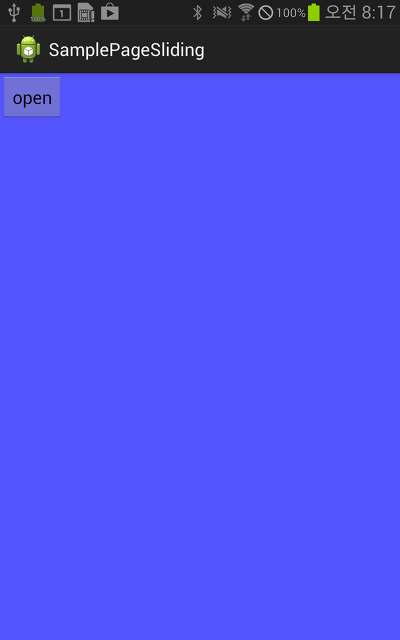
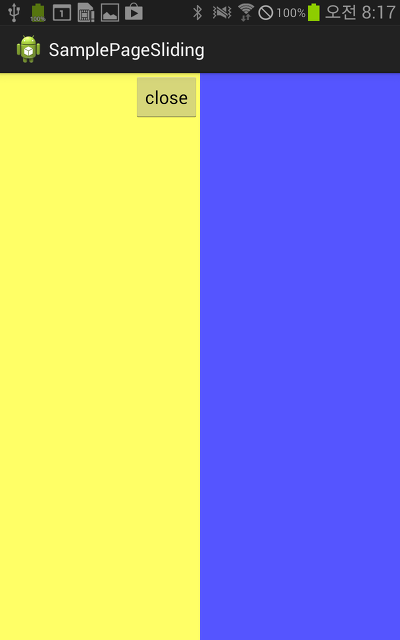
안드로이드에서 좌측에서 슬라이드 되는 슬라이드 메뉴를 구현해보았는데, FrameLayout을 이용해서 손쉽게 구현할 수 있었다. 구현 과정은 다음과 같다.
1. 레이아웃 정의
2. 슬라이드 메뉴에 대한 애니메이션 설정
3. 슬라이딩을 위한 버튼 이벤트 설정
==== activity_main ====
<FrameLayout xmlns:android="http://schemas.android.com/apk/res/android"
xmlns:tools="http://schemas.android.com/tools"
android:layout_width="match_parent"
android:layout_height="match_parent"
>
<!-- 메인 화면을 화면 전체에 꽉 차게 채운다. -->
<LinearLayout
android:orientation="vertical"
android:layout_width="match_parent"
android:layout_height="match_parent"
android:background="#ff5555ff"
>
<Button
android:id="@+id/openBtn01"
android:layout_width="wrap_content"
android:layout_height="wrap_content"
android:text="open"
/>
</LinearLayout>
<!-- 슬라이드 메뉴.
- 레이아웃 좌측에 세로로 꽉 차게 위치시킨후, 초기에는 보이지 않도록 숨긴다.
-->
<LinearLayout
android:id="@+id/slidingPage01"
android:orientation="vertical"
android:layout_width="200sp"
android:layout_height="match_parent"
android:layout_gravity="left"
android:background="#ffffff66"
android:visibility="gone"
>
<Button
android:id="@+id/btnClose"
android:layout_width="wrap_content"
android:layout_height="wrap_content"
android:layout_gravity="right"
android:text="close"
/>
</LinearLayout>
<!-- 버튼을 우측의 중간에 항상 보이도록 설정한 부분으로 예제에서는 사용하지 않음.
<LinearLayout
android:orientation="vertical"
android:layout_width="wrap_content"
android:layout_height="wrap_content"
android:layout_gravity="right|center_vertical"
android:background="#00000000"
>
<Button
android:id="@+id/openBtn02"
android:layout_width="wrap_content"
android:layout_height="wrap_content"
android:text="Open"
/>
</LinearLayout>
-->
</FrameLayout>
버튼을 눌렀을때 슬라이드 메뉴가 오른쪽으로 튀어나오는 애니메이션과 다시 눌렀을때 왼쪽으로 들어가는 애니메이션 2개를 정의한다.
==== /res/anim/translate_right.xml ====
<?xml version="1.0" encoding="utf-8"?>
<set xmlns:android="http://schemas.android.com/apk/res/android"
android:interpolator="@android:anim/accelerate_decelerate_interpolator"
>
<translate
android:fromXDelta="-50%p"
android:toXDelta="0%p"
android:duration="200"
android:repeatCount="0"
android:fillAfter="false"
/>
</set>
==== /res/anim/translate_left.xml ====
<?xml version="1.0" encoding="utf-8"?>
<set xmlns:android="http://schemas.android.com/apk/res/android"
android:interpolator="@android:anim/accelerate_decelerate_interpolator"
>
<translate
android:fromXDelta="0%p"
android:toXDelta="-50%p"
android:duration="200"
android:repeatCount="0"
android:fillAfter="true"
/>
</set>
==== MainActivity.java ====
package com.example.samplepagesliding;
import android.os.Bundle;
import android.app.Activity;
import android.view.Menu;
import android.view.View;
import android.view.View.xxOnClickListener;
import android.view.animation.Animation;
import android.view.animation.Animation.AnimationListener;
import android.view.animation.AnimationUtils;
import android.widget.Button;
import android.widget.LinearLayout;
/**
* FrameLayout을 사용한 슬라이딩 메뉴 구현 예
*
* @author hjs6877
*
*/
public class MainActivity extends Activity {
/**
* 페이지 오픈 유무 플래그
*/
boolean isPageOpen = false;
Animation translateLeft; // 왼쪽으로 이동하는 애니메이션 객체
Animation translateRight; // 오른쪽으로 이동하는 애니메이션 객체
LinearLayout slidingPage; // 슬라이딩으로 보여줄 페이지
Button btnOpen;
Button btnClose;
@Override
protected void onCreate(Bundle savedInstanceState) {
super.onCreate(savedInstanceState);
setContentView(R.layout.activity_main);
// 슬라이딩으로 보여질 레이아웃 객체 참조
slidingPage = (LinearLayout)findViewById(R.id.slidingPage01);
/**
* 애니메이션 객체 로딩
*/
translateLeft = AnimationUtils.loadAnimation(this, R.anim.translate_left);
translateRight = AnimationUtils.loadAnimation(this, R.anim.translate_right);
/**
* 애니메이션 객체에 리스너 설정
*/
SlidingPageAnimationListener aniListener = new SlidingPageAnimationListener();
translateLeft.setAnimationListener(aniListener);
translateRight.setAnimationListener(aniListener);
/**
* 버튼을 눌렀을때의 이벤트 처리. 슬라이딩 메뉴의 열고, 닫음 애니메이션 실행.
*/
btnOpen = (Button)findViewById(R.id.openBtn01);
btnClose = (Button)findViewById(R.id.btnClose);
btnOpen.setxxOnClickListener(new xxOnClickListener() {
@Override
public void xxonClick(View v) {
/**
* 슬라이드 메뉴 열기애니메이션 적용
*/
if(!isPageOpen)
{
slidingPage.setVisibility(View.VISIBLE);
slidingPage.startAnimation(translateRight);
}
}
});
btnClose.setxxOnClickListener(new xxOnClickListener() {
@Override
public void xxonClick(View v) {
/**
* 슬라이드 메뉴 닫기 애니메이션 적용
*/
if(isPageOpen)
{
slidingPage.startAnimation(translateLeft);
}
}
});
}
private class SlidingPageAnimationListener implements AnimationListener
{
/**
* 애니메이션이 끝날때 호출.
*/
@Override
public void onAnimationEnd(Animation animation) {
/**
* 슬라이딩 메뉴가 열려있으면 INVISIBLE 상태로 바꾼다.
*/
if(isPageOpen)
{
slidingPage.setVisibility(View.INVISIBLE);
isPageOpen = false;
}
else
{
isPageOpen = true;
}
}
@Override
public void onAnimationRepeat(Animation animation) {
// TODO Auto-generated method stub
}
@Override
public void onAnimatixxonStart(Animation animation) {
// TODO Auto-generated method stub
}
}
@Override
public boolean onCreateOptionsMenu(Menu menu) {
// Inflate the menu; this adds items to the action bar if it is present.
getMenuInflater().inflate(R.menu.main, menu);
return true;
}
}