rx550 2G 짜리가 나름 가성비 좋다 생각해서 더 구매할려 했으나...제품 품절이라..어쩔 수 없이 더 비싼 560 을 구매했는데...
실질적으론 가격만 차이가 나지....채굴 해시는 차이가 없다시피 하네요...
"gpu_thread_num" : 2,
"gpu_threads_conf" : [
{ "index" : 0, "intensity" : 326, "worksize" : 8, "affine_to_cpu" : false },
{ "index" : 0, "intensity" : 326, "worksize" : 8, "affine_to_cpu" : false },
=============================
XFX RX 550 4GB Monero Mining with xmr-stak-amd
- Video Cards: XFX RX 550 4GB x2
Here are the settings I am using for xmr-stak-amd for 2 XFX RX 550 4GB. Note: See update at bottom of post for 4 card configuration.
/*
 * Number of GPUs that you have in your system. Each GPU will get its own CPU thread.
 */
"gpu_thread_num" : 4,

/*
 * GPU configuration. You should play around with intensity and worksize as the fastest settings will vary.
 *      index    - GPU index number usually starts from 0
 *  intensity    - Number of parallel GPU threads (nothing to do with CPU threads)
 *   worksize    - Number of local GPU threads (nothing to do with CPU threads)
 * affine_to_cpu - This will affine the thread to a CPU. This can make a GPU miner play along nicer with a CPU miner.
 */
"gpu_threads_conf" : [
	{ "index" : 0, "intensity" : 512, "worksize" : 8, "affine_to_cpu" : 0 },
	{ "index" : 0, "intensity" : 512, "worksize" : 8, "affine_to_cpu" : 0 },
	{ "index" : 1, "intensity" : 512, "worksize" : 8, "affine_to_cpu" : 1 },
	{ "index" : 1, "intensity" : 512, "worksize" : 8, "affine_to_cpu" : 1 },

],

/*
 * Platform index. This will be 0 unless you have different OpenCL platform - eg. AMD and Intel.
 */
"platform_index" : 2,
To break it down a bit, I am starting 4 GPU threads and assigning 2 threads per card, each with an intensity of 512 and worksize of 8. One video card is set to processor core 1 and the other to processor core 2. The Pentium G4400 is a dual core processor with no hyperthreading.
Platform_index is on a case by case basis depending on your hardware, but 2 is what worked for the above configuration.
The results can be seen below:
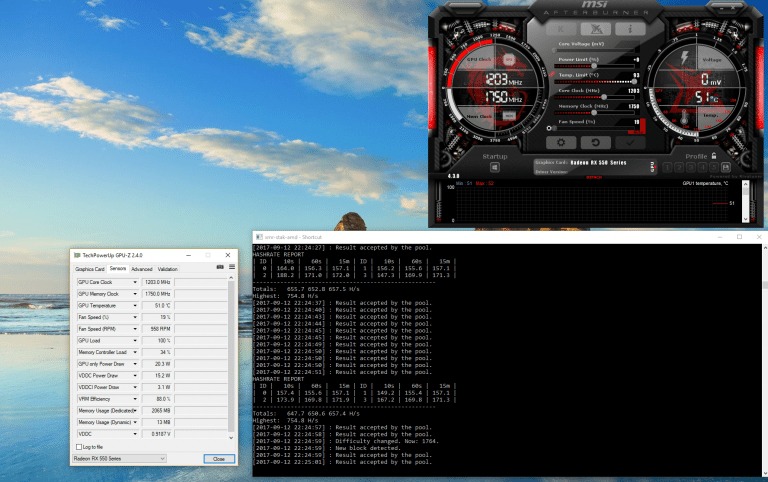
Averaging 655 h/s over 15 minutes. That works out to exactly 3 h/s per dollar spent on the video cards at a very low power output.
I would be interested in hearing your thoughts on this. Keep in mind that this is all at stock speeds! I plan to switch to Linux once I reach 8 video cards and have 12 XFX RX 550 running for just under 4 kh/s at a cost of just $1,308 dollars. The cards should retain a decent resell value due to the ram.
Update: Here is my current results with now 4 RX 550’s at stock speeds:
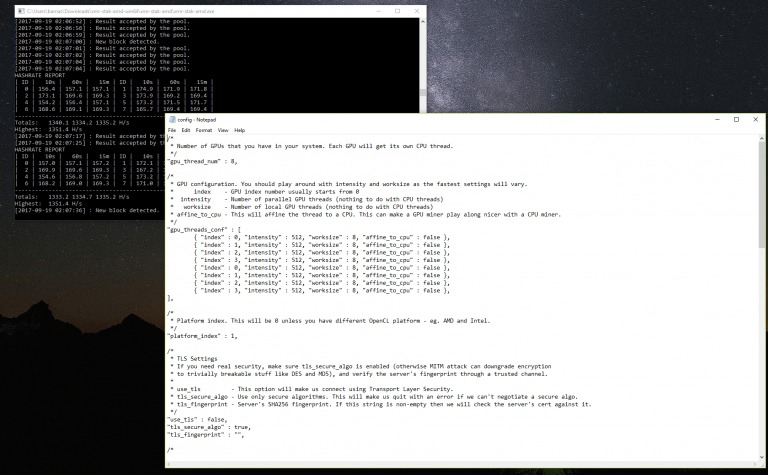
Combined, all 4 RX 550s are producing 333.75 h/s over 15 minute window. Not bad, for stock speeds.
/*
 * Number of GPUs that you have in your system. Each GPU will get its own CPU thread.
 */
"gpu_thread_num" : 8,

/*
 * GPU configuration. You should play around with intensity and worksize as the fastest settings will vary.
 *      index    - GPU index number usually starts from 0
 *  intensity    - Number of parallel GPU threads (nothing to do with CPU threads)
 *   worksize    - Number of local GPU threads (nothing to do with CPU threads)
 * affine_to_cpu - This will affine the thread to a CPU. This can make a GPU miner play along nicer with a CPU miner.
 */
"gpu_threads_conf" : [
	{ "index" : 0, "intensity" : 512, "worksize" : 8, "affine_to_cpu" : false },
	{ "index" : 1, "intensity" : 512, "worksize" : 8, "affine_to_cpu" : false },
	{ "index" : 2, "intensity" : 512, "worksize" : 8, "affine_to_cpu" : false },
	{ "index" : 3, "intensity" : 512, "worksize" : 8, "affine_to_cpu" : false },
	{ "index" : 0, "intensity" : 512, "worksize" : 8, "affine_to_cpu" : false },
	{ "index" : 1, "intensity" : 512, "worksize" : 8, "affine_to_cpu" : false },
	{ "index" : 2, "intensity" : 512, "worksize" : 8, "affine_to_cpu" : false },
	{ "index" : 3, "intensity" : 512, "worksize" : 8, "affine_to_cpu" : false },
],

/*
 * Platform index. This will be 0 unless you have different OpenCL platform - eg. AMD and Intel.
 */
"platform_index" : 1,
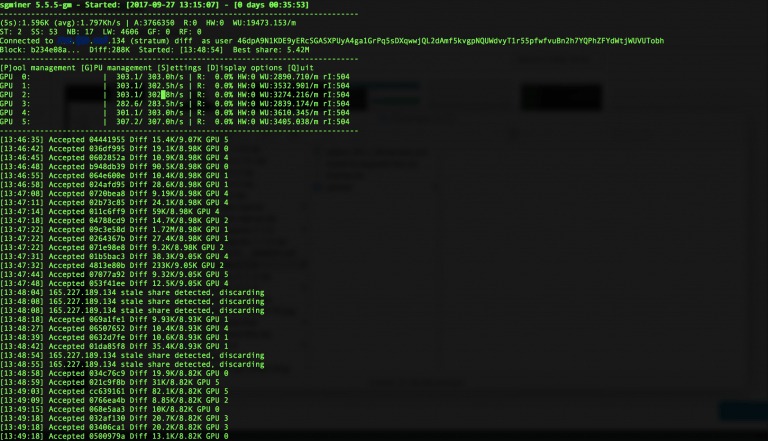
Follow Up: I have now reach 6 RX 550s and have made the move to SimpleMining OS so that I can eventually fill the entire Motherboard up with 12 of them. I am using sgminer-gm-5.5.5 with the following settings:
--no-submit-stale --kernel cryptonight -o stratum+tcp://x.227.x.134:3333 -u 46dpA9N1KDE9yERcSGASXPUyA4ga1GrPq5sDXqwwjQL2dAmf5kvgpNQUWdvyT1r55pfwfvuBn2h7YQPhZFYdWtjWUVUTobh -p x --rawintensity 504 -w 8 -g 2
I’ve found it the most stable. Results:
========================
AMD 쓰레드 나누기
xmr-stak-amd 의 config 수정
GPU 1개당 2개의 thread 로 나눠줍니다.
4 thread 로도 나워줘 봤는데 월등히 뛰어나거나 개선점은 없습니다.
"gpu_thread_num" : 2, /* 여기서 num 뒤의 숫자는 그래픽 카드 숫자 x 2로 해 주십시오 */
"gpu_threads_conf" : [
{ "index" : 0, "intensity" : 2016, "worksize" : 8, "affine_to_cpu" : false },
{ "index" : 0, "intensity" : 1600, "worksize" : 8, "affine_to_cpu" : false },
/* thread 한개당 위처럼 index 를 2개씩 써 주는 게 중요합니다. intensity 값은 두 개 다 동일하게 해도 상관없습니다. 이 세팅은 참고 세팅이며, 각자 조절하셔서 추가적인 최적값을 찾아도 됩니다. 만약에 그래픽카드가 4개라면, index 숫자만 1,2,3 으로 하고 각 2개씩 세팅해 주시면 됩니다. */
/* vega 56 의 최대 설정 가능 intensity 는 2024 입니다. 그 이상 설정할 경우 에러가 발생하니 그 밑으로 설정하세요. intensity 설정값은 그래픽카드에 따라 차이가 있습니다. */
xmr-stak-amd 의 config 수정은 다음과 같습니다.
"gpu_thread_num" : 8,
"gpu_threads_conf" : [
{ "index" : 0, "intensity" : 2016, "worksize" : 8, "affine_to_cpu" : false },
{ "index" : 0, "intensity" : 1600, "worksize" : 8, "affine_to_cpu" : false },
{ "index" : 1, "intensity" : 2016, "worksize" : 8, "affine_to_cpu" : false },
{ "index" : 1, "intensity" : 1600, "worksize" : 8, "affine_to_cpu" : false },
{ "index" : 2, "intensity" : 2016, "worksize" : 8, "affine_to_cpu" : false },
{ "index" : 2, "intensity" : 1600, "worksize" : 8, "affine_to_cpu" : false },
{ "index" : 3, "intensity" : 2016, "worksize" : 8, "affine_to_cpu" : false },
{ "index" : 3, "intensity" : 1600, "worksize" : 8, "affine_to_cpu" : false },
]
나머지 옵션 값들은 기존 있는거 그대로요.
=====================================
"gpu_thread_num" : 2,
"gpu_threads_conf" : [
{ "index" : 0, "intensity" : 880, "worksize" : 8, "affine_to_cpu" : false },
{ "index" : 0, "intensity" : 880, "worksize" : 8, "affine_to_cpu" : false },
intensity 값을 뭘 기준으로 넣어야 하는지요 ..?? 제가 해시 가장 잘 나오는 값을 찾아서 넣어줘야 하는건지?
그래픽카드 rx580 한장으로 스레드 나눠서 하면 해시 더 잘나온다고 해서 해보니
해시가 왜 더 잘나오는지요?
스레드나눠서 하면 그래픽카드 에 더 무리가 가는지요?
==========
AMD 카드의 경우 대부분 쓰레드 나누기를 하면 헤시가 5 % 이상은 더 나올수 있늘것 같습니다. 그래픽 카드 종류마다 조금씩 차이가 있는것 같습니다.
이게 그래픽카드에 무리를 주는지는 쓰레드 나누기가 알려진지 몇달 되지 않았기에 답변드릴 만한 데이타가 없는것 같네요.
intensity 값은 그래픽 카드의 메모리 용량등과 관계가 있다고 알고 있습니다.
문의하신것과 같이 최적값을 찾아서 돌리는것이 좋습니다. (최대 해시값과 안정성 모두 잡아야 합니다.)