1) 다음 2가지 방식으로 훈련결과를 실시간으로 시각화하시오.
- 원본은 건드리지 말고 새로운 소스파일 my_train.py 생성하여 원본을 복사하여 작업하고 시각화 코드를 적당한 위치에 추가할것
- 예제코드에서는 검증 로스는 출력해주지 않는다. 소스코드에서 검증로스를 추출하는 방법을 설명하라. -> 훈련과정에서 저장되는 로그 데이터가 어디에 저장되는지 어떻게 출력할수 있는지 코드 분석할 것
- 훈련로스, 정확도, 검증로스, 검증정확도 그래프 출력기능을 다음 2가지 방식으로 구현
- 교재 626페이지 코드를 이용하는 방법(matplotlib), 텐서보드를 사용하여 시각화하는 방법
- 매 에퍽마다 실시간으로 그래프를 업데이트하도록 할것 -> 훈련하는 동안 시간에 따라 로스의 변화를 확인가능하도록 할것(동영상으로 저장) -> 손실이 더이상 감소하지 않거나 감소하다가 다시 증가한다면 훈련중단해야함
그래프 예제 -> https://youtu.be/m2gqcl06UeM
1 2 3 4 5 6 7 8 9 10 11 12 13 14 15 16 17 18 19 20 21 22 23 24 25 26 27 28 29 30 31 32 33 34 35 36 37 38 39 40 41 42 43 44 45 46 47 48 49 50 51 52 53 54 55 56 57 58 59 60 61 62 63 64 65 66 67 68 69 70 71 72 73 74 75 76 77 78 79 80 81 82 83 84 85 86 87 88 89 90 91 92 93 94 95 96 97 98 99 100 101 102 103 104 105 106 107 108 109 110 111 112 113 114 115 116 117 118 119 120 121 122 123 124 125 126 127 128 129 130 131 132 133 134 135 136 137 138 139 140 141 142 143 144 145 146 147 148 149 150 151 152 153 154 155 156 157 158 159 160 161 162 163 164 165 166 167 168 169 170 171 172 173 174 175 176 177 178 179 180 181 182 183 184 185 186 187 188 189 190 191 192 193 194 195 196 197 198 199 200 201 202 203 204 205 206 207 208 209 210 211 212 213 214 215 216 217 218 219 220 221 222 223 224 225 226 227 228 229 230 231 232 233 234 235 236 237 238 239 240 241 242 243 244 245 246 247 248 249 250 251 252 253 254 255 256 257 258 259 260 261 262 263 264 265 266 | def main(args): if args.output_dir: utils.mkdir(args.output_dir) utils.init_distributed_mode(args) print(args) device = torch.device(args.device) if args.use_deterministic_algorithms: torch.backends.cudnn.benchmark = False torch.use_deterministic_algorithms(True) else: torch.backends.cudnn.benchmark = True train_dir = os.path.join(args.data_path, "train") val_dir = os.path.join(args.data_path, "val") dataset, dataset_test, train_sampler, test_sampler = load_data(train_dir, val_dir, args) # display dataset print(dataset.classes) print(dataset.class_to_idx) print(dataset.imgs) num_classes = len(dataset.classes) mixup_cutmix = get_mixup_cutmix( mixup_alpha=args.mixup_alpha, cutmix_alpha=args.cutmix_alpha, num_classes=num_classes, use_v2=args.use_v2 ) if mixup_cutmix is not None: def collate_fn(batch): return mixup_cutmix(*default_collate(batch)) else: collate_fn = default_collate # 학습 데이터 로더 data_loader = torch.utils.data.DataLoader( dataset, # 학습 데이터셋 batch_size=args.batch_size, # 배치 사이즈 sampler=train_sampler, # 샘플링 num_workers=args.workers, # worker 개수 pin_memory=True, collate_fn=collate_fn, ) # 테스트 데이터 로더 data_loader_test = torch.utils.data.DataLoader( dataset_test, batch_size=args.batch_size, sampler=test_sampler, num_workers=args.workers, pin_memory=True ) print("Creating model") #model = torchvision.models.get_model(args.model, weights=args.weights, num_classes=num_classes) model = torchvision.models.get_model(args.model, weights=args.weights, num_classes=1000) print(model.fc) model.fc = nn.Linear(model.fc.in_features, num_classes) print(model.fc) model.to(device) for param in model.parameters(): param.requires_grad = False model.fc.weight.requires_grad = True model.fc.bias.requires_grad = True for name, param in model.named_parameters(): print(name, param.requires_grad) if args.distributed and args.sync_bn: model = torch.nn.SyncBatchNorm.convert_sync_batchnorm(model) criterion = nn.CrossEntropyLoss(label_smoothing=args.label_smoothing) custom_keys_weight_decay = [] if args.bias_weight_decay is not None: custom_keys_weight_decay.append(("bias", args.bias_weight_decay)) if args.transformer_embedding_decay is not None: for key in ["class_token", "position_embedding", "relative_position_bias_table"]: custom_keys_weight_decay.append((key, args.transformer_embedding_decay)) parameters = utils.set_weight_decay( model, args.weight_decay, norm_weight_decay=args.norm_weight_decay, custom_keys_weight_decay=custom_keys_weight_decay if len(custom_keys_weight_decay) > 0 else None, ) opt_name = args.opt.lower() if opt_name.startswith("sgd"): optimizer = torch.optim.SGD( parameters, lr=args.lr, momentum=args.momentum, weight_decay=args.weight_decay, nesterov="nesterov" in opt_name, ) elif opt_name == "rmsprop": optimizer = torch.optim.RMSprop( parameters, lr=args.lr, momentum=args.momentum, weight_decay=args.weight_decay, eps=0.0316, alpha=0.9 ) elif opt_name == "adamw": optimizer = torch.optim.AdamW(parameters, lr=args.lr, weight_decay=args.weight_decay) else: raise RuntimeError(f"Invalid optimizer {args.opt}. Only SGD, RMSprop and AdamW are supported.") scaler = torch.cuda.amp.GradScaler() if args.amp else None args.lr_scheduler = args.lr_scheduler.lower() if args.lr_scheduler == "steplr": main_lr_scheduler = torch.optim.lr_scheduler.StepLR(optimizer, step_size=args.lr_step_size, gamma=args.lr_gamma) elif args.lr_scheduler == "cosineannealinglr": main_lr_scheduler = torch.optim.lr_scheduler.CosineAnnealingLR( optimizer, T_max=args.epochs - args.lr_warmup_epochs, eta_min=args.lr_min ) elif args.lr_scheduler == "exponentiallr": main_lr_scheduler = torch.optim.lr_scheduler.ExponentialLR(optimizer, gamma=args.lr_gamma) else: raise RuntimeError( f"Invalid lr scheduler '{args.lr_scheduler}'. Only StepLR, CosineAnnealingLR and ExponentialLR " "are supported." ) if args.lr_warmup_epochs > 0: if args.lr_warmup_method == "linear": warmup_lr_scheduler = torch.optim.lr_scheduler.LinearLR( optimizer, start_factor=args.lr_warmup_decay, total_iters=args.lr_warmup_epochs ) elif args.lr_warmup_method == "constant": warmup_lr_scheduler = torch.optim.lr_scheduler.ConstantLR( optimizer, factor=args.lr_warmup_decay, total_iters=args.lr_warmup_epochs ) else: raise RuntimeError( f"Invalid warmup lr method '{args.lr_warmup_method}'. Only linear and constant are supported." ) lr_scheduler = torch.optim.lr_scheduler.SequentialLR( optimizer, schedulers=[warmup_lr_scheduler, main_lr_scheduler], milestones=[args.lr_warmup_epochs] ) else: lr_scheduler = main_lr_scheduler model_without_ddp = model if args.distributed: model = torch.nn.parallel.DistributedDataParallel(model, device_ids=[args.gpu]) model_without_ddp = model.module model_ema = None if args.model_ema: # Decay adjustment that aims to keep the decay independent of other hyper-parameters originally proposed at: # https://github.com/facebookresearch/pycls/blob/f8cd9627/pycls/core/net.py#L123 # # total_ema_updates = (Dataset_size / n_GPUs) * epochs / (batch_size_per_gpu * EMA_steps) # We consider constant = Dataset_size for a given dataset/setup and omit it. Thus: # adjust = 1 / total_ema_updates ~= n_GPUs * batch_size_per_gpu * EMA_steps / epochs adjust = args.world_size * args.batch_size * args.model_ema_steps / args.epochs alpha = 1.0 - args.model_ema_decay alpha = min(1.0, alpha * adjust) model_ema = utils.ExponentialMovingAverage(model_without_ddp, device=device, decay=1.0 - alpha) if args.resume: checkpoint = torch.load(args.resume, map_location="cpu", weights_only=True) model_without_ddp.load_state_dict(checkpoint["model"]) if not args.test_only: optimizer.load_state_dict(checkpoint["optimizer"]) lr_scheduler.load_state_dict(checkpoint["lr_scheduler"]) args.start_epoch = checkpoint["epoch"] + 1 if model_ema: model_ema.load_state_dict(checkpoint["model_ema"]) if scaler: scaler.load_state_dict(checkpoint["scaler"]) if args.test_only: # We disable the cudnn benchmarking because it can noticeably affect the accuracy torch.backends.cudnn.benchmark = False torch.backends.cudnn.deterministic = True if model_ema: evaluate(model_ema, criterion, data_loader_test, device=device, log_suffix="EMA") else: evaluate(model, criterion, data_loader_test, device=device) return plt.ion() print("Start training") x_arr=[] rec_train = [[],[]] rec_valid = [[],[]] fig, (ax1, ax2) = plt.subplots(1,2, figsize=(16, 4)) start_time = time.time() for epoch in range(args.start_epoch, args.epochs): if args.distributed: train_sampler.set_epoch(epoch) # 학습 데이터셋 train_one_epoch(model, criterion, optimizer, data_loader, device, epoch, args, rec_train,model_ema, scaler) lr_scheduler.step() # 검증 데이터셋 evaluate(model, criterion, data_loader_test, device=device,rec_valid=rec_valid,epoch=epoch) print('epoch 학습 데이터 : ', str(epoch)) print(rec_train) print('epoch 검증 데이터 : ', str(epoch)) print(rec_valid) if model_ema: evaluate(model_ema, criterion, data_loader_test, device=device, log_suffix="EMA") if args.output_dir: checkpoint = { "model": model_without_ddp.state_dict(), "optimizer": optimizer.state_dict(), "lr_scheduler": lr_scheduler.state_dict(), "epoch": epoch, "args": args, } if model_ema: checkpoint["model_ema"] = model_ema.state_dict() if scaler: checkpoint["scaler"] = scaler.state_dict() utils.save_on_master(checkpoint, os.path.join(args.output_dir, f"model_{epoch}.pth")) utils.save_on_master(checkpoint, os.path.join(args.output_dir, "checkpoint.pth")) # added by 2sungryul, save the full model with its structure and weight torch.save(model, os.path.join(args.output_dir, "model.pth")) to_numpy_train = np.array(rec_train) to_numpy_valid = np.array(rec_valid) x_arr = np.arange(epoch + 1) # 실시간 그래프 업데이트 ax1.clear() # 손실 그래프 ax1.plot(x_arr, to_numpy_train[0], '-', label='Train loss', marker='o') ax1.plot(x_arr, to_numpy_valid[0], '--', label='Valid loss', marker='o') ax1.legend(fontsize=15) ax1.set_title('Loss') ax1.set_xlabel('Epoch', size=15) ax1.set_ylabel('Loss', size=15) ax2.clear() # 정확도 그래프프 ax2.plot(x_arr, to_numpy_train[1], '-', label='Train acc', marker='o') ax2.plot(x_arr, to_numpy_valid[1], '--', label='Valid acc', marker='o') ax2.legend(fontsize=15) ax2.set_title('Accuracy') ax2.set_xlabel('Epoch', size=15) ax2.set_ylabel('Loss', size=15) # 그래프 갱신 plt.draw() # 그래프 업데이트 plt.pause(0.1) # 0.5초 대기 (실제 학습 환경 시뮬레이션) plt.ioff() # 인터랙티브 모드 종료 # 그래프를 파일로 저장 (PNG 형식) plt.savefig("graph.png") plt.show() total_time = time.time() - start_time total_time_str = str(datetime.timedelta(seconds=int(total_time))) print(f"Training time {total_time_str}") | cs |
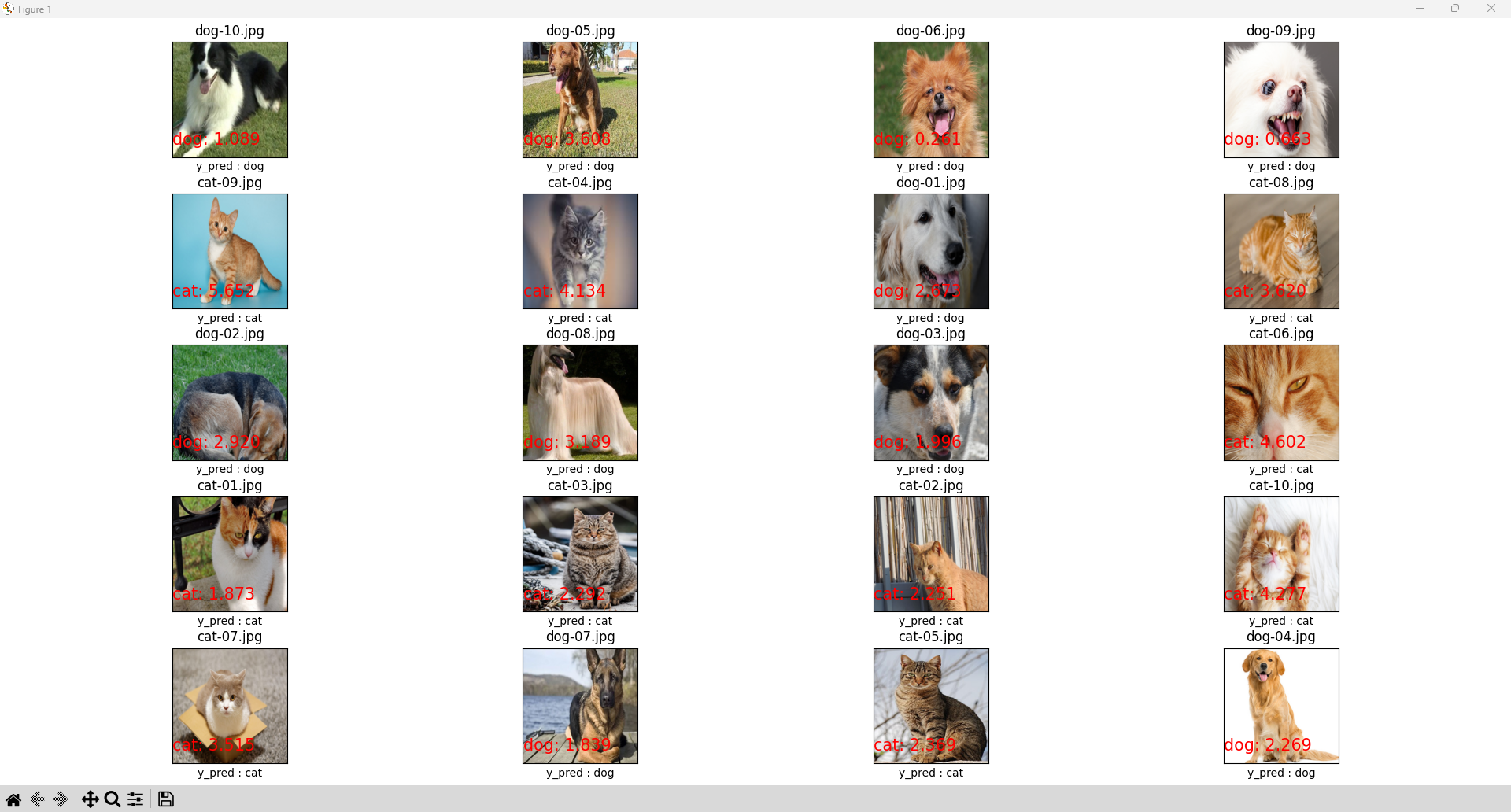
2) 최종 모델파일을 이용하여 테스트하는 파이토치 코드 my_test.py를 작성하시오.
- 테스트영상은 cat, dog 각각 10장씩 인터넷에서 다운받아 사용할것
- 파일을 개별적으로 오픈하지 말고 파이썬 os 패키지를 이용하여 데이터 폴더명을 주면 폴더에 저장된 영상파일을 모두 검색하여 자동으로 불러와서 테스트하도록 할것
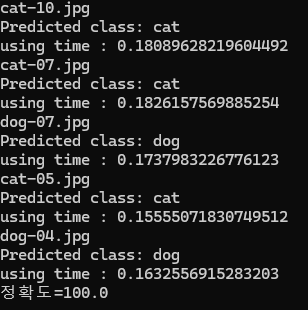
- 영상 1장의 추론(예측)시간을 측정하여 출력하시오.
- 정확도를 계산하여 출력하시오.
https://docs.python.org/ko/3/library/os.html
1 2 3 4 5 6 7 8 9 10 11 12 13 14 15 16 17 18 19 20 21 22 23 24 25 26 27 28 29 30 31 32 33 34 35 36 37 38 39 40 41 42 43 44 45 46 47 48 49 50 51 52 53 54 55 56 57 58 59 60 61 62 63 64 65 66 67 68 69 70 71 72 73 74 75 76 77 78 | import torch from PIL import Image import matplotlib.pyplot as plt import torchvision.transforms as transforms import time import os class_label = ['cat', 'dog'] # load pth model model = torch.load('/home/jetson/airlab/deeplearning/dataset1/output/model.pth',weights_only=False) # set model to inference mode model.eval() test_image_folder = '/home/jetson/airlab/deeplearning/dataset1/test' transform = transforms.Compose([ transforms.Resize(256), transforms.CenterCrop(224), transforms.ToTensor(), transforms.Normalize( mean=[0.485, 0.456, 0.406], std=[0.229, 0.224, 0.225]) ]) list_of_files = os.listdir(test_image_folder) files = [f for f in list_of_files if os.path.isfile(os.path.join(test_image_folder, f))] file_num = len(files) acc_num = 0 number = 0 # 이미지의 개수를 바탕으로 행과 열 설정 (5x4 그리드 예시) rows, cols = 5, 4 all_img = plt.figure(figsize=(15, 12)) for file in files: start_time = time.time() print(file) test_img = Image.open(os.path.join(test_image_folder, file)) # 경로 수정 img = transform(test_img).unsqueeze(0) # 배치 차원 추가 with torch.no_grad(): pred = model(img) y_pred = torch.argmax(pred) # 예측된 클래스 print(f'Predicted class: {class_label[y_pred]}') # 추론 시간 계산 using_time = time.time() - start_time print(f"using time : {using_time}") # 이미지 크기 조정 및 중앙 자르기 test_img = test_img.resize((256, 256)) # 256x256으로 조정 test_img = test_img.crop((16, 16, 240, 240)) # 중앙을 기준으로 224x224로 자르기 # 정확도 계산 if class_label[y_pred] in file: acc_num+=1 # 서브플롯에 이미지를 추가 number += 1 plot = all_img.add_subplot(rows, cols, number) plot.set_title(file) plot.imshow(test_img) plot.set_xlabel('y_pred : ' + class_label[y_pred]) plot.set_xticks([]), plot.set_yticks([]) # 예측값 및 신뢰도 텍스트 추가 plot.text(0, 200, f'{class_label[y_pred]}: {pred[0][y_pred]:.3f}', size=15, color='red') if number == file_num: break print(f"정확도={(acc_num/file_num)*100}") # 그래프 레이아웃을 조정 plt.tight_layout() plt.show() | cs |
4) 전이학습이란 무엇인가?
- 전이 학습은 한 작업 또는 데이터 세트를 통해 얻은 지식을 사용하여 다른 관련 작업 및 또는 다른 데이터 세트에서 모델 성능을 개선하는 머신 러닝 기술이다.
5) 전이학습을 하는 이유는 무엇인가?
- 학습하기 위해 대량 데이터 필요함 --> 전이학습을 하면 적은 양의 데이터로도 좋은 성능을 얻을 수 있음
- 처음부터 모델을 학습하면 시간이 너무 오래 걸림 --> 전이학습을 하면 이미 학습된 가중치를 활용해 짧은 시간안에 좋은 성능 얻을 수 있음.
- 전이학습을 하면 기존 모델이 학습한 특징을 활용하여 더 좋은 성능을 얻을 수 있음
6) 전이학습에서 훈련하는 웨이트는 컨벌루션레이어와 완전연결레이어중 어느것인가?
- 컨벌루션레이어는 일반적인 특징을 학습하기 때문에 고정하고 새로운 작업에 맞게 완전 연결층을 조정함.
--> 전이학습에서 훈련하는 웨이트는 완전연결레이어임
7) 훈련결과를 이용하여 과적합을 판단하는 방법을 설명하라.
- 훈련손실이 지속적으로 감소하며 매우 낮아지거나 검증 손실이 어느 시점까진 감소하다가 더이상 감소하지 않고 오히려 증가할 경우, 훈련정확도가 거의 100%에 가깝거나 검증 정확도가 낮거나 특정 값에서 더 이상 증가하지 않을때, 훈련 정확도와 검증 정확도의 차이가 너무 클때 과적합을 판단할 수 있다.
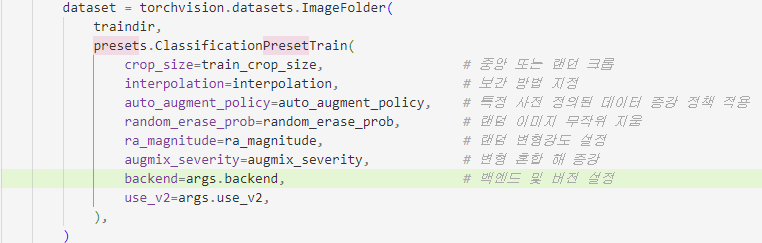
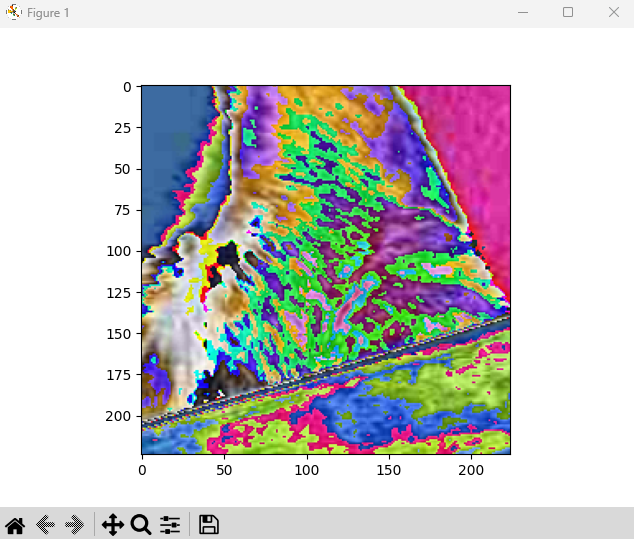
8) 파이토치 예제에서 사용한 증식적용에 대하여 다음 사항을 설명하라.
- 파이토치 예제에서 사용한 증식방법이 무엇인지 소스코드를 찾아서 자세히 설명하라.
- 증식 전후 영상을 비교하여 적용여부를 확인하라.
- 증식을 추가하려면 어떤 소스파일의 어느 부분을 수정해야 하는지 설명하라
- 증식방법을 추가하거나 삭제하는 방법(어떤 소스파일의 어디를 수정해야 하는지)을 설명하고 원하는 증식방법을 추가하여 훈련을 진행해보라.
- 원본소스는 건드리지 말고 새로운 파일 my_train.py를 만들어서 테스트코드를 추가하여 실행할것
참고 : https://cafe.daum.net/SmartRobot/W2or/159
9) 필기체 숫자 0~9를 분류하시오. (작성중)
- 영상분류용 훈련데이터는 영상 1개당 클래스(객체) 1개만 있어야 함
- 훈련데이터 샘플 : mnist 데이터셋을 컬러(3채널) jpg로 변환하여 사용할 것
직접작성한 필기체 파일 -> https://github.com/kCW-tb/number_recognization/blob/main/number.zip
- 데이터 증식 추가, 회전은 6, 9 분류가 힘드므로 작은 각도로 회전할것, 180도 회전하면 구분힘듦
- 매 에퍽마다 실시간으로 훈련 손실,훈련정확도, 검증 손실, 검증 정확도 그래프를 업데이트하도록 할것(동영상으로 저장할것)-> 훈련동안 시간의 흐름에 따라 손실,정확도의 변화를 확인가능하도록 할것 -> 손실이 더이상 감소하지 않거나 감소하다가 다시 증가한다면 훈련중단
- 2가지 이상의 백본모델(Resnet50, 101, ViT 등)을 이용하여 훈련 수행
- 모델별 정확도 비교 -> 테스트 이미지는 훈련에 사용되지 않는 영상 30장을(자신의 필체로 작성할것) 작성하여 테스트할 것
- mnist 분류모델중 최고성능을 보이는 모델성능과 비교해보라
<훈련>
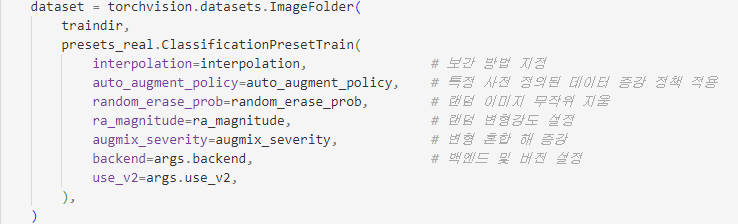
- my_mnist_train.py의 load_data 함수
train 증식
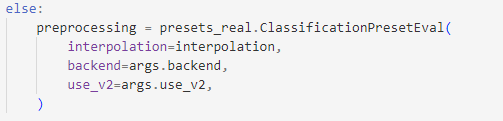
eval 증식
- presets.py를 presets_real.py로 copy하여 작성
ClassificationPresetTrain 클래스
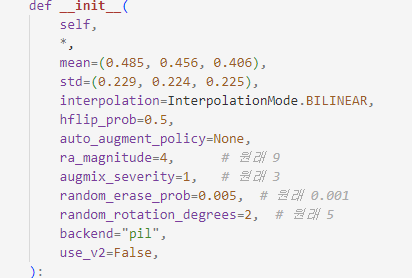
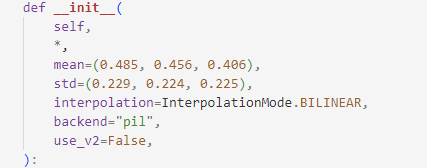
- 사진 크기가 28x28이므로 매우 작아 crop이나 resize를 활용하면 오히려 안 좋음.
-> 사진 크기가 작은 만큼 증식 강도도 줄여야함.
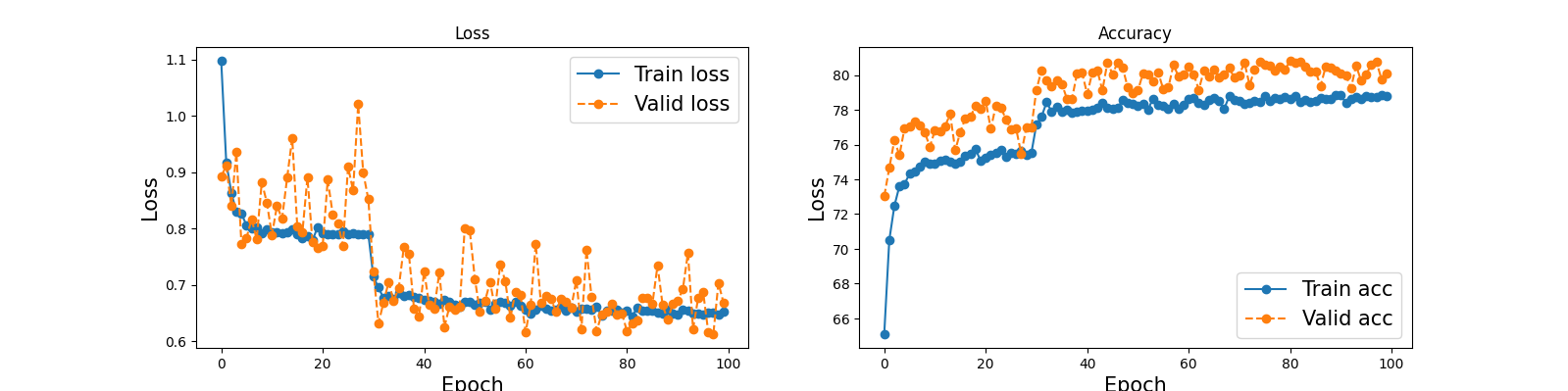
- ra_magnitude(증강 연산의 강도) 강도를 9->4로 조정
- augmix_severity(AugMix 데이터 증강 기법에서 변형 강도를 조절하는 변수 ) 강도를 3->1로 조정
- random_rotation_degress(회전) 강도를 5->2로 조정
- random_erase_prob(랜덤으로 지우기) 강도를 0.01->0.005로 조정
ClassificationPresetEval 클래스
훈련결과
<테스트>
1 2 3 4 5 6 7 8 9 10 11 12 13 14 15 16 17 18 19 20 21 22 23 24 25 26 27 28 29 30 31 32 33 34 35 36 37 38 39 40 41 42 43 44 45 46 47 48 49 50 51 52 53 54 55 56 57 58 59 60 61 62 63 64 65 66 67 68 69 70 71 72 73 74 75 76 77 78 79 80 81 82 83 84 85 86 87 88 89 | import torch from PIL import Image import matplotlib.pyplot as plt import torchvision.transforms as transforms import time import os import re class_label = [str(i) for i in range(0,10)] print(class_label) # 사용 가능한 디바이스 확인 device = torch.device("cuda" if torch.cuda.is_available() else "cpu") # load pth model model = torch.load('/home/jetson/airlab/mnist3_dataset/output/model.pth',map_location=device,weights_only=False) model.to(device) # set model to inference mode model.eval() test_image_folder = '/home/jetson/airlab/mnist3_dataset/test' transform = transforms.Compose([ transforms.ToTensor(), transforms.Normalize( mean=[0.485, 0.456, 0.406], std=[0.229, 0.224, 0.225]) ]) list_of_files = os.listdir(test_image_folder) files = [f for f in list_of_files if os.path.isfile(os.path.join(test_image_folder, f))] file_num = len(files) acc_num = 0 number = 0 # 이미지의 개수를 바탕으로 행과 열 설정 (5x4 그리드 예시) rows, cols = 6, 5 all_img = plt.figure(figsize=(15, 12)) for file in files: start_time = time.time() print(file) test_img = Image.open(os.path.join(test_image_folder, file)) # 경로 수정 # 이미지 크기 28x28로 변경 img = transform(test_img).unsqueeze(0).to(device) # 배치 차원 추가 및 GPU 이동 with torch.no_grad(): pred = model(img) y_pred = torch.argmax(pred) # 예측된 클래스 print(f'Predicted class: {class_label[y_pred]}') print(f"pred[0][y_pred]: {pred[0][y_pred]:.3f}") # 추론 시간 계산 using_time = time.time() - start_time print(f"using time : {using_time}") # 이미지 크기 조정 및 중앙 자르기 test_img = test_img.resize((256, 256)) # 256x256으로 조정 test_img = test_img.crop((16, 16, 240, 240)) # 중앙을 기준으로 224x224로 자르기 # 파일 이름에서 첫 번째 숫자만 추출 actual_label = re.match(r'\d+', file).group() print(f"actual_label={actual_label}, class_label[yred]={class_label[y_pred]}") # 정확도 계산 if class_label[y_pred]==actual_label: acc_num+=1 # 서브플롯에 이미지를 추가 number += 1 plot = all_img.add_subplot(rows, cols, number) plot.set_title(file) plot.imshow(test_img) plot.set_xlabel('y_pred : ' + class_label[y_pred]) plot.set_xticks([]), plot.set_yticks([]) # 예측값 및 신뢰도 텍스트 추가 plot.text(0, 200, f'{class_label[y_pred]}: {pred[0][y_pred]:.3f}', size=15, color='red') if number == file_num: break print(f"acc_num={acc_num}, 정확도={(acc_num/file_num)*100}") # 그래프 레이아웃을 조정 plt.tight_layout() plt.show() | cs |
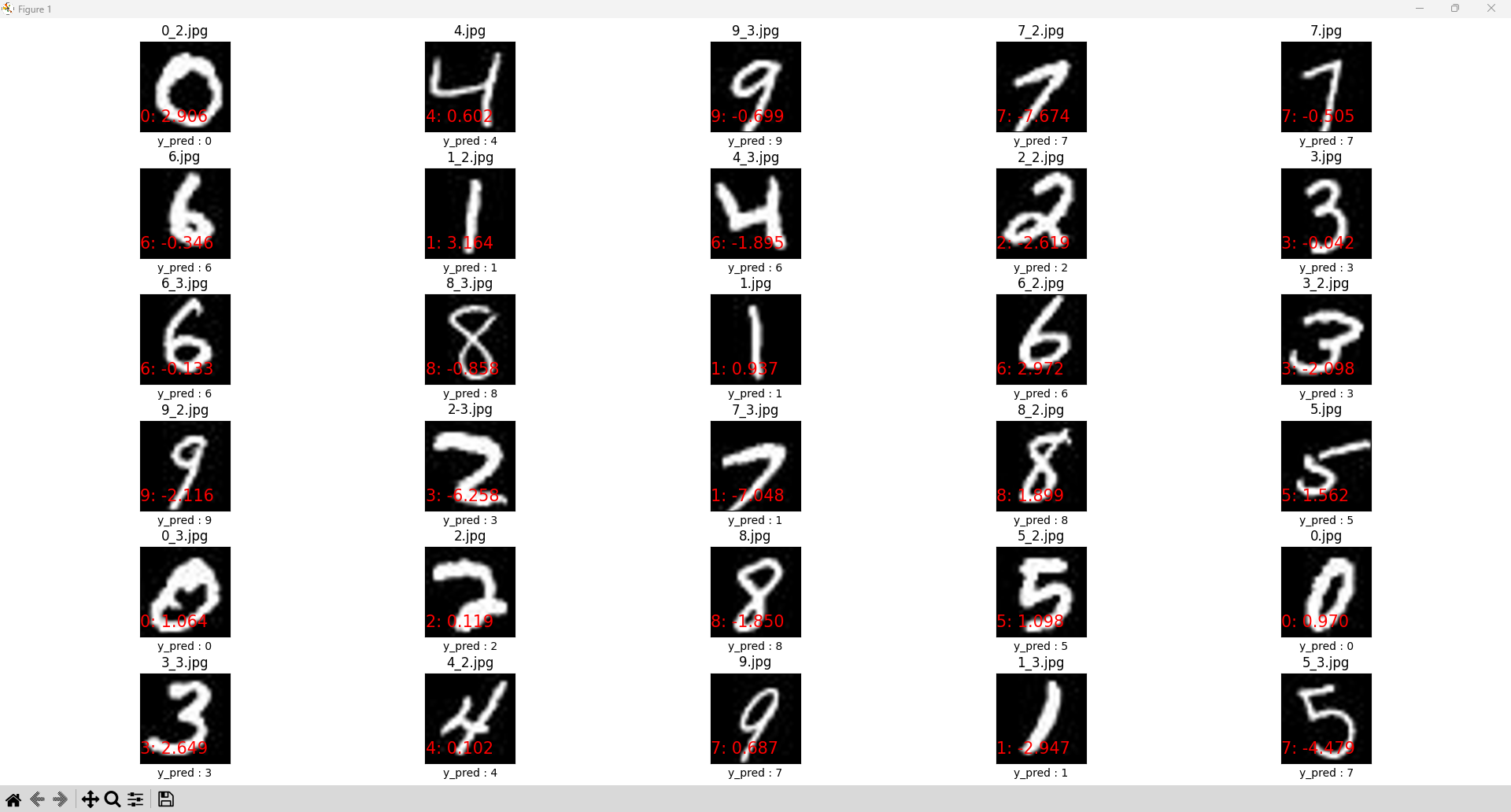
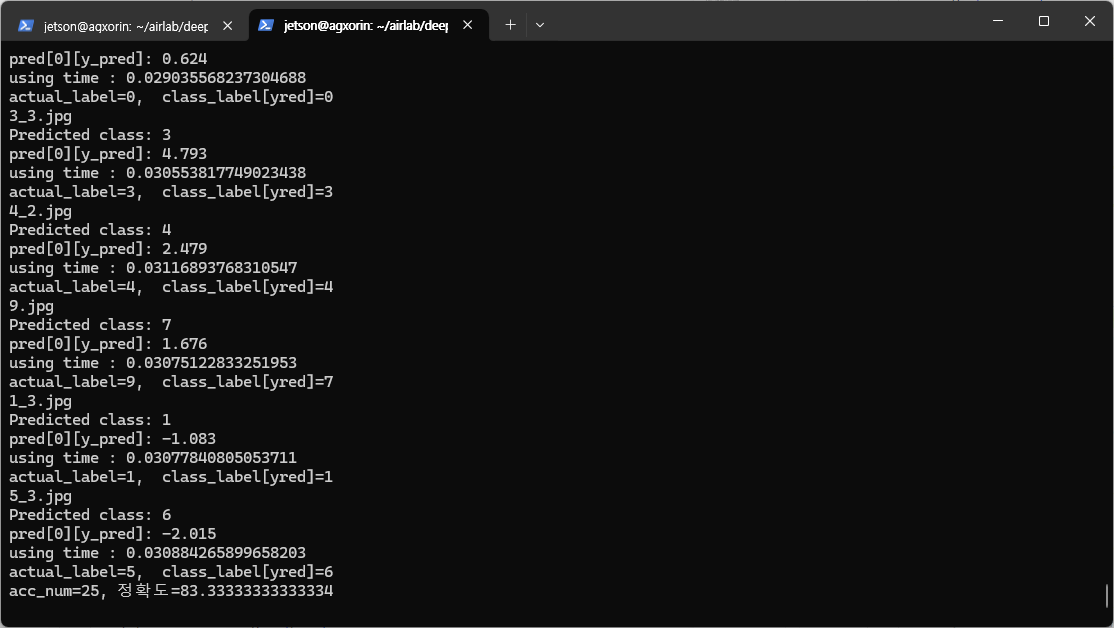
- 훈련과정에서 resize 증식을 빼 28x28 사진만 올바르게 추론한다.
- 직접 손글씨로 작성한 test는 정확도 13.33으로 매우 낮다...
-->28x28 크기로 줄여 해봤는데 원래 크기에 비해 28x28이 너무 작아서 픽셀이 흐려진다.