1. 3d object detection model 추론
open3d-ml 라이브러리를 이용하여 3d object detection model의 추론을 수행하는 예제
사용할 객체검출 모델 : pointpillar, pointrcnn -> open3d-ml 라이브러리에서 사용가능한 3d object detection 모델임
테스트 데이터 : KITTI 데이터셋 이용 -> 윈도우즈에서 다운받고 리눅스에서 폴더 공유가능
실행환경 ; wsl2-ubuntu24.04, anaconda 가상환경 open3d-ml
3. pointpillar 모델을 이용한 3d object detection 추론
참고사이트
https://soulhackerslabs.com/3d-object-detection-with-open3d-ml-and-pytorch-backend-b0870c6f8a85
https://github.com/carlos-argueta/open3d_experiments
다음파일을 작업 디렉토리에 다운로드 후 실행할 것
pointpillars_kitti.yml -> https://github.com/isl-org/Open3D-ML/tree/main/ml3d/configs
pointpillars_kitti_202012221652utc.pth -> https://storage.googleapis.com/open3d-releases/model-zoo/pointpillars_kitti_202012221652utc.pth
<소스코드>
# Running a pretrained model for 3d object detection using open3d-ml library
# 3d od model : PointPillars
import os
import open3d.ml as _ml3d
import open3d.ml.torch as ml3d
from open3d.ml.vis import Visualizer
from tqdm import tqdm
def filter_detections(detections, min_conf = 0.5):
good_detections = []
for detection in detections:
if detection.confidence >= min_conf:
good_detections.append(detection)
return good_detections
cfg_file = "./pointpillars_kitti.yml"
cfg = _ml3d.utils.Config.load_from_file(cfg_file)
model = ml3d.models.PointPillars(**cfg.model)
cfg.dataset['dataset_path'] = "/mnt/d/Users/2sungryul/Dropbox/Work/Dataset/KITTI/data_object_velodyne"
dataset = ml3d.datasets.KITTI(cfg.dataset.pop('dataset_path', None), **cfg.dataset)
pipeline = ml3d.pipelines.ObjectDetection(model, dataset=dataset, device="cuda", **cfg.pipeline)
# download the weights.
ckpt_folder = "./"
os.makedirs(ckpt_folder, exist_ok=True)
ckpt_path = ckpt_folder + "pointpillars_kitti_202012221652utc.pth"
pointpillar_url = "https://storage.googleapis.com/open3d-releases/model-zoo/pointpillars_kitti_202012221652utc.pth"
if not os.path.exists(ckpt_path):
cmd = "wget {} -O {}".format(pointpillar_url, ckpt_path)
os.system(cmd)
# load the parameters.
pipeline.load_ckpt(ckpt_path=ckpt_path)
test_split = dataset.get_split("training")
# Prepare the visualizer
#vis = Visualizer()
vis = ml3d.vis.Visualizer()
# Variable to accumulate the predictions
data_list = []
# Let's detect objects in the first few point clouds of the Kitti set
for idx in tqdm(range(1)):
# Get one test point cloud from the SemanticKitti dataset
data = test_split.get_data(idx)
#print(data.__class__)
print('data:',type(data))
#print(len(data))
print(data.keys())
# Run the inference
result = pipeline.run_inference(data)[0]
#print(result.__class__)
#print('result:',type(result))
#print(len(result))
#print(result)
#print('result[0]:',type(result[0]))
# Filter out results with low confidence
result = filter_detections(result)
#print(result.__class__)
print('result:',type(result))
print(len(result))
print(result)
print('result[0]:',type(result[0]))
# Prepare a dictionary usable by the visulization tool
pred = {
"name": 'KITTI' + '_' + str(idx),
'points': data['point'],
'bounding_boxes': result
}
# Append the data to the list
data_list.append(pred)
# Visualize the results
vis.visualize(data_list, None, bounding_boxes=None)
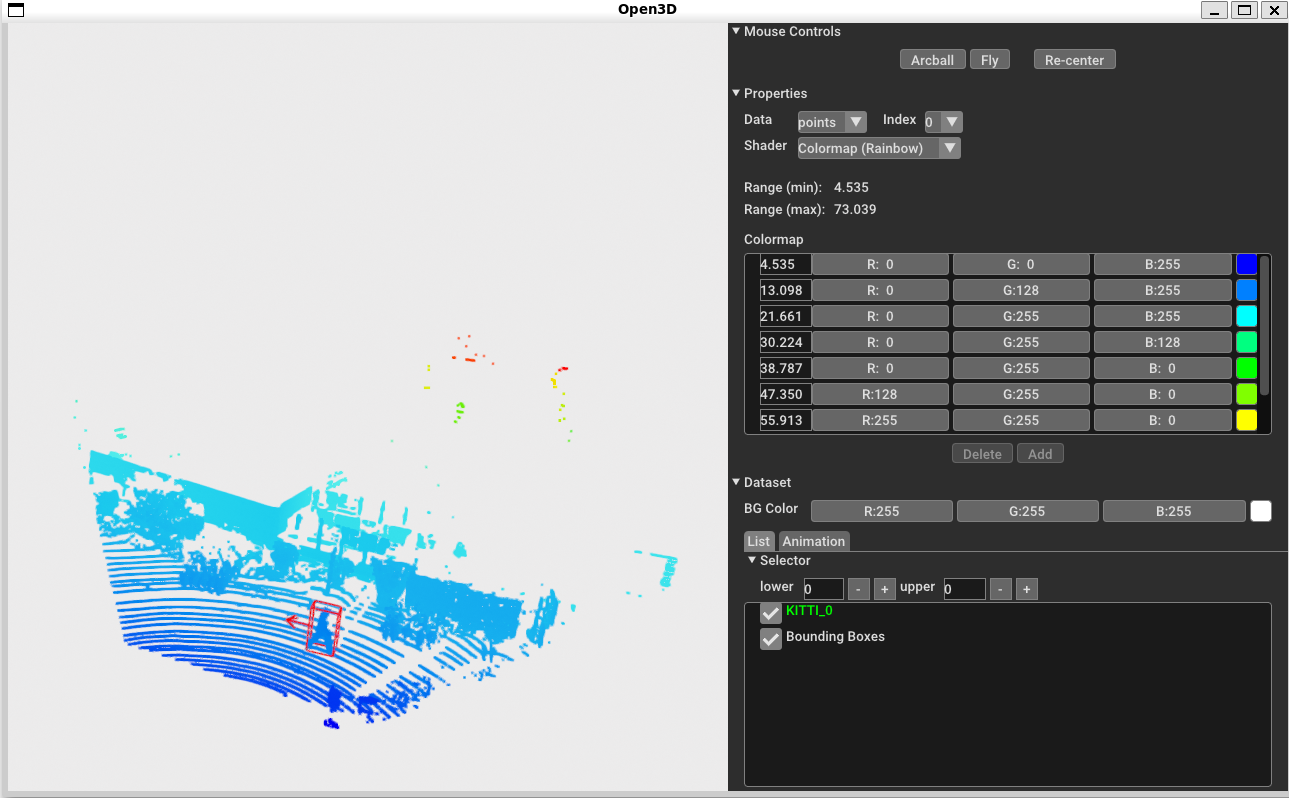
<실행결과>
run_inference함수의 출력은 리스트이고 첫번째 원소안에 검출한 바운딩 박스정보가 저장됨
바운딩 박스정보는 center(x,y,z), size(whl), yaw, class_label, confidence, 등임
4. pointrcnn 모델을 이용한 3d object detection 추론
아래 주소의 코드를 참고하여 작성함
https://github.com/isl-org/Open3D-ML/blob/main/scripts/demo_obj_det.py
5. 실습과제