QnA
|
사용언어 (칠해주세요) => (C#,VB) |
|
사용툴 (VS) : 2013 |
|
운영체제 (OS) : 윈도우 |
|
상세언어(칠해주세요.) => 1) ASP.NET, 2) ASP.NET MVC, 3) ASP.NET AJAX |
안녕하세요 ^^
.NET 웹폼 사용하던걸 이번에 MVC 형식으로 바꾸고 있는데 엑셀 기능을 작업하면서 어려움이 있어 여쭤봅니다 ㅠ
POST 방식으로 (대량의) html 태그들을 컨트롤러에 전송한 다음에
이 데이터들을 엑셀 파일로 만들고 다운로드 받을 수 있는 창이 뜨게 하려고 합니다.

하지만 이렇게 저렇게 해봐도 에러 뜨네요ㅠㅠ
코드는 이겁니다.
Index.cshtml
1 2 3 4 5 6 7 8 9 10 11 12 13 14 15 16 | $.ajax({ type: "POST", url: "/Common/DoExcel", dataType: "json", data:{ branchname:"전체", saupname:"전체", agentname:"전체" }, success: function (data) { window.location = '/Common/Download?virpath=' + data.virtualPath + '&file=' + data.file; }, error:function(e){ console.log(e.responseText); } }); | cs |
CommonController
1 2 3 4 5 6 7 8 9 10 11 12 13 14 15 16 | public ActionResult DoExcel(string saupname, string branchname, string agentname) { StringWriter sw = new StringWriter(); // 가상경로 취득 string virturePath2 = Request.ServerVariables["script_name"]; Response.Clear(); string filename = "Agent_" + System.DateTime.Now.ToString("yyyy_MM_dd") + ".xls"; Response.ContentType = "application/vnd.xls"; Response.AddHeader("content-disposition", "attachment;filename=" + filename); Response.Write(sw.ToString()); return Json(new {file = filename, virtualPath =virturePath2}); } | cs |
1 2 3 4 5 6 | public ActionResult Download(string virpath, string file) { string fullPath = Path.Combine(Server.MapPath(virpath), file); return File(fullPath, "application/vnd.xls", file); } | cs |
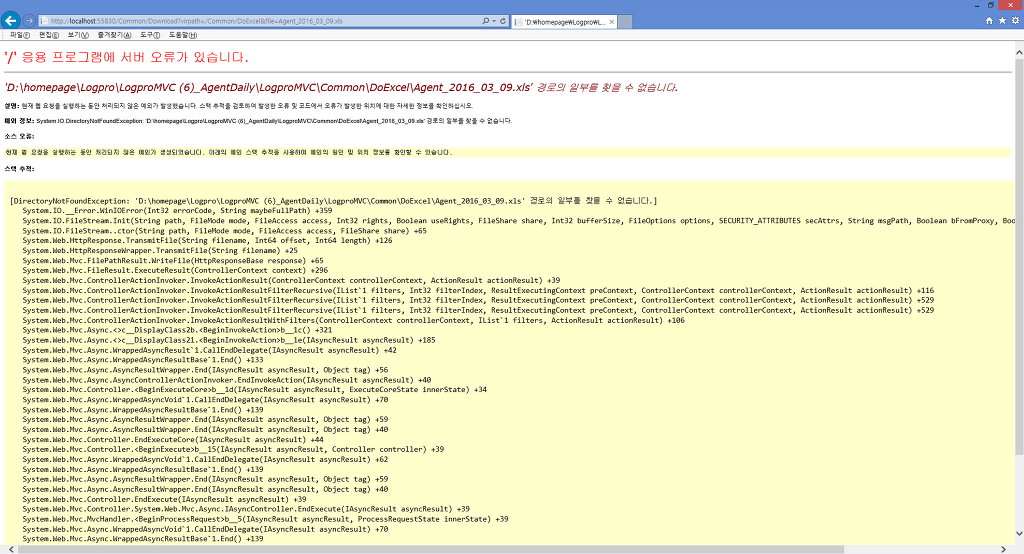
경로를 찾을 수 없다는...ㅎㅎㅎ
다음검색
댓글
댓글 리스트-
작성자심재운 작성시간 16.03.09 파일 저장하는 구문은 보이지 않네요 ㅎㅎ참고 링크 보내 드립니다. https://jamessdixon.wordpress.com/2010/05/12/export-to-excel-in-mvc/
-
답댓글 작성자앵두야 작성자 본인 여부 작성자 작성시간 16.03.09 감사합니다!~ 해보겟습니다^.^
-
답댓글 작성자앵두야 작성자 본인 여부 작성자 작성시간 16.03.09 해보니 @Html.ActionLink 로는 다운로드창이 뜨는데요. <a> 태그를 선택한 이벤트를 받아서 ajax POST 로 controller 를 호출할시엔 다운로드창이 뜨질 않습니다. 전 .NET DATA그리드폼이 아니라 html 테이블을 사용해서 데이터를 넣어뒀기 때문에 ajax 를 사용하려고 하는데 말이죠... ㅜ