안녕하세요.
wpf 및 mvvm으로 app개발을 하는 도중 막히는 부분이 생겨 글을 올립니다.
main화면을 다음과 같이 만들었습니다.
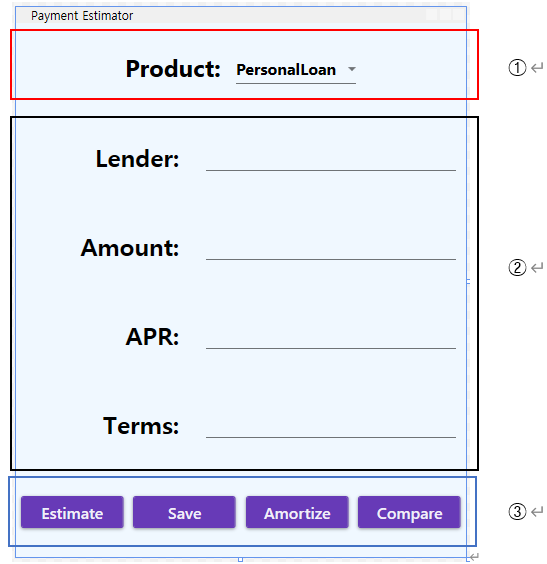
이 화면을 3개 grid로 나눠서 1의 combobox에서 선택한 값으로 2에서 입력화면을 호출합니다. 입력화면은 usercontrol이며 views라는 폴더에 선언되어 있습니다.
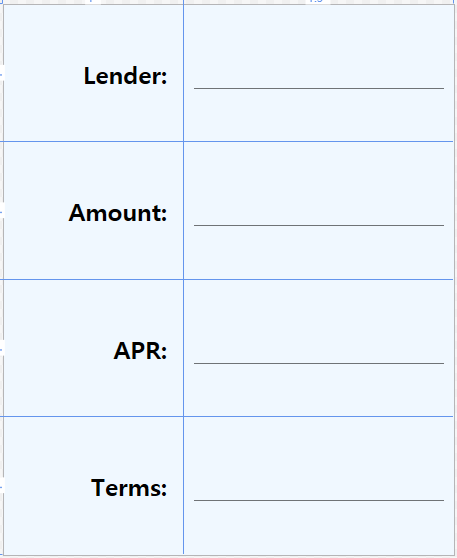
이 화면에서 입력된 값을 3의 버튼에서 처리하는 식으로 구현하려고 합니다. main화면용 viewmodel은 아래와 같습니다.(위의 입력화면을 property로 지정했습니다)
using Microsoft.Toolkit.Mvvm.ComponentModel;
using Microsoft.Toolkit.Mvvm.Input;
using System;
using System.Collections.Generic;
using System.Windows.Controls;
using System.Windows.Input;
namespace PaymentEst.Viewmodels
{
class MainViewModel:ObservableObject
{
//code for navigation
public ICommand ProdSelectCommand { get; set; }
private IList<string> _prodStrings = new List<string>();
public IList<string> ProdStrings
{
get => _prodStrings;
set => SetProperty(ref _prodStrings, value);
}
private string _selectedCode;
public string SelectedCode
{
get => _selectedCode;
set => SetProperty(ref _selectedCode, value);
}
//property for PersonalLoanViewModel
private readonly PersonalLoanViewModel _personalLoanVM;
public PersonalLoanViewModel PersonalLoanVM
{
get { return _personalLoanVM; }
}
public MainViewModel()
{
foreach (object item in Enum.GetValues(typeof(ProdCode)))
{
ProdStrings.Add(item.ToString());
}
ProdSelectCommand = new RelayCommand<object>(p => ShowSelect(p));
_personalLoanVM = new PersonalLoanViewModel();
}
private void ShowSelect(object obj)
{
if (obj is not SelectixxxxonChangedEventArgs args)
{
return;
}
object SelectedItem = args.AddedItems[0];
SelectedCode = SelectedItem.ToString();
}
}
}
PersonalLoanViewModel은 다음과 같습니다.
using Microsoft.Toolkit.Mvvm.ComponentModel;
using Microsoft.Toolkit.Mvvm.Input;
using System;
using System.Windows;
using System.Windows.Input;
namespace PaymentEst.Viewmodels
{
class PersonalLoanViewModel:ObservableObject
{
public ICommand PLCommand { get; set; }
private string _prod;
public string Prod
{
get => _prod;
set => SetProperty(ref _prod, value);
}
private string _lender;
public string Lender
{
get => _lender;
set => SetProperty(ref _lender, value);
}
private string _loanamt;
public string LoanAmt
{
get => _loanamt;
set => SetProperty(ref _loanamt, value);
}
private string _apr;
public string APR
{
get => _apr;
set => SetProperty(ref _apr, value);
}
private string _terms;
public string Terms
{
get => _terms;
set => SetProperty(ref _terms, value);
}
public PersonalLoanViewModel()
{
PLCommand = new RelayCommand<object>(p => ShowOffer(p));
}
private void ShowOffer(object param)
{
var p = param as TextBox;
var factor = Convert.ToDouble(p.FourthBoxValue) / 100 / 12;
var fogr = Math.Pow(1 + factor, Convert.ToInt32(Terms) * 12);
var Payment = Convert.ToInt32(p.ThirdBoxValue) * factor * (fogr / (fogr - 1));
MessageBox.Show(string.Format($"Product: {p.FirstBoxValue}, Lender:{p.SecondBoxValue}, Amount: ${Convert.ToInt32(p.ThirdBoxValue):N0}, APR: {p.FourthBoxValue}%, Terms: {Convert.ToInt32(p.FifthBoxValue) * 12} months, Payment:{Payment:N0} "), "Review your Offer");
}
}
}
converter의 code는 다음과 같습니다.
using System;
using System.Globalization;
using System.Windows.Data;
namespace PaymentEst.Viewmodels
{
class TextBox
{
public string FirstBoxValue { get; set; }
public string SecondBoxValue { get; set; }
public string ThirdBoxValue { get; set; }
public string FourthBoxValue { get; set; }
public string FifthBoxValue { get; set; }
}
class PersonalLoanConverter : IMultiValueConverter
{
public object Convert(object[] values, Type targetType, object parameter, CultureInfo culture)
{
return new TextBox
{
FirstBoxValue = values[0].ToString(),
SecondBoxValue = values[1].ToString(),
ThirdBoxValue = values[2].ToString(),
FourthBoxValue = values[3].ToString(),
FifthBoxValue = values[4].ToString()
};
}
public object[] ConvertBack(object value, Type[] targetTypes, object parameter, CultureInfo culture)
{
throw new NotImplementedException();
}
}
}
코드를 compile후 실행해 보니
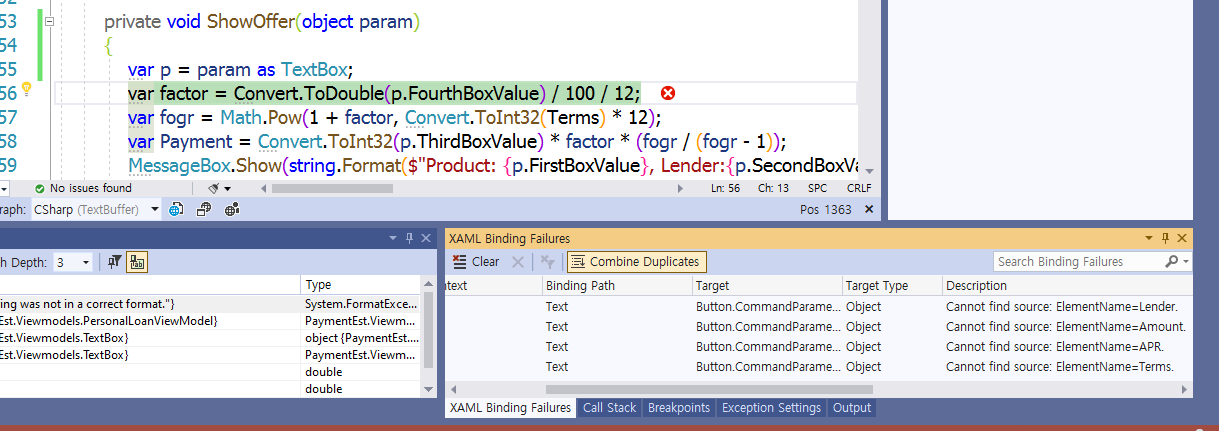
위 화면과 같은 에러메시지가 뜨면서 작동을 멈춰버립니다. 보니까 PersonalLoanViewModel에서 선언된 converter에서 문제가 생긴 거 같은데. 이를 어찌 해결해야 할지 막히네요. 답변 부탁드립니다. (올린지 며칠 되었는데 답변이 없어 자세하지 않아서 그런가 싶어 좀더 보충해서 올립니다.)
보충> mainWindow의 XAML code입니다
<Window x:Class="PaymentEst.MainWindow"
xmlns="http://schemas.microsoft.com/winfx/2006/xaml/presentation"
xmlns:x="http://schemas.microsoft.com/winfx/2006/xaml"
xmlns:d="http://schemas.microsoft.com/expression/blend/2008"
xmlns:mc="http://schemas.openxmlformats.org/markup-compatibility/2006"
xmlns:System="clr-namespace:System;assembly=mscorlib"
xmlns:b="http://schemas.microsoft.com/xaml/behaviors"
xmlns:views="clr-namespace:PaymentEst.Views"
xmlns:local="clr-namespace:PaymentEst"
xmlns:local1="clr-namespace:PaymentEst.Viewmodels"
mc:Ignorable="d"
WindowStartupLocation="CenterScreen"
ResizeMode="NoResize"
Background="AliceBlue"
Title="Payment Estimator" Height="550" Width="450">
<Window.DataContext>
<local1:MainViewModel/>
</Window.DataContext>
<Window.Resources>
<ObjectDataProvider x:Key="ProdCode" MethodName="GetValues" ObjectType="{x:Type System:Enum}">
<ObjectDataProvider.MethodParameters>
<x:Type TypeName="local1:ProdCode"/>
</ObjectDataProvider.MethodParameters>
</ObjectDataProvider>
<local1:PersonalLoanConverter x:Key="PLConverter"/>
<DataTemplate x:Key="PersonalLoanTemplate" DataType="{x:Type local1:MainViewModel}">
<views:PersonalLoan/>
</DataTemplate>
<DataTemplate x:Key="MortgageTemplate" DataType="{x:Type local1:MainViewModel}">
<views:Mortgage/>
</DataTemplate>
<DataTemplate x:Key="AutoLoanTemplate" DataType="{x:Type local1:MainViewModel}">
<views:AutoLoan/>
</DataTemplate>
</Window.Resources>
<Grid>
<Grid.RowDefinitions>
<RowDefinition Height="*"/>
<RowDefinition Height="4*"/>
<RowDefinition Height="*"/>
</Grid.RowDefinitions>
<TextBlock Text="Product: " VerticalAlignment="Center" HorizontalAlignment="Left" Margin="109,0,0,0" FontWeight="Bold" FontSize="24" FontFamily="Segoe UI" Width="101"/>
<ComboBox x:Name="ProdBox" Grid.Row="0" ItemsSource="{Binding Source={StaticResource ProdCode} }" SelectedValue="0" SelectedIndex="0" Grid.Column="0" Width="120" Margin="210,31,100,0" VerticalAlignment="Top" FontSize="16" FontWeight="Bold" FontFamily="Segoe UI" >
<b:Interaction.Triggers>
<b:EventTrigger EventName="SelectixxxxonChanged">
<b:InvokeCommandAction Command="{Binding ProdSelectCommand}" PassEventArgsToCommand="True"/>
</b:EventTrigger>
</b:Interaction.Triggers>
</ComboBox>
<ContentControl Grid.Row="1" Content="{Binding}">
<ContentControl.Style>
<Style TargetType="{x:Type ContentControl}">
<Setter Property="ContentTemplate" Value="{StaticResource PersonalLoanTemplate}"/>
<Style.Triggers>
<DataTrigger Binding="{Binding SelectedCode}" Value="Mortgage" >
<Setter Property="ContentTemplate" Value="{StaticResource MortgageTemplate}"/>
</DataTrigger>
<DataTrigger Binding="{Binding SelectedCode}" Value="AutoLoan">
<Setter Property="ContentTemplate" Value="{StaticResource AutoLoanTemplate}"/>
</DataTrigger>
</Style.Triggers>
</Style>
</ContentControl.Style>
</ContentControl>
<Grid Grid.Row="2">
<Grid.ColumnDefinitions>
<ColumnDefinition Width="*"/>
<ColumnDefinition Width="*"/>
<ColumnDefinition Width="*"/>
<ColumnDefinition Width="*"/>
</Grid.ColumnDefinitions>
<Button x:Name="Estimate" DataContext="{Binding PersonalLoanVM}" Command="{Binding PLCommand, IsAsync=True}" Grid.Column="0" Margin="5" Content="Estimate" FontFamily="Segoe UI" FontSize="16">
<Button.CommandParameter>
<MultiBinding Converter="{StaticResource PLConverter}">
<Binding ElementName="ProdBox" Path="Text"/>
<Binding ElementName="Lender" Path="Text"/>
<Binding ElementName="Amount" Path="Text"/>
<Binding ElementName="APR" Path="Text"/>
<Binding ElementName="Terms" Path="Text"/>
</MultiBinding>
</Button.CommandParameter>
</Button>
<Button x:Name="Save" Grid.Column="1" Margin="5" Content="Save" FontFamily="Segoe UI" FontSize="16"/>
<Button x:Name="Amortize" Grid.Column="2" Margin="5" Content="Amortize" FontFamily="Segoe UI" FontSize="16"/>
<Button x:Name="Compare" Grid.Column="3" Margin="5" Content="Compare" FontFamily="Segoe UI" FontSize="16"/>
</Grid>
</Grid>
</Window>
usercontrol의 XAML입니다.
<UserControl x:Class="PaymentEst.Views.PersonalLoan"
xmlns="http://schemas.microsoft.com/winfx/2006/xaml/presentation"
xmlns:x="http://schemas.microsoft.com/winfx/2006/xaml"
xmlns:mc="http://schemas.openxmlformats.org/markup-compatibility/2006"
xmlns:d="http://schemas.microsoft.com/expression/blend/2008"
xmlns:local="clr-namespace:PaymentEst.Views"
xmlns:local1="clr-namespace:PaymentEst.Viewmodels"
mc:Ignorable="d"
Background="AliceBlue"
d:DesignHeight="550" d:DesignWidth="450">
<UserControl.DataContext>
<local1:PersonalLoanViewModel/>
</UserControl.DataContext>
<UserControl.Resources>
<local1:PersonalLoanConverter x:Key="PLConverter"/>
</UserControl.Resources>
<Grid>
<Grid.ColumnDefinitions>
<ColumnDefinition Width="*"/>
<ColumnDefinition Width="1.5*"/>
</Grid.ColumnDefinitions>
<Grid.RowDefinitions>
<RowDefinition Height="*"/>
<RowDefinition Height="*"/>
<RowDefinition Height="*"/>
<RowDefinition Height="*"/>
</Grid.RowDefinitions>
<TextBlock Grid.Row="0" Grid.Column="0" Text="Lender: " VerticalAlignment="Center" HorizontalAlignment="Right" FontSize="24" FontWeight="Bold" />
<TextBox x:Name="Lender" Text="{Binding Lender, Mode=OneWayToSource}" Grid.Row="0" Grid.Column="1" Margin="10" Height="30" FontFamily="Segoe UI" FontSize="18"/>
<TextBlock Grid.Row="1" Grid.Column="0" Text="Amount: " VerticalAlignment="Center" HorizontalAlignment="Right" FontSize="24" FontWeight="Bold" />
<TextBox x:Name="Amount" Text="{Binding LoanAmt, Mode=OneWayToSource}" Grid.Row="1" Grid.Column="1" Margin="10" Height="30" FontSize="18" FontFamily="Segoe UI"/>
<TextBlock Grid.Row="2" Grid.Column="0" Text="APR: " VerticalAlignment="Center" HorizontalAlignment="Right" FontSize="24" FontWeight="Bold"/>
<TextBox x:Name="APR" Text="{Binding APR, Mode=OneWayToSource}" Grid.Row="2" Grid.Column="1" Margin="10" Height="30" FontSize="18" FontFamily="Segoe UI"/>
<TextBlock Grid.Row="3" Grid.Column="0" Text="Terms: " VerticalAlignment="Center" HorizontalAlignment="Right" FontSize="24" FontWeight="Bold"/>
<TextBox x:Name="Terms" Text="{Binding Terms, Mode=OneWayToSource}" Grid.Row="3" Grid.Column="1" Margin="10" Height="30" FontFamily="Segoe UI" FontSize="18"/>
</Grid>
</UserControl>
댓글
댓글 리스트-
답댓글 작성자c00012 작성자 본인 여부 작성자 작성시간 21.06.30 확인을 해 봤는데 제 생각에는 PersonalLoanViewModel에 데이터가 입력되지 않는 거 같습니다. 그리고 PersonalLoanViewModel이 2개 만들어진다는 게 무슨 뜻인지요? 같은 instance가 2개가 생긴다는 건가요? 그게 가능한가요? 어찌해야 좋을지 막막하네요... 답변 기다립니다.
-
답댓글 작성자김예건 작성시간 21.06.30 c00012 동일한 클래스로 2개의 인스턴스가 생긴다는 겁니다. 제가 보기에는 DataContext 가 제대로 설정되지 않아서 경로가 엉뚱하게 되어있어 TwoWay 바인딩이 동작하지 않는 문제이거나, 2개의 인스턴스가 생겨서 하나는 UserControl 에 다른 하나는 MainWindow 에 연결된 문제로 보입니다.
일단 학습이 좀더 필요하실 듯합니다.
추천하는 건 아래 사이트를 먼저 학습하신 뒤,
https://wpf-tutorial.com/
아래 MS 공식 샘플들 중 중요한 기능들을 살펴보시는 겁니다.
https://github.com/microsoft/WPF-Samples
개인적으로 WPF 보다 미래를 위해 MAUI 로 개발하시길 추천드리지만.. 아직 Preview 버전이라 과감하게 추천드리긴 어렵네요. 2021년 11월에 LTS 버전으로 공개되기는 하지만..
차라리 원격으로 점검을 해드릴까요? -
답댓글 작성자c00012 작성자 본인 여부 작성자 작성시간 21.06.30 김예건 먼저 답변 감사합니다. 원격 점검은 제 사정상 좀 그렇고요.Github에 소스를 올려놓았는데 그걸 좀 봐주시면 안될까요?
주소는 https://github.com/c00012/PayEstPractice 입니다. -
답댓글 작성자c00012 작성자 본인 여부 작성자 작성시간 21.07.02 김예건님 말씀이 맞았습니다. 경로가 엉뚱하게 되어있었네요. 다 해놓고 마지막에 삼천포로 빠져서 헤멨었네요. 지적 감사드립니다.
-
작성자카키104 작성시간 21.07.06 와우~ 오늘 봤어요;; 두분 고생하셨습니다.