VS 2015 에서 Webform 개발시 webmethod 호출 안되는 경우에 대해서 말씀 드릴까 합니다.
VS 2015 에서 웹폼으로 선택하여 템플릿을 만들게 되면, asp.net mvc 와 동일한 친화적인 url 을 만들 수 있습니다.
즉, http://www.daum.net/asp.aspx?num=1 이렇게 된 url 을 http://www.daum.net/asp/1 처럼 가능하게 끔 routing 기능을 제공해 주죠. 그래서 이런 작업을 App_Start 폴더 내부에 RouteConfig.cs 파일이 존재합니다.
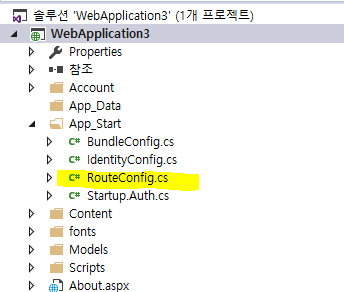
해당 파일을 열어보면,, FriendlyUrlSettings 객체를 생성하여 AutoRedirectMode 에 친화적인 url 로 운영되도록 템플릿 화 한겁니다.
using System;
using System.Collections.Generic;
using System.Web;
using System.Web.Routing;
using Microsoft.AspNet.FriendlyUrls;
namespace WebApplication3
{
public static class RouteConfig
{
public static void RegisterRoutes(RouteCollection routes)
{
var settings = new FriendlyUrlSettings();
settings.AutoRedirectMode = RedirectMode.Permanent;
routes.EnableFriendlyUrls(settings);
}
}
}
그렇다면, 기존과 동일한 구조로 호출을 하고자 한다면??? 위의 부분을 제거 해야 합니다.
그냥 나중에 사용할 수도 있으니 간단하게 끄도록 하는 off 의 enum 을 넣어보죠.
using System;
using System.Collections.Generic;
using System.Web;
using System.Web.Routing;
using Microsoft.AspNet.FriendlyUrls;
namespace WebApplication3
{
public static class RouteConfig
{
public static void RegisterRoutes(RouteCollection routes)
{
var settings = new FriendlyUrlSettings();
settings.AutoRedirectMode = RedirectMode.Off;
routes.EnableFriendlyUrls(settings);
}
}
}
이제 기존의 웹폼 개발과 과 동일한 url 호출을 할 수 있습니다. 대신 친화적인 url 을 포기하니 좀 아쉽긴 합니다.
위의 작업을 한 상태에서 작동이 되는지 테스트 해보죠.
아래 샘플은 회원님이 질문한 내용의 소스를 발췌한 부분입니다. 습관적으로 url 을 기재할때는 ResolveUrl() 함수를 활용하시기 바랍니다. 이제 test.aspx 비하인드 단 뒤에 WebMethod 어트리뷰트를 기재하여 웹서비스와 동일한 결과값을 얻도록 해보죠.
참고 : https://msdn.microsoft.com/ko-kr/library/system.web.ui.control.resolveurl(v=vs.110).aspx
<%@ Page Language="C#" AutoEventWireup="true" CodeBehind="Test.aspx.cs" Inherits="WebApplication3.Test" %>
<!DOCTYPE html>
<html xmlns="http://www.w3.org/1999/xhtml">
<head>
<meta http-equiv="Content-Type" content="text/html; charset=utf-8"/>
<title></title>
<script src="Scripts/jquery-1.10.2.min.js"></script>
<script >
function test() {
$.ajax({
type: "POST",
url: "<%= ResolveUrl("~/test.aspx/GetData") %>",
data: "{}",
contentType: "application/json; charset=utf-8",
dataType: "json",
success: function (msg) {
alert(msg.d);
}
});
}
</script>
</head>
<body>
<form id="form1" runat="server">
<div>
<input id="Button1" type="button" value="button" xxonclick="test()" />
</div>
</form>
</body>
</html>
코드 비하인드 단은 아래와 같습니다. 요즘 트랜드 경우, asp.net mvc 에서는 아래와 같은 WebMethod 코드를 사용하지 않고 web api 나 또는 web serivce 를 통해 호출합니다. (사실 asp.net mvc 부터 코드비하인드 단이 사라졌죠..^^;;)
namespace WebApplication3
{
public partial class Test : System.Web.UI.Page
{
protected void Page_Load(object sender, EventArgs e)
{
}
[WebMethod]
public static string GetData()
{
string s = "hello";
return s;
}
}
}
이제 호출해 보시면 hello 라는 값이 경고창으로 보이게 될겁니다.
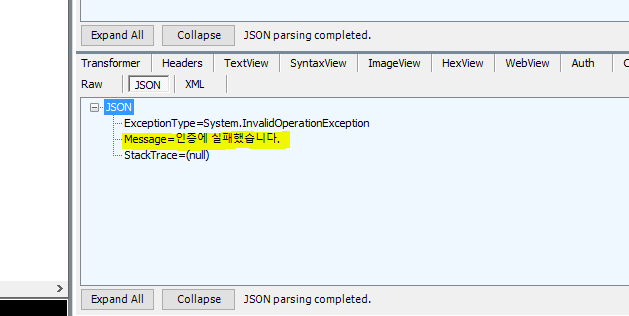
만약에 RedirectMode.Permanent 으로 설정되어 있다면... 인증 실패로 뜹니다. 오류 믿었다가는 web.config 의 페이지 접속 권한 부분을 보시게 될텐데 그와는 상관없습니다. ㅡㅡ;
감사합니다.