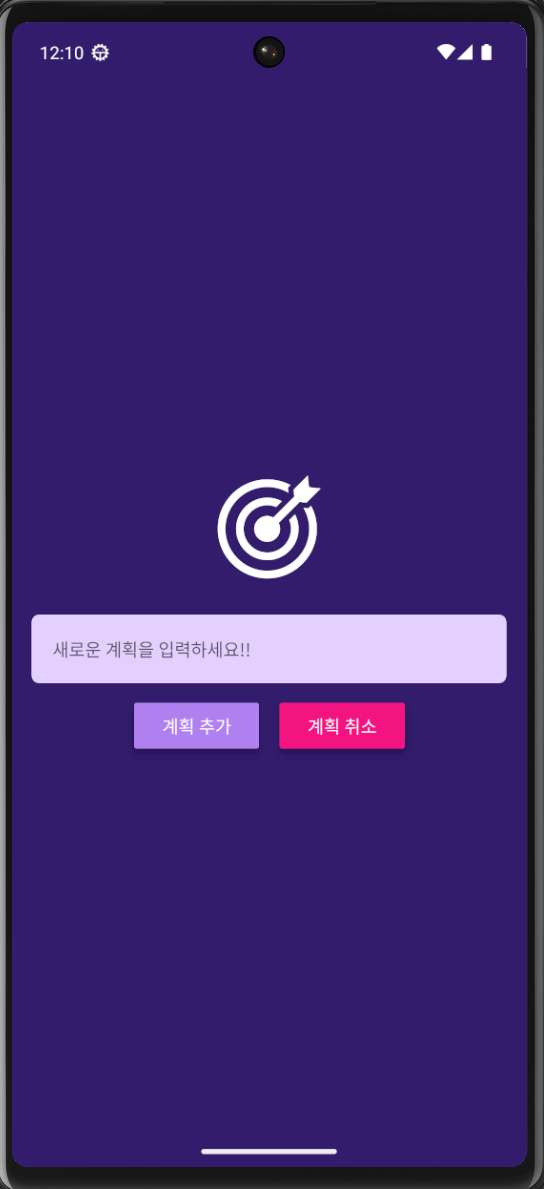
 | 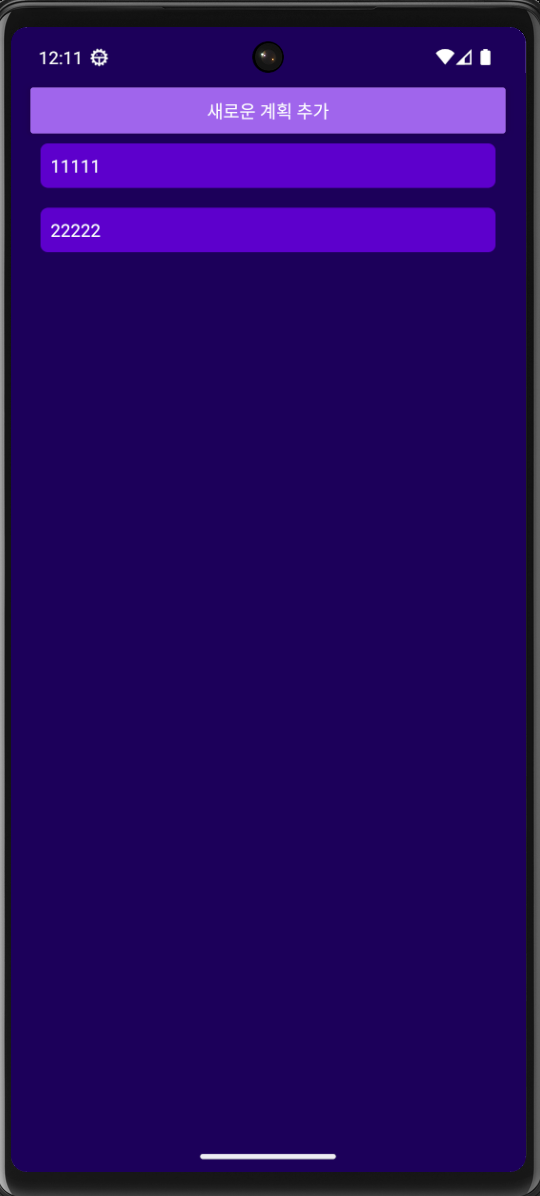 |
App.js
import { useState } from "react";
import { Button, FlatList, StyleSheet, View } from "react-native";
import GoalInput from "./components/GoalInput";
import GoalItem from "./components/GoalItem";
import { StatusBar } from "expo-status-bar";
import { SafeAreaProvider, SafeAreaView } from "react-native-safe-area-context";
export default function App() {
const [courseGoals, setCourseGoals] = useState([]); // 빈 배열로 초기화
const [modalIsVisible, setModalIsVisible] = useState(false);
const addGoalHandler = (enteredGoalText) => {
setCourseGoals((currentCourseGoals) => [
// 기존 배열을 복사하고 새로운 목표를 추가
...currentCourseGoals,
{ text: enteredGoalText, id: Math.random().toString() },
]);
endAddGoalHandler(); // 목표 추가 후 모달 닫기
};
const deleteGoalHandler = (id) => {
setCourseGoals((currentCourseGoals) => {
return currentCourseGoals.filter((goal) => goal.id !== id);
});
};
const startAddGoalHandler = () => {
setModalIsVisible(true);
};
const endAddGoalHandler = () => {
setModalIsVisible(false);
};
return (
<SafeAreaProvider>
<StatusBar style="light"/>
<SafeAreaView style={styles.appContainer}>
<Button
title="새로운 계획 추가"
color="#a065ec"
onPress={startAddGoalHandler}
/>
{/* 모달 처리 */}
<GoalInput
onAddGoal={addGoalHandler}
onCancel={endAddGoalHandler}
visible={modalIsVisible}
/>
{/* 목표 추가 핸들러 전달 */}
<View style={styles.goalsContainer}>
<FlatList
data={courseGoals}
renderItem={({ item }) => {
return (
<GoalItem
text={item.text}
id={item.id}
onDeleteItem={deleteGoalHandler} // 삭제 핸들러 전달
/>
);
}}
keyExtractor={(item, index) => {
return item.id;
}}
alwaysBounceVertical={false}
/>
</View>
</SafeAreaView>
</SafeAreaProvider>
);
}
const styles = StyleSheet.create({
appContainer: {
flex: 1 /* 1은 100% */,
paddingHorizontal: 16 /* 좌우 16만큼 패딩 */,
backgroundColor: '#1e085a',
},
goalsContainer: {
flex: 5,
},
});
GoalInput.js
import React, { useState } from "react";
import {
Button,
Image,
Modal,
StyleSheet,
TextInput,
View,
} from "react-native";
import PropTypes from "prop-types";
const GoalInput = ({ onAddGoal, onCancel, visible }) => {
const [enteredGoalText, setEnteredGoalText] = useState(""); // 빈 문자열로 초기화
const goalInputHandler = (enteredText) => {
setEnteredGoalText(enteredText);
};
const addGoalHandler = () => {
onAddGoal(enteredGoalText); // 부모 컴포넌트로 목표 텍스트 전달
setEnteredGoalText(""); // 입력 필드 초기화
};
return (
<Modal visible={visible} animationType="slide">
<View style={styles.inputContainer}>
<Image
source={require("../assets/images/goal.png")}
style={styles.image}
/>
<TextInput
style={styles.textInput}
placeholder="새로운 계획을 입력하세요!!"
xxonChangeText={goalInputHandler}
value={enteredGoalText} // 입력 필드의 값으로 상태 변수를 설정
/>
<View style={styles.buttonContainer}>
<View style={styles.button}>
<Button title="계획 추가" onPress={addGoalHandler} color="#b180f0"/>
</View>
<View style={styles.button}>
<Button title="계획 취소" onPress={onCancel} color="#f31282"/>
</View>
</View>
</View>
</Modal>
);
};
GoalInput.propTypes = {
onAddGoal: PropTypes.func.isRequired,
visible: PropTypes.bool.isRequired,
};
const styles = StyleSheet.create({
inputContainer: {
flex: 1 /* 1은 100% */,
justifyContent: "center" /* 수직 중앙 정렬 */,
alignItems: "center" /* 수직 중앙 정렬 */,
padding: 16 /* 안쪽 여백 */,
backgroundColor: "#311b6b",
},
image: {
width: 100,
height: 100,
margin: 20,
},
textInput: {
borderWidth: 1 /* 테두리 두께 */,
borderColor: '#e4d0ff' /* 테두리 색상 */,
backgroundColor: '#e4d0ff' /* 입력 필드 배경 색상 */,
color: '#120438' /* 입력 텍스트 색상 */,
borderRadius: 6 /* 모서리 둥글게 */,
width: '100%' /* 가로 100% */,
padding: 16 /* 안쪽 여백 */,
},
buttonContainer: {
marginTop: 16,
flexDirection: "row",
},
button: {
width: 100,
marginHorizontal: 8,
},
});
export default GoalInput;
GoalItem.js
import { Pressable, StyleSheet, Text, View } from "react-native";
import PropTypes from "prop-types";
const GoalItem = ({ text, onDeleteItem, id }) => {
return (
<View style={styles.goalItemContainer}>
<Pressable
onPress={() => onDeleteItem(id)}
android_ripple={{ color: "#dddddd" }}
style={({ pressed }) => [
styles.goalItem,
pressed && styles.pressedItem, // 눌렸을 때 스타일 추가 (iOS에서도 피드백을 주기 위함)
]}
>
<Text style={styles.goalText}>{text}</Text>
</Pressable>
</View>
);
};
GoalItem.propTypes = {
text: PropTypes.string.isRequired,
onDeleteItem: PropTypes.func.isRequired,
id: PropTypes.string.isRequired,
};
const styles = StyleSheet.create({
goalItemContainer: {
margin: 8,
borderRadius: 6, // Ripple 효과가 둥근 모서리를 벗어나지 않도록 부모 View에 적용
overflow: "hidden", // Ripple 효과가 밖으로 나가지 않도록 설정
},
goalItem: {
backgroundColor: "#5e0acc",
},
pressedItem: {
opacity: 0.5, // 눌렸을 때 투명도 조절
},
goalText: {
color: "white",
padding: 8,
},
});
export default GoalItem;