예전 자료
https://cafe.daum.net/candan/BLQD/72
https://cafe.daum.net/candan/BLQD/84
파일을 D 드라이브에 넣고
cmd 관리자 권한으로 하고요.
echo 등록 하기 /RL HIGHEST을 꼭 넣어 주어야 하네요 결론.
schtasks /create /ru administrators /tn "old_cert_del" /tr "cmd /c d:\old_cert_del.cmd" /sc onlogon /RL HIGHEST
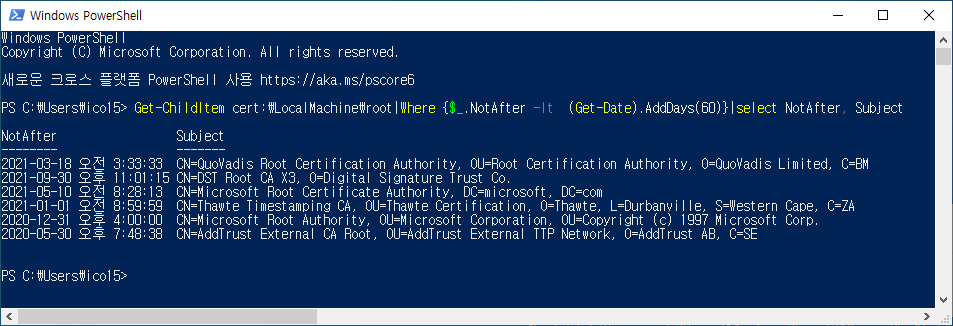
echo 파워쉘 오래된 자격증명 보기
Get-ChildItem cert:\LocalMachine\root|Where {$_.NotAfter -lt (Get-Date).AddDays(60)}|select NotAfter, Subject
만약 필요 없드면 삭제 방법
schtasks /Delete /tn "old_cert_del" /f
기타 수상한 자격증명이 있는 것 같으면 바이러스 포털에 검사.
https://docs.microsoft.com/ko-kr/sysinternals/downloads/sigcheck 파일 받는곳
sigcheck.exe –tv
.\sigcheck.exe -tv
삭제 방법 Thumbprint: 부분을 적으면 된다.
파워쉘에서 해야 하네요 c:로 이동 이걸 꼭 적으세요 ㅎ
C:
Get-ChildItem Cert:\LocalMachine\Root\c843721cbc3ad29910e1f31c99361eedceb6ddds | Remove-Item
Get-ChildItem Cert:\LocalMachine\Root\??? | Remove-Item
무름표 부분을 지우고 의심 가는 키를 넣으면 되네요.
자격증명을 보려면 (이거 머냐? 하면 컴퓨터에서 열쇠 같은건대요? 해커가 이 열쇠 훔쳐서.. 나쁜 짓을 하기도 해요 결론) 잘 관리 해야함. ㅎㅎ 한대 업데이트 잘 안해주네요.
윈도우키 + R
netplwiz
certmgr.msc
certlm.msc
https://github.com/oklokl/schtasks/blob/main/Others/old_cert_del_N02.cmd
기타 전승환님이 만들어 주신것. 여러가지 환경의 경우 실행 안될수 있다고 조언 해주심
/ru "NT Authority\System" 부분 같아요.(이렇게 하면 사용자에 따라 실행 안되는 경우가 있다고)
/ru "administrators" 이렇게 하면 보편적인 사용자 계정인대 이렇게 할 경우 실행 되는 모습이 보이게 되네요. 단점.
해결 /RL HIGHEST 이걸 적어 주면 자동으로 숨는군요 ㅎㅎb 그래서
해보니 결론은 /ru "administrators" /RL HIGHEST 조합으로 해야 되네요.
이런식으로 -windowstyle hidden 숨김 옵션을 주었지만 여전히 보였음 ㅎㅎ
@echo off
PowerShell -windowstyle hidden -Command "& {Set-Location Cert: ; $expired = Get-ChildItem cert:\* ` -recurse -ExpiringInDays 0 ; $expired | Remove-Item -DeleteKey}"
exit
이건 최소화 실행 해본 거네요.
https://www.codeproject.com/Questions/599352/Howplustoplusremovepluscertificateplususingpluspow
매우 깔끔한 버전 40일 이후 모두 삭제 버전
댓글
댓글 리스트-
작성자동우 작성자 본인 여부 작성자 작성시간 22.10.08 이야기를 들어 보니 VBS를 사용 해야 비활성 할수 있다고 하네요 ㅎㅎ WScript 매우 어렵군요 ㅠㅠ.. 그냥 될줄 알았는대 어쩔수가 없네요 ㅋㅋ
-
작성자동우 작성자 본인 여부 작성자 작성시간 22.10.08 https://www.codeproject.com/Questions/599352/Howplustoplusremovepluscertificateplususingpluspow
Get-ChildItem -Path Cert:\LocalMachine\Root | Where-Object {$_.NotAfter -lt (Get-Date).AddDays(40)} | ForEach-Object {Remove-Item -Path "Cert:\LocalMachine\Root\$($_.Thumbprint)" -Recurse -Verbose} -
답댓글 작성자동우 작성자 본인 여부 작성자 작성시간 22.10.09 schtasks /create /tn old_cert_del /tr "powershell -WindowStyle hidden Get-ChildItem -Path Cert:\LocalMachine\Root | Where-Object ($_.NotAfter -lt (Get-Date).AddDays(40)) | ForEach-Object (Remove-Item -Path "Cert:\LocalMachine\Root\$($_.Thumbprint)" -Recurse -Verbose)" /sc onlogon /ru administrators /RL HIGHEST
-
작성자동우 작성자 본인 여부 작성자 작성시간 22.10.09 schtasks /create /tn "old_cert_del" /tr "c:\windows\syswow64\WindowsPowerShell\v1.0\powershell.exe -c '& (Set-Location Cert: ; $expired = Get-ChildItem cert:\* ` -recurse -ExpiringInDays 0 ; $expired | Remove-Item -DeleteKey;pause;)'" /sc onlogon /ru administrators /RL HIGHEST
실패한 것 -
작성자동우 작성자 본인 여부 작성자 작성시간 25.01.31 control.exe keymgr.dll
자격증명 모두 삭제 하고 새로 받기