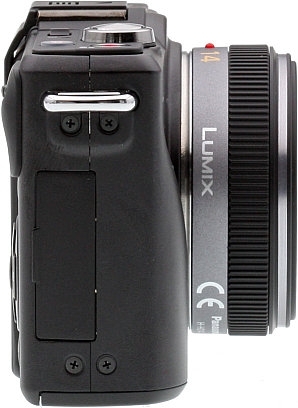
| Basic Specifications | |
|---|---|
| Resolution: | 12.10 Megapixels |
| Kit Lens: | 3.00x zoom 14-42mm (28-84mm eq.) |
| Viewfinder: | LCD |
| LCD Size: | 3.0 inch |
| ISO: | 100-6400 |
| Shutter: | 60-1/4000 |
| Max Aperture: | 3.5 |
| Mem Type: | SD / SDHC / SDXC |
| Battery: | Custom LiIon |
| Dimensions: | 4.4 x 2.7 x 1.3 in. (113 x 68 x 33 mm) |
| Weight: | 16.8 oz (475 g) includes batteries, kit lens |
| MSRP: | |
| Availability: | 01/2011 |
| 12.10 Megapixels |
Micro Four Thirds mount | 3.0 inch LCD |
|---|---|---|
 | ||
 |
 |
 |
 |
 |
Panasonic Lumix DMC-GF2 Hands-on Preview
by Mike Tomkins, Dave Etchells, Shawn Barnett, and Zig Weidelich
Posted: 11/04/2010
An aggressive drive toward smaller interchangeable-lens digital cameras intensifies with Panasonic's announcement of the Lumix DMC-GF2. Though the drive toward smaller cameras was begun by Olympus and Panasonic, Sony's very small NEX series of SLD (Single Lens Direct-view) or mirrorless cameras has forced Panasonic to respond. As a result, the Panasonic GF2 is closer to the size of the LX5 than it is the GF1, and also closer to the diminutive size of the Sony NEX-5. It's even smaller than two of the high-end fixed-lens digital cameras that it competes with, the Nikon P7000 and Canon G12.
Discussion of size is important in this market space, because in addition to image quality, this is where the battle lines are drawn. These cameras are designed to deliver the best image quality in the smallest volume. Technically, the Lumix GF2 is similar to its predecessor, with the same 12.1-megapixel sensor, but Panasonic says its Venus Engine FHD processor will improve noise performance across the ISO range, which is important when going up against APS-C sensors. What they've achieved in this important area will have to wait until we receive a production version, as all we've seen is a working prototype.
Size isn't the only component to the story, what's also interesting is what they had to do to achieve this size reduction, which includes moving many of the features that previously had a dial to the new touchscreen. Many of the G2's touchscreen features have been brought to the GF2, and many new ones were created to replace features like the Mode dial. At the same time, Panasonic added higher resolution video to the GF2, up to 1,920 x 1,080 at 60i in AVCHD compression.
The Panasonic GF2 is packed with both trade-offs and benefits. Because we saw an unfinished prototype camera, we have to be careful in our early evaluation of the Panasonic GF2, but it's easy to see what the final package will be overall.
Look and feel. The Panasonic Lumix GF2 is smaller than the company's previous GF1 model, with an approximate 19% reduction in body volume, accompanied by a 7% drop in body-only weight. The change brings the Panasonic GF2 into much closer contention with Sony's popular NEX-series camera in terms of overall size and weight. Compared to the Sony NEX-3, both cameras have similar body thickness. The Panasonic GF2 is a little less than a quarter inch taller, and the Sony NEX-3 is wider by a similar margin. Compared to the more aggressively styled Sony NEX-5, though, the comparison still falls more clearly in Sony's favor. Both cameras have similar width, and the NEX-5 gives away a little less than a quarter inch in thickness to the Panasonic GF2, but is almost a third of an inch less tall than the Panasonic.
| Model | Standard | Metric |
| Panasonic GF1 | 4.7 x 2.8 x 1.4 in. | 119 x 71 x 36mm |
| Panasonic GF2 | 4.4 x 2.7 x 1.3 in. | 113 x 68 x 33mm |
| Panasonic LX5 | 4.3 x 2.6 x 1.7 in. | 110 x 66 x 43mm |
| Sony NEX-5 | 4.4 x 2.4 x 1.6 in. | 111 x 60 x 40mm |
| Sony NEX-3 | 4.6 x 2.5 x 1.3 in. | 117 x 63 x 33mm |
| Olympus E-P2 | 4.7 x 2.8 x 1.4 in. | 121 x 70 x 35mm |
| Olympus E-PL1 | 4.5 x 2.8 x 1.6 in. | 115 x 72 x 42mm |
| Nikon P7000 | 4.5 x 3.0 x 1.8 in. | 114 x 77 x 45mm |
| Canon G12 | 4.4 x 3.0 x 1.9 in. | 112 x 76 x 48mm |
Excluding protrusions, the Panasonic GF2 measures 4.4 x 2.7 x 1.3 inches (113 x 68 x 33mm), versus 4.6 x 2.5 x 1.3 inches (117 x 63 x 33mm) for the Sony NEX-3. The NEX-5, meanwhile, is 4.4 x 2.4 x 1.6 inches (111 x 60 x 40mm). An important detail hidden by these numbers is that both Sony cameras have a more deeply sculpted handgrip, where Panasonic's new offering has only a very slight protrusion offering purchase for your fingertips. In other words, its body thickness is similar across most of the camera's width, whereas much of the bulk in the NEX cameras is found in their handgrips. Note also that the GF2 is only one-tenth of an inch larger than the Panasonic LX5 in width and height. (When comparing the camera dimensions shown above, be sure to consider that the last dimension, thickness, is measured without a lens for the SLD cameras. Also, see our comparison images below.)
The Panasonic GF2 weighs approximately 9.4 ounces (265g) body-only, or 12.9 ounces (365g) with battery, flash card, and the 14mm f/2.5 (28mm eq.) lens shown below. The Sony NEX-5, for comparison, weighs 8.1 ounces (229g) body-only, or 12.9 ounces (365g) when ready to shoot with its 16mm f/2.8 (24mm eq.) lens -- the nearest model to that on the Sony. The Sony NEX-3 weighs 8.4 ounces (239g) body-only, or 13.1 ounces loaded and ready with the 16mm f/2.8 lens.
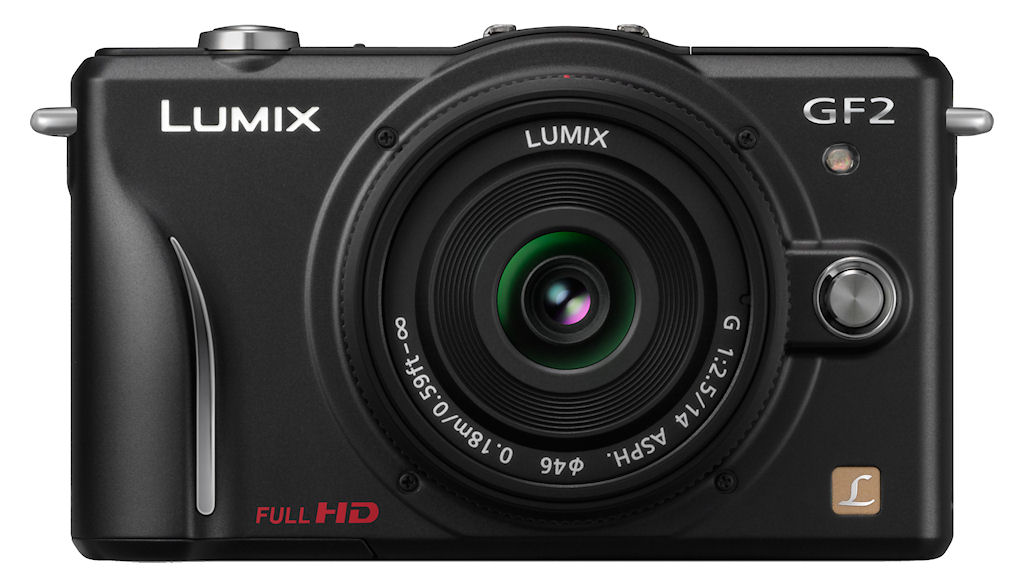
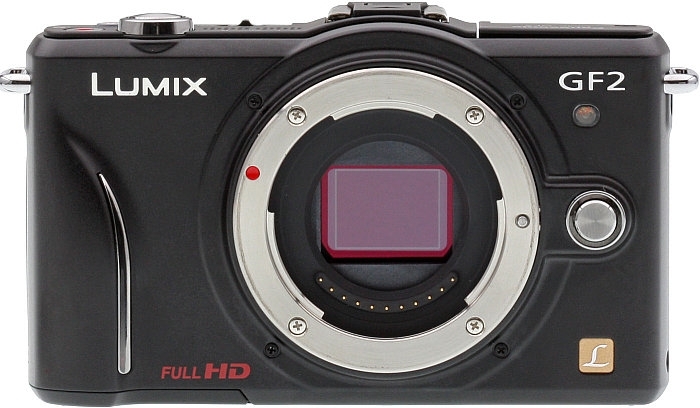
To achieve the smaller, lighter body versus that of its predecessor, Panasonic has made quite a few changes in the Lumix GF2's layout and user interface. Looking at the front of the Panasonic GF2, a small finger grip lined with a silver trim piece curves away gently towards the top of the camera, providing just enough of a hold to make the otherwise flat camera easy to handle while shooting. Compared to the GF1, the AF Assist lamp has jumped to the other side of the lens mount, and now sits directly beneath the GF2 badge. Directly beneath, the silver lens release button appears just right of the lens mount, with a greater gap between the two than in the GF1.
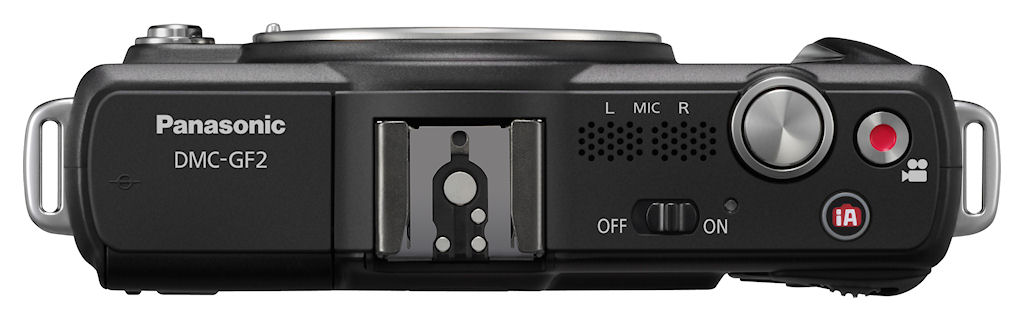
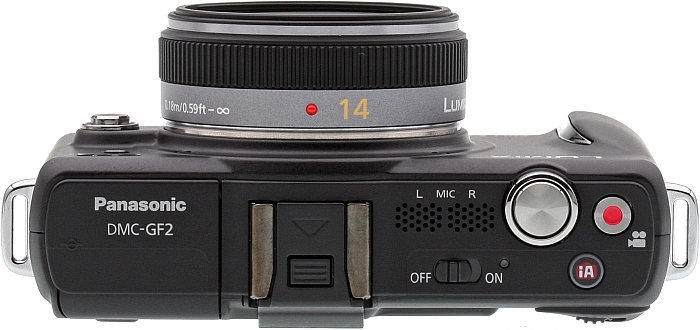
Comparing the top deck of the Panasonic GF2 side-by-side with that of the GF1, the most obvious difference is the removal of the Mode dial, as well as the Drive Mode switch that was located directly beneath. The newly available space is occupied by a repositioned power switch, and a new stereo microphone, which is an upgrade from the GF1's monaural mic. While the change to a two-channel mic might look good on paper, the lack of spacing between the microphone channels -- and the fact that they don't face toward the subject -- may conspire to rob the GF2's video of much stereo effect (this is how the mics are situated on the other G-series cameras that support stereo recording as well, which are mounted on the pop-up flash mechanism). To the left, the flash hot shoe sits lower on the GF2's top panel than on the GF1. Along with the removal of the Mode dial and Drive Mode switch, this change gives the GF2 a smoother top deck than in its predecessor.
Just to the right of the stereo microphone ports is the Shutter button, and directly to its right is the Movie Record button: both still and movie modes are available at all times. Directly behind the Shutter and Movie Record buttons is a new Intelligent Auto button, dedicated to activating Panasonic's beginner-friendly shooting mode that can automatically control most camera functions, including automatic recognition of the shooting scene type. This button glows blue when activated. Just like the GF1, the left and right ends of the Panasonic GF2's top deck feature wide metal camera strap lugs, something we greatly appreciate. The metal D-rings on the E-P1 and several other recent digital SLRs are unsuitable for video, because they can make noise that gets picked up by the camera's microphone.

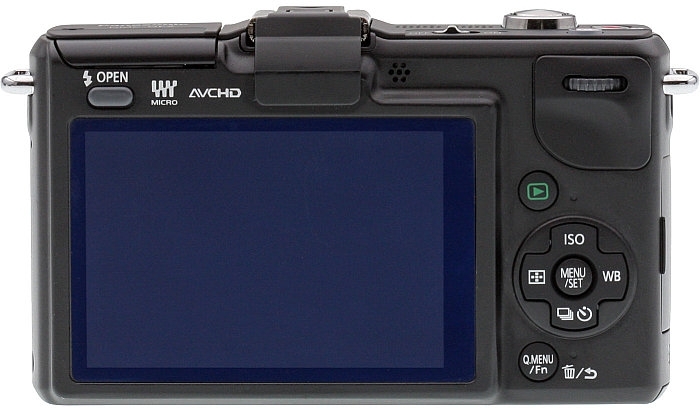
The bulk of the user interface differences from the GF1 can be found on the Panasonic GF2's rear panel. There are four less physical controls here than on the previous camera, and that's achieved thanks to a switch to a touch-panel LCD display. Panasonic is far from the only company offering touch-panel digital cameras, but it's the only one to provide an interchangeable-lens camera with the feature. The Panasonic GF2's touch interface is similar to that from the Lumix G2, one which we found to be uncommonly mature and useful -- especially when it came to controlling autofocus in video mode. As well as controlling menus and accessing soft keys, the touch panel can be used to indicate the subject on which the camera should focus and set exposure, and to trip the shutter release. It can also be used to intuitively control the playback zoom, and then pan around the zoomed image by dragging a finger across the screen, among other functions. The Panasonic GF2's 3-inch LCD is very sharp, with 460,000 dots of resolution, sufficient to confirm focus with good accuracy, but lags somewhat behind the 921,000 dot resolution of Sony's NEX-series cameras.
To save real estate (and clutter), the Panasonic GF2 combines the Quick Menu and Function controls into a single button, which serves double duty as a Delete / Return button in Playback mode. The GF2 also drops the Autofocus / Auto Exposure lock, Autofocus / Manual Focus, Display Mode, and Preview / Delete buttons from the rear panel, with their functionality either catered for with the touch screen, or other buttons -- in some cases thanks to the ability to assign functions to the Quick Menu / Function button. Despite the reduction in size, the GF2 manages to find space to retain a single, SLR-style rear dial that can be used both to adjust variables such as aperture or shutter speed by rolling it in either direction, and also to confirm selections by pressing it inward. In the absence of the top-panel Drive Mode dial from the GF1, the down arrow button in the Lumix GF2's four-way controller serves as a Drive Mode button. Most other rear-panel controls are similar in functionality and approximate placement to those of the GF1.

Compact Flash The Panasonic GF2 is the smallest interchangeable-lens digital camera with a built-in flash.

Bounce Flash? Unfortunately, this trick didn't work; see text for the details.
Flash. The Panasonic Lumix GF2 is the smallest and lightest interchangeable-lens camera to include a built-in flash. We shoot available-light whenever possible, but frequently flash is either the only way to go, or makes for a better photo.
Similar to that of the GF1, the Panasonic GF2's OPEN button on the back releases the springloaded flash mechanism, which pops up and forward at the same time. Panasonic told us that the GF2's flash mechanism has been redesigned to make it more simple. While we didn't have a GF1 handy to make a direct comparison, the Panasonic GF2's flash head does appear to pop up a little higher than that on the GF1, and it felt less finicky than we recalled when pressing it back down to its closed position.
The Panasonic GF2's flash has a guide number of 6 meters at ISO 100, the same as that of the GF1, but significantly reduced from the flash in the G1 and GH1 which had an ISO 100 guide number of 11 meters. Flash modes include Auto, Auto w/ Red-eye reduction, Forced, Forced w/ Red-eye reduction, Slow-sync, Slow-sync w/ Red-eye reduction, and Off. X-sync is at 1/160 second. As well as the built-in flash, there's also an intelligent hot shoe, compatible with Panasonic's DMW-FL220, DMW-FL360, and DMW-FL500 flash strobes.
One of the first things we noticed about the Panasonic GF2's flash head was that we could easily tilt it back as shown at right, aiming the flash at the ceiling. Built-in bounce flash? Unfortunately not; it appears that the GF2's flash sensor is located in the flash head itself, so aiming the flash towards the ceiling sets the exposure based on light bouncing off the ceiling, rather than the subject.

EVF Socket The Panasonic GF2 has the same external viewfinder socket we saw on the GF1.
EVF. Just like the GF1 before it, the GF2 includes a small connector beneath its hot shoe, which can be used for Panasonic's optional swiveling, electronic viewfinder accessory: the DMW-LVF1 External Live Viewfinder. This neat little accessory is essentially an electronic viewfinder that you can snap on if you're having trouble viewing the LCD in direct light, or if you just prefer looking through a viewfinder. It's similar in concept to the electronic viewfinder accessory offered by Olympus for the E-P2 and E-PL1 Micro Four Thirds models, and has the same drawback -- attachment of the viewfinder accessory precludes use of an external flash strobe. That's perhaps less of an issue thanks to the inclusion of a built-in flash strobe, but it's still a compromise worth bearing in mind.
 With 202,000 dots of resolution, the Panasonic DMW-LVF1 EVF accessory isn't in the same class as the 1,440,000 dot resolution of Olympus' EVF, nor does it match the resolution of the GF2's own rear-panel LCD. On the plus side, though, it has a swift 60 frame per second refresh, and 1.04x magnification. It also comes in a very retro leather pouch with a snap cover, and a loop on the back designed to thread onto the camera strap. There's even a plastic socket inside the pouch into which the DMW-LVF1 can securely dock. List pricing for this accessory is set at $199, and street pricing is in the region of $130, making it a relatively affordable, worthwhile addition to your camera bag.
Sensor and Processor. The Panasonic GF2's sensor resolution is unchanged from 12.1 megapixels of the GF1, and according to Panasonic, it's the same sensor used in the G1 and GF1. The magic is in the new Venus Engine FHD, a three-core processor whose noise reduction is expected to be better, even at higher ISOs. We were told that the prerelease model we looked at was not final, and so we should not judge image quality based on its performance. As such we've only posted the images at 1/4 size, with the exception of two ISO 100 images of our Still Life target.
The sensor and processor combination also enable 1,920 x 1,080 videos at 60i or 1280 x 720 at 60p in AVCHD mode. HD Motion JPEG recording is also available at 1,280 x 720, 848 x 480, 640 x 480, and 320 x 240, all at 30fps. (Maximum data rate from the sensor is 30fps, so the 60i in AVCHD mode is basically captured at 30p, then encoded at 60i.)
ISO range. Standard ISO settings range from 100 to 6,400, with an extended setting of 12,800. (The specs say maximum ISO is 6,400, but our sample went to 12,800. It's possible that production samples will top out at 6,400.) There's also both an Auto ISO mode whose upper limit can be defined by the user from 200 to 1,600, and an Intelligent ISO function which takes into account not only the brightness of the scene when determining the sensitivity, but also subject motion.
Dust reduction. The Panasonic GF2 includes a Supersonic Wave Filter dust reduction system that vibrates the a filter over the image sensor at around 50,000 cycles per second to remove dust, which is captured on a sticky material beneath the filter.
Autofocus. The Panasonic Lumix GF2 offers a 23-point TTL contrast-detection autofocusing system, and includes an AF-assist lamp to help with focusing in low-light conditions. As well as the multi-point focusing mode, the GF2 can be set to either single AF, tracking AF, or face detection modes.
When a face is detected, the camera can automatically adjust focus and exposure to ensure that your subject's face is correctly rendered. When detected in the image frame, those six individuals' faces can be prioritized over others in the scene (and over each other based on the order they've been sorted when training the camera) when determining exposure variables, and the image metadata can also be automatically tagged with up to three individuals' names. Thanks to the GF2's touchscreen and iAuto mode, touching a face onscreen automatically switches the GF2 to Portrait mode and sets focus and exposure accordingly.
Face recognition also offers assistance in Playback mode, making it easier to find photos containing a specific individual -- and in the event that a face has been detected incorrectly, the tagging can be changed after the fact. Images that weren't tagged at capture time cannot be tagged manually, however. The Panasonic GF2 can recognize up to six faces, assigning a name to each, and you can store up to three shots per face to refine its detection capability.
Modes. The Panasonic GF2's Mode selection is brought up by pressing the Mode icon in the upper left of the screen, and includes Intelligent Auto, Program, Aperture- and Shutter-priority, and Manual shooting modes, plus My Color, Scene, Motion Picture P, and Custom.
The Panasonic GF2's Custom modes allow three groups of settings to be saved for later recall. Just press on the C button and press to select one of the three custom buttons.
The Scene selection offers 17 modes that help beginners get the results they desire with a minimum of effort.

Peripheral defocus. The Panasonic GF2 has a Scene mode designed to help novices use depth of field to their advantage.
Modes on offer in the Panasonic GF2 include Normal Portrait, Soft Skin, Normal Scenery, Architecture, Sports, Peripheral Defocus, Flower, Food, Objects, Night Portrait, Night Scenery, Illuminations, Baby 1 + 2 (so you can keep track of birthdays for two different children, allowing the Panasonic software to display the child's age along with the photo), Pet, Party, and Sunset.
A subset of eleven of these Scene modes are applicable not only to still images, but also to movie capture. The Panasonic GF2's Intelligent Auto mode, activated via a button on the camera's top deck, can automatically detect certain scene types and select the appropriate scene mode from either i-Portrait, i-Scenery, i-Macro, i-Night Portrait, i-Night Scenery, or i-Baby.
Connectivity. The Lumix GF2 uses a miniHDMI Type C connector for output to high-definition displays. Data can be transferred via USB 2.0 High-Speed. The Panasonic GF2 no longer has the remote cable socket on the GF1.
Storage and battery. Power is supplied by a proprietary Panasonic 7.2v, 1,010mAh battery, with an expected battery life of 300 shots with the 14-42mm kit lens, or 320 shots with the 14mm kit lens. The GF2 includes the company's ID-Security technology, which prevents use of third-party batteries. This battery is smaller in mAh capacity when compared to the GF1's 1,250 mAh battery.
Panasonic GF2 Comparisons
One of the main advantages of SLD cameras over their SLR siblings is that -- with no need to accommodate a bulky reflex mirror mechanism -- they can be made significantly smaller and lighter. As Sony has proven with its NEX series, that can be a very desirable selling point. With the Panasonic GF2, the company shows that it's standing up and taking notice of the desire for smaller interchangeable lens cameras. With that in mind, we thought comparisons against some of the Panasonic GF2 competitors were appropriate. The Sony NEX-5 marks the current best-in-breed in terms of what's possible with SLD camera miniaturization, while the Olympus Pen E-P2 and Samsung NX100 represent something closer to the norm in terms of form factor. Finally, the Nikon P7000 represents a fixed-lens camera designed with the enthusiast photographer in mind. Read on to see how each compares with the Panasonic GF2.
Panasonic GF2 vs Sony NEX-5
 |
|
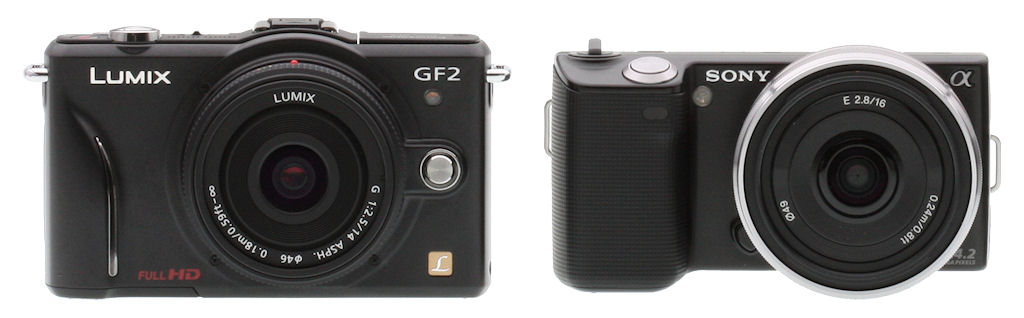
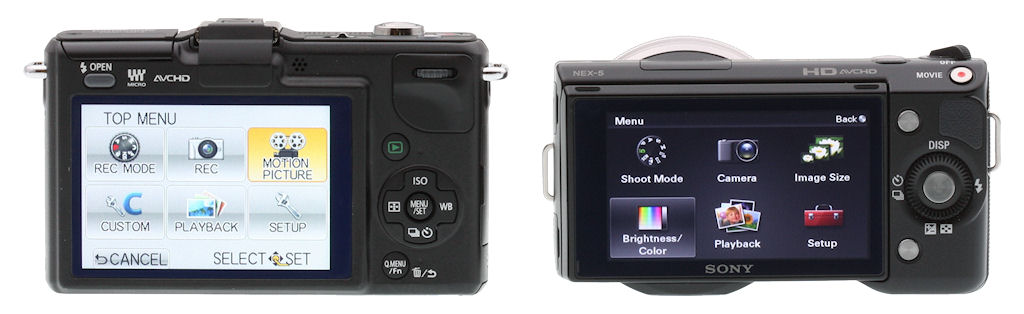
Compared to the Sony NEX-5, the Panasonic GF2 is almost exactly the same width, but it's around a third of an inch taller than Sony's aggressively-styled competitor. Neither the GF2's internal strobe or the NEX-5's proprietary external strobe are very powerful, but Panasonic's camera can also accept more powerful external strobes courtesy of an intelligent hot shoe. The GF2 can also accept both optical and electronic viewfinder accessories in the shoe, where Sony offers only an optical finder. |
 |
|
Both cameras offer 3.0-inch LCD panels, but thanks to a 3:2 aspect ratio, the GF2's screen has a larger surface area than the wide-aspect display on the Sony, and it also includes a touch panel. The NEX-5's LCD has significantly higher resolution, and is also articulated, able to tilt 80 degrees upwards, or 45 degrees downwards. The GF2 has a roomier thumbgrip, and includes a more traditional, SLR-like rear dial. |
 |
|
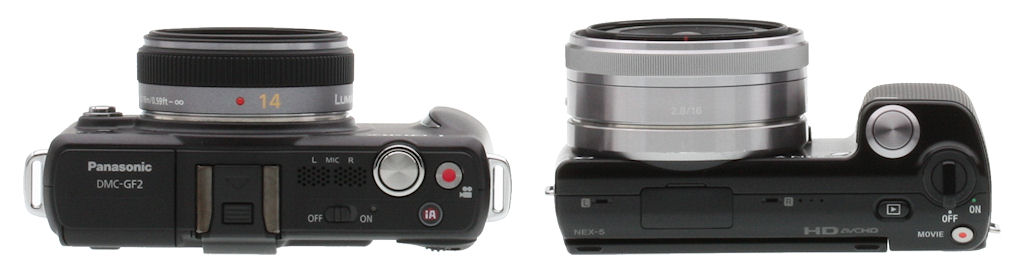
On paper, the GF2 is the slimmer camera, but a view from above shows that the NEX-5's body is pretty thin over much of its surface, despite the articulated LCD. The Sony's bulk is mostly to be found in the much deeper handgrip, where the Panasonic's grip is only a relatively subtle bulge, although the lens mount also makes the NEX thicker than its slim body makes you think. The GF2 should provide a better two-handed grip with small lenses, however, since unlike the Sony, it provides a little room to grip at left of the lens mount. The GF2 is shown with a 14mm f/2.5 lens, while the NEX-5 carries a 16mm f/2.8, the closest equivalent in Sony's E-mount range. Body-only, the GF2 weighs around 16% more than the NEX-5. |
Panasonic GF2 vs Olympus E-P2
 |
|
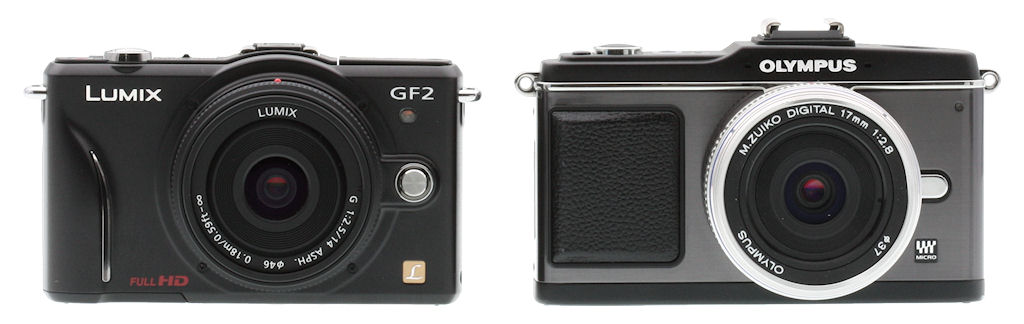
The Panasonic GF2 is a third of an inch less wide than the Olympus E-P2, and also just slightly less tall, especially at the hot shoe. |
 |
|
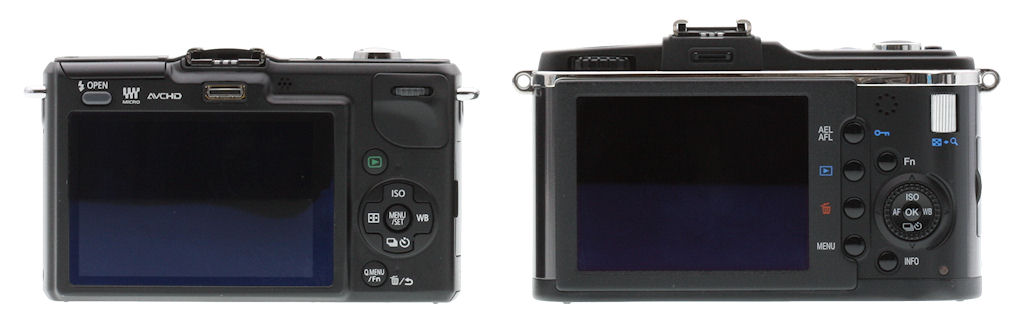
LCD panel size and aspect is identical, but compared to the E-P2, the Panasonic GF2 adds a touch panel, and doubles the total dot count -- 460K dots for the Panasonic, versus 230K for the Olympus. |
 |
|
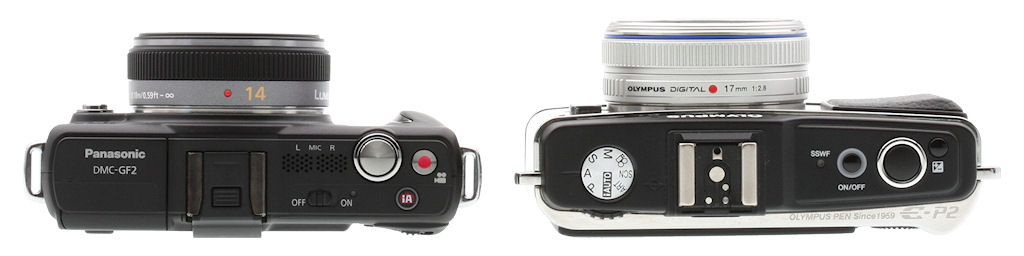
Seen from above, the size advantage of the Panasonic GF2 is clearer, although it's hardly a night and day difference. As well as the previously mentioned reduction in width and height, the Panasonic GF2 is almost a tenth of an inch slimmer. Body-only, it's also around 20% lighter than its Micro Four Thirds rival. The Olympus is shown here with the 17mm f/2.8 lens attached. |
Panasonic GF2 vs Samsung NX100
 |
|
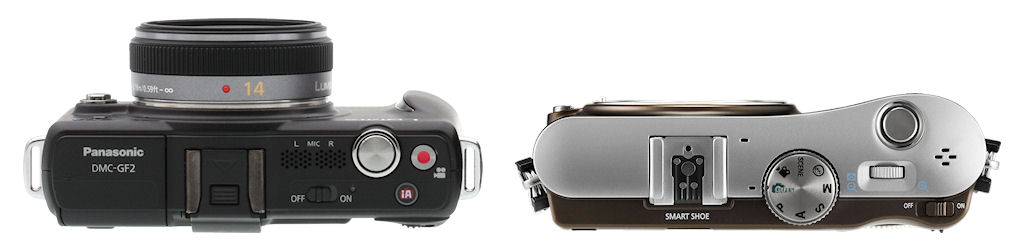
The Panasonic GF2 is a little smaller in every dimension than the Samsung NX100. The width difference is the most significant, at almost a third of an inch. The GF2 is also just barely shorter, by around a tenth of an inch. Also notable is the difference in sensor size between a Micro Four Thirds sensor camera (such as those from Panasonic and Olympus), versus an APS-C sensor camera (like the Samsung and Sony SLDs.) (Note: As we don't have the NX100 in-house yet, this comparison shows our own GF2 images alongside Samsung's NX100 press images. The NX100 has been re-scaled appropriately using manufacturer-supplied dimensions for camera width, excluding projections. This comparison is hence approximate.) |
 |
|
As seen from above, there's little to choose between the GF2 and NX100 in terms of body thickness, but the Samsung lacks an internal flash strobe. |
Panasonic GF2 vs. Nikon P7000
 |
|
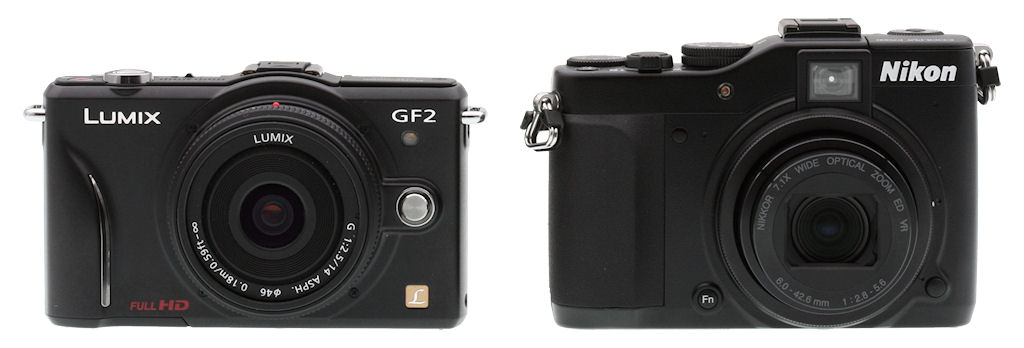
The Nikon P7000 doesn't accept interchangeable lenses, but we've included it in this comparison as being representative of an enthusiast-friendly, fixed-lens model. As you can see, there's little to choose in terms of body width, but the GF2 is nearly half an inch shorter -- largely thanks to the fact it lacks an optical viewfinder directly above the lens, as in the P7000. |
 |
|
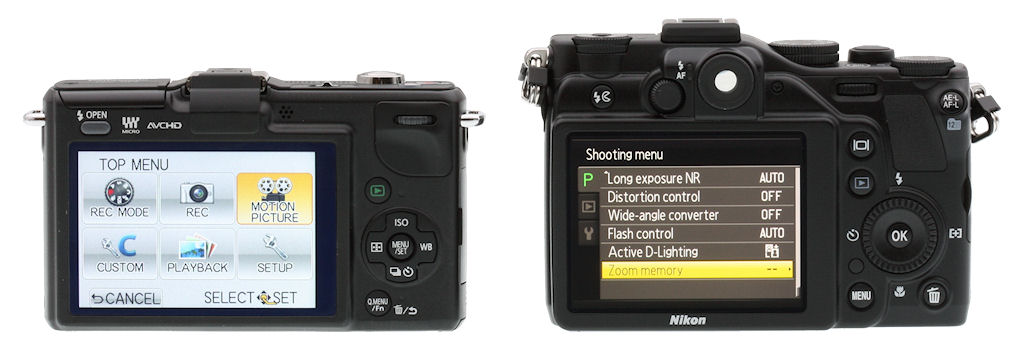
Both cameras have 3.0-inch LCD panels, but thanks to an even narrower aspect, the P7000's screen has slightly higher total area. It also provides much higher resolution, at around 921k dots. Catering to enthusiasts, the P7000 is rich in external controls, making for quick settings adjustments, but a steeper learning curve. |
 |
|
Weight and overall depth are similar with the Panasonic's 14mm lens mounted, or at least, would be if the P7000's lens was retracted in this image. Of course, that's with a fixed focal length lens on the GF2. There isn't a direct equivalent to the P7000's 7x zoom lens in the Micro Four Thirds lineup, but it falls roughly between Panasonic's 14-50mm and 14-150mm lenses in terms of 35mm-equivalent focal length range. Both of those lenses are in the region of 3.5 inches long, and 15+ ounces for the lens alone. Hence, with an equivalent lens to that of the P7000, the size and weight advantage would fall very clearly in favor of the fixed-lens camera. Of course, that would be thanks to its (relatively speaking) tiny image sensor, which also brings increased noise compared to a large-sensor camera, limits the wide-angle possibilities, and makes it harder to blur backgrounds. |
Panasonic GF2 User Interface
The prototype sample of the Panasonic GF2 that we had to play with was still pretty early in its development, so the operating screens may change by the time the final production model makes its way to store shelves. There are also some display modes from the GF1 and G2 that we expect to see in final versions, but that weren't available yet in the sample we saw. Still, the screen shots below should give a pretty good idea of the camera's basic functions and capabilities.
| Panasonic GF-2 Record Mode Screens | |
|---|---|
 |
 |
|
Basic Record-Mode display This is the default record-mode screen, when all the on-screen controls are enabled. The ghosted rectangles are soft buttons, indicating touch-panel menu options. The button with a finger icon toggles the touch-shutter option: When enabled, just touch the screen to fire the shutter. |
Optional histogram display Histogram on/off can optionally be controlled via a programmable rear-panel button, enabling quick exposure checks without covering too much of the image the rest of the time, and you can move the graph where you want on the LCD screen, simply by touching and dragging it. |
 |
 |
|
Alignment grids Several alignment grid options are available in Record mode. This shot shows the rectangular grid and diagonal lines combined. (Either can also be chosen separately.) |
Custom crosshairs As an aid to squaring up a specific subject that may not align with the standard grid, you can position a horizontal/vertical crosshairs anywhere in the frame. This shows a screen when the crosshairs are being positioned, via the arrow keys. |
 |
 |
|
No "image-only" mode One consequence of a touch-panel display is that an option for an unobstructed viewfinder image would mean losing control of the camera. The display above shows the minimum info that can be displayed in record mode. (We do suspect that final firmware may allow the lower left button to be disabled.) |
Alternate display format You can choose from two different display styles. This one has a smaller image area, but less of the subject is obscured by soft buttons and exposure info. The +/- box at lower right appears for just a few seconds after changing the exposure mode, to let you know that the thumbwheel controls exposure compensation. (Not shown here is the "Q. Menu" option, which wasn't fully functional on the prototype we received.) |
 |
 |
|
Movie-Mode record screen In movie recording mode, the basic recording display is relatively uncluttered.
|
Still vs Movie-Mode aspect ratio HD movies record at a 16:9 aspect ratio, while stills can have one of several narrower formats. A custom menu option lets you choose either the still or video aspect ratio as the default viewfinder display. |
 |
 |
|
Touch AF We're not huge fans of touch screens on cameras, but have to admit we really like Panasonic GF2's touch-autofocus implementation. Touching any part of the screen not covered by a button brings up an AF-point setting screen that looks like this. Drag your finger or use the arrow keys to move the focus box, use the control dial to adjust AF point size. |
Variable AF point size The autofocus point can be made quite small. This is the smallest size possible, allowing for very precise selection of critical subject areas. In practice, we generally found ourselves shooting with a bit larger area than this. Too small an area can make it difficult to keep the AF point on moving subjects. |
 |
 |
|
Tracking AF The Panasonic GF2 also offers a tracking AF option. In this mode, touching the LCD screen positions a tracking reticle over your subject. Once positioned, the AF point will move to follow your subject until you snap the shutter. Subjects with notable color differences work best, as with the red car here. |
Focus assist in Manual Focus mode When you're in manual focus mode, moving the focus ring on the lens or just touching the screen brings up a very magnified display, making it easy to set focus accurately. |
 |
 |
|
Exposure display This display optionally pops up whenever you make an exposure adjustment. The shutter speed and aperture indicators move separately when you're making an EV adjustment, or together when you're just doing a program shift. Nice. |
Direct button controls A number of settings can be accessed via buttons on the Panasonic GF2's rear panel. Pressing one of these buttons brings up a display like that shown above, letting you make a quick selection and quickly get back to shooting. |
 |
 |
|
Extensive LCD adjustments We all know that camera LCDs aren't to be trusted for color and tonal judgements, but we all rely on them to some extent. The Panasonic GF2 lets you adjust brightness, color saturation, and hue, on both the magenta/green and yellow/blue axes. |
White Balance fine tuning White balance settings can be tweaked over a fairly wide range of hue. (Perhaps easier to set, with the overall display color more finely adjusted?) This shot shows the auto white balance setting shifted towards the yellow/magenta corner of the adjustment range. |
|
Panasonic GF-2 Playback Mode Screens | |
|---|---|
 |
 |
|
Basic Playback-Mode display This is the basic Record-mode information display. The ghosted rectangles are soft buttons, indicating touch-panel menu options. The button with a finger icon toggles the touch-shutter option: When enabled, just touch the screen to fire the shutter. |
Image plus details Touching the DISP soft button switches from the default display at left to a screen with a small image and exposure details. |
 |
 |
|
Histogram Touching the DISP button again takes you to a screen with a small image and RGBY (brightness) histograms |
Image Only Touching the DISP button once more brings you to a screen with just the image (and unfortunately, the DISP button again) |
 |
 |
|
Playback Scrolling In playback mode, swiping your finger left or right across the display scrolls forward or back in the images on the card. |
Thumbnail views |
 |
 |
|
Zoomed playback |
Maximum zoom Maximum magnification is 16x, sufficient for determining critical focus. |
 |
 |
|
Movie playback Movie files show this default screen in playback mode. Touching the arrow in the center of the screen or hitting the up-arrow button on the multi-way controller begins playback. |
Movie playback adjustments During movie playback, the thumbwheel controls the volume. When you adjust it, this control display pops up on the LCD, giving you touch controls for pausing and resuming, fast playback forward or reverse, or stopping playback and returning to the static view shown at left. |
Panasonic Lumix DMC-GF2 Shooter's Report
by Shawn Barnett
I'm pretty enthusiastic about this new category of digital camera, so I was keen to check out Panasonic's latest entry. Panasonic made many changes to their small mirrorless model, shrinking it by only millimeters. The result is what you'd expect to see if you reduced the size of the outer body of the GF1 in a computer CAD program, then noted and removed the components that no longer fit inside the new skin without completely redesigning the other internal components. As a result, the Mode and Drive mode dials are supplanted by the stereo microphones, which had to move from under the hot shoe in order to reduce the overall height of the GF2. The power switch also moved to a better position to make room for the iA (Intelligent Auto) button.
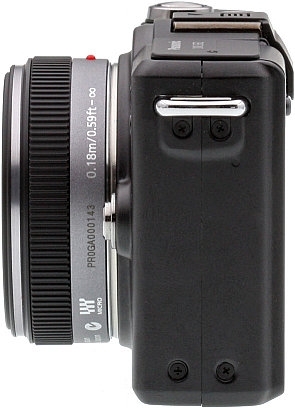
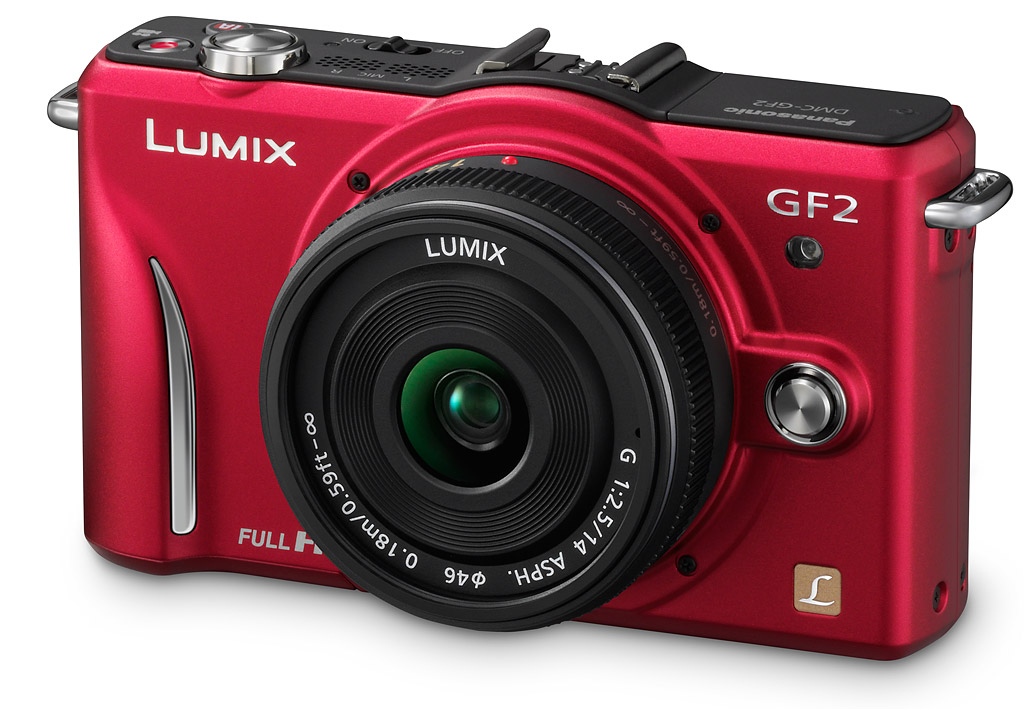 Build. Though our sample was a prototype, it seemed pretty close to final. The body is solid and hefty, with no creaks or twisting. A hard, rubber-tethered door conceals the ports on the right side, and a plastic, springloaded door covers the battery and memory card on the bottom right. The grip is more comfortable than the one on the GF1, allowing my fingers to curve around it and still get good purchase on the rear thumbgrip and find easy placement on the shutter button. I found it easy to shoot one-handed with the 14mm lens, but longer lenses will likely require two hands; naturally zooms are mechanical, so you'll need that second hand anyway. Note the red model at right, and a white model will also be available.
Pop-up Flash. The simplified pop-up flash is very similar to the design in the Olympus E-PL1, except that it doesn't stay pointed straight ahead. It always pops up into the right position, but can be moved to point slightly upward. Since this is the one point that seems a little rough on this prototype, I'll chalk that up to its early status. I'm glad they simplified it compared to the GF1, because that one, while elegant and more firm than the GF2's, was very finicky about how you moved it to press it back down.

Flash. The built in flash wasn't powerful enough, but the external FL-14 did just fine on the GF2. (Their faces are dark, but that's an easy fix.)
As for power, this tiny flash has very little, barely lighting objects just six feet away. It's also not equal to the 14mm (28mm equivalent) lens that shipped with the GF2, only lighting up the center of the frame, leaving most of the left and right dark.
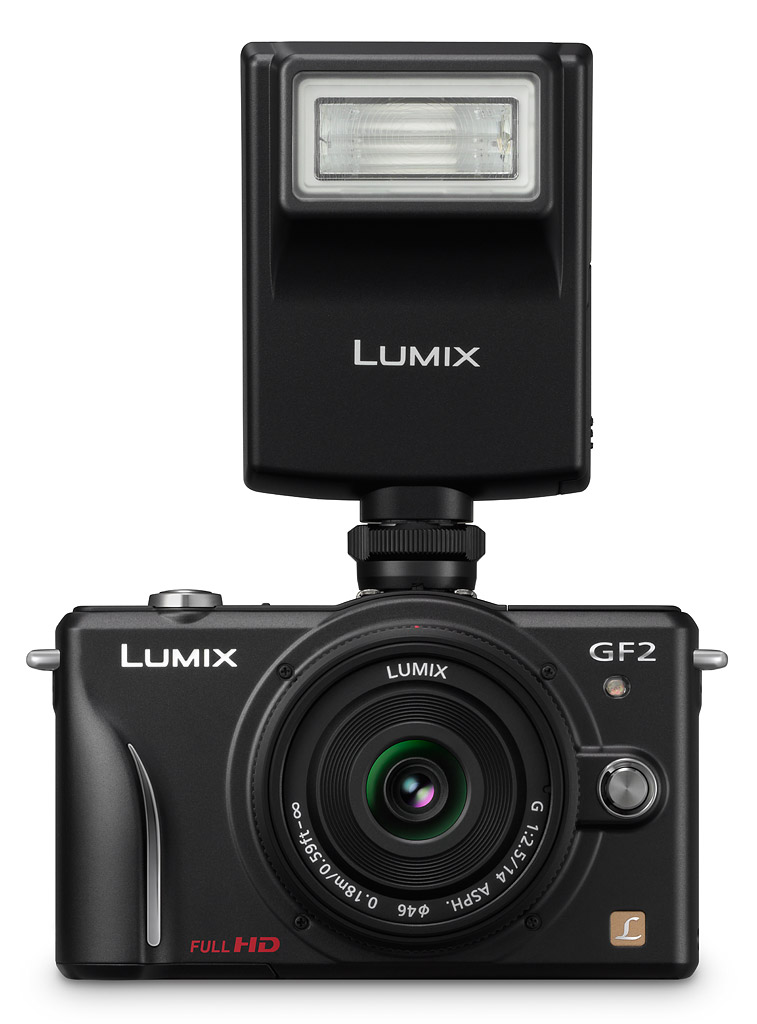
External flash. Though I used the Olympus flash that I had, this Lumix DMW-FL220 unit is also available for the GF2.
I slipped the Olympus FL-14 flash into the hot shoe to good effect. It worked just fine, overexposing a bit for my taste, but I was able to adjust it to my satisfaction. It's so close to the lens that I had a little problem with red-eye. Panasonic makes several flashes that will work with the G-series, including the smallest FL220, which should have less of a problem with red-eye, though it is larger.
LCD. The vibrant LCD is a pleasure to use, with 460,000 pixels and a fast refresh rate. We didn't have the optional EVF, called the LVF1, but that optional accessory attaches to the Lumix GF2, slipping into the hot shoe and accessory port just like it does on the GF1 and LX5. I prefer to keep the camera smaller, so I wouldn't have used this $199 accessory anyway. The higher-resolution LCD is great for framing and focusing manually, offering better discrimination than is available on Olympus PENs, and the touch interface offers a fast way to pick a focus point--and even fire the shutter--with a simple touch on the screen.

Fast enough for these two is high praise. Yes, they were standing still, but still wiggling around, and the AF system allowed me to get a few good shots despite their constant motion.
Autofocus. But before I get into using the touch screen, I should mention the main aspect that made the Panasonic GF2 such fun to use: its autofocus is very responsive. I detected very little delay from when I half-pressed the shutter button to hearing and seeing focus confirmation with the 14mm f/2.5 lens. Almost none. According to the lab, the full-autofocus shutter lag is 0.38 to 0.41 second. That includes the shutter mechanism delay, which on mirrorless cameras is fairly long, because the shutter has to first close before opening for the exposure. That's about as fast as the GF1 was with the 20mm f/1.7 lens, so it's not a noticeable net gain over its predecessor, it's just fast for the category.
Fast autofocus means not only getting closer to the moment you want, but also quicker followup shots so you can capture multiple moments without thinking about it. I took a fun sequence of my boys being silly and I didn't have to think about the camera at all, just the changing expressions and poses.
I also attached the Olympus 14-150mm f/4-5.6 lens for some of the focus tracking shots, since focusing a 28mm-equivalent lens isn't quite as challenging as focusing a longer zoom. I had trouble getting the Panasonic GF2's tracking AF point to stay on a panning subject, but got much better luck when that subject (a child on a bike) was coming straight toward me. It only lost focus lock as the subject got within 10 feet or so. Not bad. This lens is one of Olympus's better lenses, with a more advanced autofocus motor, but we will need to test the GF2 with a Panasonic lens before passing judgment on the AF system's tracking performance.
Touch. Much of the control simplification comes thanks to the addition of a touchscreen on the GF2, which we've detailed in the table above. Though it's not quite the same as the touchscreen implementation on the Panasonic G2, I find that I generally like it, despite my distaste for touchscreen digital cameras in general. There's no question that it speeds some operations, like autofocus point selection, but it's made switching modes more cumbersome.
First, picking an AF point can be as easy as touching the screen where you want the camera to focus. That's especially good if you're shooting on a tripod, but also useful handheld. One thing I always find difficult, though, is re-centering the AF point after shooting, but the GF2 has a solution for that too, if you set the Quick Menu/Function button to re-centering (there's an onscreen button for the Quick Menu, so the physical button is better assigned to another function).
The Panasonic GF2 will also focus and fire with one touch on the screen if you have the Touch-shutter feature enabled. A few translucent touch icons appear left and right of the screen for quickly activating or deactivating these features. The icons tend to clutter the screen, unfortunately, and they also limit the area you can select for autofocus. An optional histogram can be moved around the screen with a touch, but unfortunately it's not translucent, so it blocks a good percentage of the view.
Another feature I like is the ability to change the size of the autofocus point using either the rear command dial or a scroll bar on the touchscreen itself.
After training me to use the touch controls instead of the four-way navigator, the Panasonic GF2 insists I return to the navigator once I've pressed the last screen control telling it which kind of menu I want. From there it's the usual tabs and line items that you move through with the navigator. I'm okay with it, because I don't think there's anything wrong with using the four-way navigator most of the time, and thankfully, you can navigate the touch-based menu items with the four-way as well. I'm sure there are some who would wish for the ability to turn off the touchscreen altogether, but alas, that would require a mode dial.
The Quick menu is a useful tool, but now that it's designed for touch, it's not quite as compact and versatile as the old pull-down Quick menu. As such there are many items that require you to scroll left and right to see all the available options, which can be a pain. There's also no animation to the movement of the touch icons, so if you're not paying close attention you might miss that your touch has registered and you've changed the icons. Of all the features of the Panasonic GF2 prototype camera we saw, the touchscreen system seemed the least complete, so it's likely that they'll have remedied many of the concerns I had when they finally ship the camera.
Drive modes. There are now three Continuous drive modes, and two of them address a problem that all mirrorless cameras have had since their inception: You can't follow a subject once you've started shooting. That's because most mirrorless cameras only have the time to capture the image and show you the last one captured, rather than returning you to Live view. SLRs don't have this problem when you're looking through the optical viewfinder, because the mirror goes down between each shot, giving you a real-time view so you can follow your subject. The Panasonic GF2's fastest mode still behaves like other mirrorless designs, but Medium and Low speed modes return you to a live view between each shot so you can better track your subject. There's some electronic delay, I'm sure, but I found it considerably easier to track my kids on their bike in these modes than in the fastest mode, where I just had to point and pray.
Intelligent Auto seems to be designed as a quick way to go fully automatic if you find yourself in the wrong mode, and you want to just take a picture, letting the camera decide what Intelligent Scene mode to apply. Those who would leave it on all the time might be annoyed by the button's bright blue glow when activated, and oddly, you have to reactivate iAuto every time you turn the camera on.
Customization. You can do many things to make the Panasonic GF2 your own, like turning off a few of the touch icons, and adding that moveable histogram, and there are quite a few Scene modes to explore if that's your thing. But having the three Custom modes is important to me, where I can create something like a black and white, a vivid and a mode meant more for Movies than for stills. Why would I want that? Well, there's a menu item called Record area, that lets you select between the aspect ratio you've set for your movies--which would usually be 16:9--and the aspect ratio I'd usually want for stills, either 3:2 or 4:3. This little setting is fairly stubborn, in that it completely blackens the undesired area, rather than just masking it out as we've seen on other cameras. So though you can start recording a movie while shooting stills in 4:3, you won't know precisely where it'll cut off when recording starts in 16:9 ratio. The Custom modes at least allow you a way around that. (In fairness, while I found this either/or aspect ratio display annoying, it does allow the camera to make maximum use of its LCD area for each image format. It would be nice, though, if there were a custom settings option that would display the full viewfinder image for both modes, and indicate the video area with an outline or ghosting of appropriate parts of the overall display .)
Image quality. Because of our sample's early prototype status, we weren't able to post all the shots we took in the lab at full resolution (and we didn't take very many), but Panasonic did allow us to show them and the gallery shots at half linear resolution, or 1/4 size. This is quite reasonable, as there's likely to be a lot more development on the camera's image processing between the version we had and the final production models: Panasonic said that image noise at high ISO in particular will change as the camera's image processing is tweaked. The ISO 100 shots were so sharp and showed such nice detail, though, that we asked for and received permission to show them at full resolution. They really look pretty good, especially for an early prototype. One is shot with the 14mm f/2.5 lens, and the other with the Olympus 50mm f/2 Macro, an amazingly sharp lens. The good news is that the 14mm looks extremely sharp as well.
 |
 |
 |
 |
| ISO 100 with Zuiko 50mm f/2 | ISO 100 with Lumix 14mm f/2.5 |
|
Both shots are very sharp with good resolution. Color is muted. The Zuiko, which is an extremely sharp Four Thirds lens, shows excellent detail center to corner. The Lumix 14mm also shows excellent detail. The images are skewed slightly by both the difference between a 50mm and a 14mm, and the very different angle of attack and proximity we needed to frame the image the same from different distances. The 14mm is impressively sharp considering. | |
 Analysis. Overall, we had a great time with the little Panasonic GF2. It's extremely nimble and compact; still a little too large to slip into a pair of slacks without looking like you have a camera in your pocket (I did get looks), but the design has never been more sportcoat or jacket-friendly. With the 14mm mounted, I'd say it's about the same profile as the Sony NEX-5 in a pocket, just a slightly different shape. With the 14-42mm lens, shown at right, all that changes, but it's still amazing what a few millimeters can do to make a camera more portable.
Panasonic's excellent lenses, fast autofocus, and smooth focusing are what you want when shooting action or video. I'm hoping that we'll see good high-ISO performance and good color rendition when the final units ship in January 2011. Watch for pricing and actual ship date 30 days prior to shipment. All in all, a very promising little camera, and one that we look forward to revisiting when a final production sample is available.