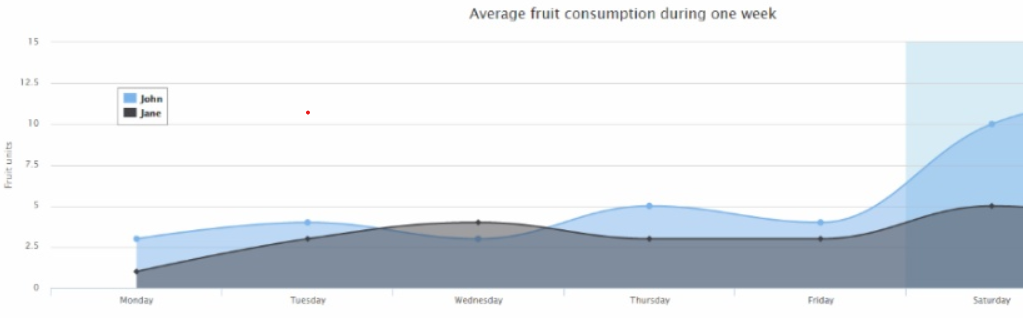
1) highcharts
주소 : https://www.highcharts.com/
사용방법 : https://coor.tistory.com/18

highcharts로 Django에서 차트 그리기 : https://dowtech.tistory.com/3
2) echarts
주소 : https://echarts.apache.org/en/index.html
사용방법 : https://ggomgom22.tistory.com/8

3) D3.js
주소 : https://d3js.org/
https://www.w3schools.com/ai/ai_d3js.asp
사용방법 : https://moo-you.tistory.com/414

참고 : 자바스크립트 시각화 라이브러리 중 일반적으로 많이 쓰이고 + 사용법이 쉬운 범주로 보면 아래 3개가 대표적이다.
- 가장 단순하고 배우기 쉬움 → Chart.js
- 다양한 차트 + 대량 데이터 처리 강점 → ECharts
- 스프레드시트나 구글 서비스와 연계 → Google Charts
--- Chart.js, ECharts, Google Charts를 동일한 데이터셋으로 시각화 비교 예제 ---
<!DOCTYPE html>
<html lang="ko">
<head>
<meta charset="UTF-8" />
<meta name="viewport" content="width=device-width, initial-scale=1" />
<title>Chart.js · ECharts · Google Charts 비교</title>
<style>
:root { --chart-h: 260px; }
* { box-sizing: border-box; }
body { font-family: ui-sans-serif, system-ui, -apple-system, Segoe UI, Roboto, Noto Sans, Apple SD Gothic Neo, 'Malgun Gothic', sans-serif; margin: 24px; }
h1 { margin: 0 0 16px; }
.grid { display: grid; grid-template-columns: repeat(auto-fit, minmax(320px, 1fr)); gap: 24px; align-items: stretch; }
.card { border: 1px solid #e5e7eb; border-radius: 16px; padding: 16px; box-shadow: 0 1px 2px rgba(0,0,0,0.04); display: flex; flex-direction: column; }
.title { font-weight: 700; margin-bottom: 6px; }
.desc { color: #6b7280; font-size: 14px; margin-bottom: 10px; }
.box { width: 100%; height: var(--chart-h); max-height: var(--chart-h); }
#gc-line { display: block; width: 100%; height: var(--chart-h); }
footer { margin-top: 24px; color: #6b7280; font-size: 13px; }
code { background: #f3f4f6; padding: 2px 6px; border-radius: 6px; }
</style>
</head>
<body>
<h1>Chart.js · ECharts · Google Charts — 동일 데이터셋 비교</h1>
<p>동일한 월별 매출 데이터(<code>months</code>, <code>sales</code>)를 세 라이브러리로 같은 형태(라인 차트)로 그려 비교합니다.</p>
<div class="grid">
<section class="card">
<div class="title">Chart.js</div>
<div class="desc">가벼운 API, 캔버스 기반, 빠른 시작</div>
<canvas id="cj-line" class="box"></canvas>
</section>
<section class="card">
<div class="title">ECharts</div>
<div class="desc">강력한 옵션 체계, 상호작용·대용량 데이터에 강함</div>
<div id="ec-line" class="box"></div>
</section>
<section class="card">
<div class="title">Google Charts</div>
<div class="desc">문서·예제 풍부, 데이터테이블 중심</div>
<div id="gc-line" class="box" style="width:100%;height:260px"></div>
</section>
</div>
<footer>
동일 데이터셋: <code>months = ['1월','2월','3월','4월','5월','6월']</code>, <code>sales = [120, 150, 90, 180, 200, 170]</code>
</footer>
<script>
const months = ['1월','2월','3월','4월','5월','6월'];
const sales = [120, 150, 90, 180, 200, 170];
function debounce(fn, ms){ let t; return (...args)=>{ clearTimeout(t); t=setTimeout(()=>fn.apply(this,args), ms); }; }
</script>
<!-- Chart.js -->
<script src="https://cdn.jsdelivr.net/npm/chart.js@4.4.3/dist/chart.umd.min.js"></script>
<script>
(function renderChartJS(){
const ctx = document.getElementById('cj-line');
new Chart(ctx, {
type: 'line',
data: { labels: months, datasets: [{ label: '매출(만원)', data: sales, tension: 0.3, fill: false, pointRadius: 3 }] },
options: { responsive: true, maintainAspectRatio: false, plugins: { legend: { display: true }, tooltip: { enabled: true } }, scales: { y: { beginAtZero: true, title: { display: true, text: '만원' } } } }
});
})();
</script>
<!-- ECharts -->
<script src="https://cdn.jsdelivr.net/npm/echarts@5.5.1/dist/echarts.min.js"></script>
<script>
(function renderECharts(){
const el = document.getElementById('ec-line');
const chart = echarts.init(el);
const option = { tooltip: { trigger: 'axis' }, grid: { left: 40, right: 20, top: 24, bottom: 30 }, xAxis: { type: 'category', data: months }, yAxis: { type: 'value', name: '만원', min: 0 }, series: [{ name: '매출(만원)', type: 'line', smooth: true, symbolSize: 6, data: sales }] };
chart.setOption(option);
window.addEventListener('resize', debounce(() => chart.resize(), 150));
})();
</script>
<!-- Google Charts -->
<script src="https://www.gstatic.com/charts/loader.js"></script>
<script>
google.charts.load('current', { packages: ['corechart'] });
google.charts.setxxxxOnLoadCallback(initGoogle);
function initGoogle(){
const el = document.getElementById('gc-line');
const data = new google.visualization.DataTable();
data.addColumn('string', '월');
data.addColumn('number', '매출(만원)');
months.forEach((m, i) => data.addRow([m, sales[i]]));
const options = { legend: { position: 'top' }, chartArea: { left: 56, right: 16, top: 24, bottom: 30, width: '100%', height: '75%' }, vAxis: { title: '만원', viewWindow: { min: 0 } }, pointSize: 4, lineWidth: 2 };
const chart = new google.visualization.LineChart(el);
const draw = () => chart.draw(data, options);
// 즉시 1회 그리기 + 안정화 후 추가 호출
draw();
requestAnimationFrame(draw);
setTimeout(draw, 200);
window.addEventListener('resize', debounce(draw, 150));
document.addEventListener('visibilitychange', () => { if (!document.hidden) draw(); });
}
</script>
</body>
</html>
차트 실습용 소스 파일 https://raw.githubusercontent.com/vega/vega-datasets/master/data/seattle-weather.csv
참고 : 데이터 시각화 툴 TOP 10 사용 후기 모음
https://www.finereport.com/kr/10-data-visualization-tools-open-sourse-that-you-cannot-miss-in-2020/
A JavaScript event calendar. Customizable and open source.
화면 디자인(HTML, CSS, JS 템플릿을 위한 프레임워크)
웹 접근성 연구소
-- spring project에서 참고용 --------------------------------------------------------------------------------