 |
안녕하세요. ^^
렉사르 서버 마법사 물맛이좋아요입니다.
새로 추가한 매크로를 포함해 그동안 만들었던 매크로들을 정리해 보았습니다.
제가 주로 마법사/사제를 플레이 하기 때문에
마법사/사제용 매크로를 정리해 보았습니다.
■ 매크로 (Macro)
기본적인 매크로 사용법을 모르시는 분들을 위한 글입니다.
그림을 보시면서 하나씩 따라해 보시면 쉽게
매크로를 사용하실 수 있습니다.
매크로의 세계로 오세요. ^^;
☞ '사냥을 더욱 편리하게! 매크로 사용법!' 기사 바로가기 [클릭!!]
■ 슈퍼 매크로 (SuperMacro) : LUA를 사용하는 매크로의 경우 필수 애드온
☞ '애드온 설치! 한방에 해결하자!' 기사 바로가기 [클릭!!]
SuperMacro는 매크로의 255 byte 제한을 풀어주는 아주 고마운 애드온입니다.
채팅창에 '/매크로' 라고 치면 매크로 창이 뜹니다.
SuperMacro를 설치했다면 매크로 입력하는 부분이 두 곳입니다.
☞ 'SuperMacro 3.12' 다운로드 [클릭!!]
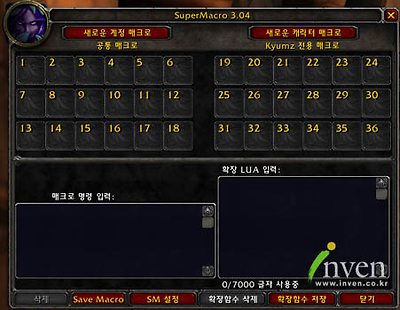
* 왼쪽에 '매크로 명령 입력', 오른쪽에 '확장 LUA 입력'이 보이시나요?
위쪽에 보면 '새로운 계정 매크로', '새로운 캐릭터 매크로'라고 보이죠?
계정 매크로는 계정에 전체 캐릭터가 공유하는 매크로이며
캐릭터 매크로는 현재 접속한 캐릭터에게만 적용되는 매크로입니다.
둘 중에서 원하는 것을 하나 골라서 선택해 보세요.
그러면 오른쪽에 새 창이 뜰 겁니다.
먼저 매크로의 이름을 정한 뒤 아이콘을 선택합니다.
이름이나 아이콘은 아무 것을 선택해도 크게 상관없으니
적절하게 골라서 넣어 주세요.
그럼 왼쪽에 새로운 매크로 아이콘이 생겼을 것입니다.
이제 매크로 명령어들을 조합해 만들어 사용하시면 됩니다.
한 번 테스트 해볼까요?
매크로 명령 입력(왼쪽) :
/script msg();
확장 LUA 입력(오른쪽) :
function msg()
SendChatMessage("SuperMacro 잘 돌아 갑니다.")
end;
|
입력 부분에 위처럼 작성하고
매크로 아이콘을 단축창으로 옮겨 놓으신 뒤
한번 사용해 보세요.
메세지가 정상적으로 출력된다면 성공한 것입니다.
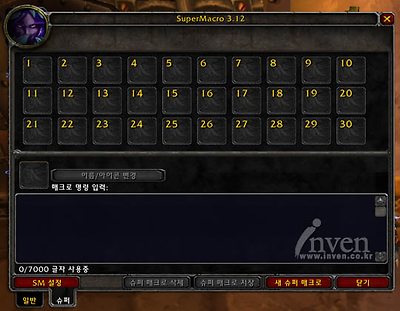
그리고 SuperMacro 3.12 버전에 새로운 기능이 추가 되었습니다.
'/매크로'를 입력하시면 나오는 SuperMacro 창 좌측 하단에 일반/슈퍼 라는 탭이 생겼는데
그 중 슈퍼 탭을 선택하면 기존처럼 '매크로 입력' / '확장 LUA 입력'을 나눌 필요 없이
한번에 7000자 까지 쓸 수 있는 새로운 매크로를 사용하실 수 있습니다.
추가된 '신비한 폭발'(자동 얼음방패) 매크로는 이 새로운 슈퍼 매크로를 사용했습니다. ^^
한글화 해주신 damjau님 감사합니다.
■ 마법사 매크로
▶ 라면 법사 : SuperMacro 필요없음
1. 타겟이 없을 때 아무일 없음
2. 타겟이 적대적일 때 '얼음 화살'로 공격
3. 타겟이 아군이고 타겟의 타겟이 적대적 일 때 타겟의 타겟에게 '얼음 화살'로 공격
4. 타겟이 아군일 때 공격 후에도 타겟 유지
* 탱커 선택 후 매크로 버튼만 계속 누르면 탱커가 때리고 있는 몬스터를 일점사하며
탱커가 대상을 다른 몬스터로 바꾸면 따라서 변경하고 계속 일점사하게 됨
매크로 명령 입력 :
/script local t="target";if(UnitExists(t))then e=not UnitCanAttack("player",t);f=UnitCanAttack(t,"targettarget");if e and f then AssistUnit(t);end;CastSpellByName("얼음 화살");if e and f then TargetLastTarget();end;end;
|
▶ 라면 법사 Plus : SuperMacro 필요함
1. 라면 법사 '얼음 화살' 매크로 기능과 동일
2. Alt 키를 누른 상태에서 매크로를 실행하면 '잔달라 + 단명 + 냉정 + 아케인'
매크로 명령 입력 :
/script if(UnitExists("target"))then t="target"e=not UnitCanAttack("player",t)f=UnitCanAttack(t,"targettarget")if e and f then AssistUnit(t)end;IceArr3()if e and f then TargetLastTarget();end;end;
확장 LUA 입력 :
function IceArr3()
k=IsAltKeyDown();if(k)then UseInventoryItem(GetInventorySlotInfo("Trinket0Slot"))SpellStopCasting();UseInventoryItem(GetInventorySlotInfo("Trinket1Slot"))SpellStopCasting();CastSpellByName("냉정")SpellStopCasting();CastSpellByName("신비한 마법 강화")SpellStopCasting();end;CastSpellByName("얼음 화살)end;
|
▶ 물맛표 양변 매크로 : SuperMacro 필요함
0. 매크로의 이름을 변이로 만드셔야 합니다.
1. '변이'를 시전 하면서 대상의 레벨과 이름을 표시해 줍니다.
2. 대상이 '변이'를 시전할 수 없는 대상이라면(예: 언데드, 아군 등) 메세지를 출력하지 않습니다.
3. 대상과의 거리를 체크하여 양변을 할 수 없는 거리라면 양변 메세지를 출력하지 않습니다.
4. Alt 키를 누른 상태로 매크로를 시전하면' 냉정 + 변이'를 시전 합니다.
매크로 명령 입력 :
/script local a,b,c,d;a="target"b=UnitCreatureType(a)d=GetActionID("변이")c=IsActionInRange(d)if UnitCanAttack("player",a)and c==1 and (b=="야수"or b=="인간형"or b=="동물")then UsePomByAlt()PolymorphMsg()end;CastSpellByName("변이")
확장 LUA 입력 :
function UsePomByAlt()
k=IsAltKeyDown()if(k)then CastSpellByName("냉정")SpellStopCasting()SpellStopCasting()end;end;
function PolymorphMsg()
d=UnitLevel("target")SendChatMessage("[Lv "..d.."] <%t>을(를) 앙변 합니다!")end;
function GetActionID(SpellName)
local ActionID=nil,k;for i=1,72 do k=GetSpellText(i);if(k==SpellName)then ActionID=i;break;end;end;return ActionID;end;
function GetSpellText(slot)
GameTooltip:SetAction(slot);
return GameTooltipTextLeft1:GetText();end;
|
▶ 얼음 방패 매크로 : SuperMacro 필요함
0. 매크로의 이름을 얼음 방패로 만드셔야 합니다.
1. '얼음 방패' 사용 가능시 '얼음 방패' 사용
2. '얼음 방패' 사용 불가시 '매서운 한파' 사용
3. '얼음 방패' 연타시에도 '얼음 방패'가 풀리지 않음
매크로 명령 입력 :
/script if(CheckCoolTimeByName("얼음 방패")==0)then SpellStopCasting()CastSpellByName("얼음 방패")else CastSpellByName("매서운 한파")end;
확장 LUA 입력 :
function CheckCoolTimeByName(SName)
local ctBlock; _,ctBlock,_=GetActionCooldown(GetActionID(SName)) return ctBlock;end;
function GetActionID(SpellName)
local ActionID=nil,k;for i=1,72 do k=GetSpellText(i);if(k==SpellName)then ActionID=i;break;end;end;return ActionID;end;
function GetSpellText(slot)
GameTooltip:SetAction(slot);
return GameTooltipTextLeft1:GetText();end;
|
▶ 낙스라마스의 눈 처리 매크로 (신버전) : SuperMacro 필요함
1. 낙스라마스의 눈에게 '화염 작열'이 시전 가능한 거리라면 '화염 작열' 사용
2. '화염 작열'을 시전 가능한 거리보다 멀지만 '얼음 화살'은 사용할 수 있는 거리일 때
'냉정 + 얼음 화살' 사용
3. 낙스라마스의 눈이 죽었다면 처리 메세지 출력
4. 처리 불가능한 거리일 때는 아무일 없음
5. 처리했는지 여부를 낙스라마스의 시체가 있는지 확인하는 방식이기 때문에
다른 사람이 처리했더라도 메세지는 뜹니다.
매크로 명령 입력 :
/대상 낙스라마스의 눈
/script if UnitCanAttack("player","target")and(UnitName("target")=="낙스라마스의 눈") then AttackNa()end;EliminateMsg();
확장 LUA 입력 :
function AttackNa()
if(IsActionInRange(GetActionID("화염 작열"))==1) then CastSpellByName("화염 작열") elseif(IsActionInRange(GetActionID("얼음 화살"))==1)then CastSpellByName("냉정")SpellStopCasting()CastSpellByName("얼음 화살")end;end;
function EliminateMsg()
if UnitHealth("target")==0 then SendChatMessage("낙스라마스의 눈이 죽었습니다.")end;end;
function GetActionID(SpellName)
local ActionID=nil,k;for i=1,72 do k=GetSpellText(i);if(k==SpellName)then ActionID=i;break;end;end;return ActionID;end;
function GetSpellText(slot)
GameTooltip:SetAction(slot);
return GameTooltipTextLeft1:GetText();end;
|
▶ 신비한 폭발(자동 얼음방패) 매크로 - SuperMacro 3.12 이상 필요함
SuperMacro 새 버전이 나왔길래 그 기념으로 만들어 봤습니다.
SuperMacro 3.12 버전 이상을 설치하시고 '/매크로' 라고 치시면
매크로 창 왼쪽 아래에 일반 / 수퍼 라고 새로 생긴 탭이 있답니다.
거기서 수퍼 탭을 누르시고 매크로를 만들면 됩니다.
따로 일반 매크로입력/확장 매크로 입력을 구분하지 않고
한방에! 7000자까지 매크로가 사용가능하군요! 와우!!
1. '신비한 폭발' 사용
2. 피가 1000이하로 감소하였을 경우 '얼음 방패' 사용
3. 피가 1000이하이고 얼음 방패가 쿨타임 중일 때 '매서운 한파' 사용
4. 얼음 방패도 매서운 한파도 쿨 타임 중일 때 그냥 죽을 때까지 '신비한 폭발' 사용 -ㅅ-;
5. Alt 키를 누른 상태에서 사용하면 '얼음 방패' / '매서운 한파'를 사용하지 않고
계속 '신비한 폭발' 사용
* 매크로 첫 번째 줄 중간에 보시면
if(UnitHealth("player")<1000)then hp=1 end; 라는 부분이 있습니다.
여기서 1000을 다른 숫자로 고쳐 주시면 얼음방패 사용 Hp를 조절하실 수 있습니다.
* 이 매크로의 치명적인 결함은 매크로의 아이콘이 '신비한폭발'이 아니라
'얼음방패'의 아이콘이랍니다. -ㅅ-;;
/script local hp,AltKeyUp;hp=0;AltKeyUP=not IsAltKeyDown();if(UnitHealth("player")<1000)then hp=1 end;if(AltKeyUP and hp ==1 and CheckCoolTimeByName("얼음 방패")==0)then SpellStopCasting()CastSpellByName("얼음 방패")elseif(AltKeyUP and hp==1 and CheckCoolTimeByName("매서운 한파")==0)then CastSpellByName("매서운 한파")else CastSpellByName("신비한 폭발")end;function CheckCoolTimeByName(SName)local ctBlock; _,ctBlock,_=GetActionCooldown(GetActionID(SName)) return ctBlock;end;function GetActionID(SpellName)local ActionID=nil,k;for i=1,72 do k=GetSpellText(i);if(k==SpellName)then ActionID=i;break;end;end;return ActionID;end;function GetSpellText(slot) GameTooltip:SetAction(slot);return GameTooltipTextLeft1:GetText();end;
|
■ 사제 매크로
▶ 부활 매크로 : SuperMacro 필요없음
1. 타겟을 클릭 한 후 매크로를 시전하면 부활 메시지를 출력합니다.
2. 타겟이 없는 경우 메세지를 출력하지 않습니다.(단, 부할 스킬은 시전합니다.)
매크로 명령 입력 :
/script a="target";if(not UnitExists(a))then CastSpellByName("부활")else b=UnitIsFriend("player", a)CastSpellByName("부활")if UnitHealth(a)==0 then SendChatMessage("<%t>님에게 부활을 시전합니다.")end;end;
|
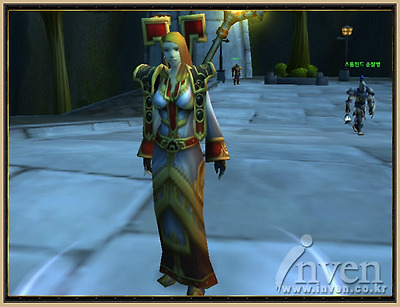
▶ 라면 힐러 : SuperMacro 필요없음
1. 타겟이 없는 경우 자신에게 힐을 시전합니다.
2. 타겟이 아군인 경우 타겟에게 힐을 시전합니다.
3. 타겟이 몬스터 혹은 적군인 경우
- 타겟이 바라보고 있는 대상에게 힐을 시전합니다. 그리고 그 대상을 유지합니다.
* 몬스터를 클릭한 상태에서 그 몬스터에게 계속 힐을 넣으면
몬스터가 공격하는 대상에게 힐이 들어갑니다.
그리고 몬스터가 다른 대상을 공격한다면 힐하는 대상 역시 바뀝니다. 보스전에 좋겠지요.
매크로 명령 입력 :
/script if(not UnitExists("target"))then TargetUnit("player");end;t="target";e=not UnitCanAssist("player",t);if(e)then AssistUnit(t);end;CastSpellByName("순간 치유");if(e) then TargetLastTarget();end;
|
* 사제의 '순간 치유'를 기본으로 만들었습니다.
다른 스킬의 경우 CastSpellByName("순간 치유") 부분을
다른 스킬로 바꿔 넣으시면 됩니다.
레벨을 정하고 싶으시다면
CastSpellByName("순간 치유(3 레벨)") 과 같은 식으로 바꿔 주시면 됩니다.
▶ 라면 힐러 Plus : SuperMacro 필요함
1. 대상이 없을 때 - 자신에게 치유 스킬 사용
2. 대상이 아군일 때 - 아군에게 치유 스킬 사용
3. 대상이 적군일 때 - 대상이 공격하고 있는 아군에게 치유 스킬 사용
(그리고 적군을 타겟으로 유지)
4. 대상이 적군일 때 그리고 그 대상이 공격하는 대상이 플레이어일 때 - '소실' 사용
5. 힐을 하는 대상의 잃은 체력에 따라서 다른 레벨의 치유 스킬 사용
6. 잃은 체력이 1000 이상일 때 최고 레벨 '순간 치유',
잃은 체력이 1000 미만 400 이상 일 때 5레벨 '순간 치유',
400 미만일 때 2레벨 '순간 치유' 사용
매크로 명령 입력 :
/script l=7;if(not UnitExists("target"))then TargetUnit("player")end;HEAL2(l);
확장 LUA 입력 :
function HEAL2(l)
t="target"f=not UnitCanAssist("player",t)if(f)then AssistUnit(t)end;if(f and UnitName("player")==UnitName(t))then CastSpellByName("소실")else local dhp=UnitHealthMax(t) - UnitHealth(t);if(dhp < 400) then l=2 elseif(dhp < 1000)then l=5 end;CastSpellByName("순간 치유("..l.." 레벨")end;if(f)then TargetLastTarget()end;end;
|
▶ 라면 힐러 Plus(소실 기능 제거 버전) : SuperMacro 필요함
매크로 명령 입력 :
/script l=7;if(not UnitExists("target"))then TargetUnit("player")end;HEAL2(l);
확장 LUA 입력 :
function HEAL2(l)
t="target"f=not UnitCanAssist("player",t)if(f)then AssistUnit(t)end;
local dhp=UnitHealthMax(t)-UnitHealth(t);if(dhp<400)then l=2 elseif(dhp<1000)then l=5 end;CastSpellByName("순간 치유("..l.." 레벨")if(f)then TargetLastTarget()end;end;
|
▶ 언데드 속박 매크로 : SuperMacro 필요함
0. 매크로의 이름을 언데드 속박으로 만드셔야 합니다.
1. '언데드 속박'을 시전하면서 대상의 레벨과 이름을 표시해 줍니다.
2. 대상이 '언데드 속박'을 시전할 수 없는 대상이라면(예: 인간형) 메세지를 출력하지 않습니다.
3. 대상과의 거리를 체크하여 속박할 수 없는 거리라면 메세지를 출력하지 않습니다.
매크로 명령 입력 :
/script local a,b,c,d;a="target"b=UnitCreatureType(a)d=GetActionID("언데드 속박")c=IsActionInRange(d)if UnitCanAttack("player",a)and c==1 and (b=="언데드")then ShackleUndeadMsg()end;CastSpellByName("언데드 속박")
확장 LUA 입력 :
function ShackleUndeadMsg()
d=UnitLevel("target")SendChatMessage("[Lv "..d.."] <%t>을(를) 속박합니다.")end;
function GetActionID(SpellName)
local ActionID=nil,k;for i=1,72 do k=GetSpellText(i);if(k==SpellName)then ActionID=i;break;end;end;return ActionID;end;
function GetSpellText(slot)
GameTooltip:SetAction(slot);
return GameTooltipTextLeft1:GetText();end;
|
▶ 소생 / 어둠의 권능:고통 + 흡혈을 버튼 하나로 : SuperMacro 필요함
1. 대상이 없을 때 - 자신에게 '소생' 사용
2. 대상이 아군일 때 - 대상에게 '소생' 사용
3. 왼쪽 Alt키를 누른 상태이며 대상이 아군일 때
- 아군이 공격하는 대상에게 '어둠의 권능: 고통' 사용,
만약 상대가 고통에 걸려 있는 경우 '흡혈' 사용 그리고 타겟 유지
4. 대상이 적군일 때
- 대상에게 '어둠의 권능: 고통' 사용, 만약 상대가 고통에 걸려 있는 경우 '흡혈' 사용
5. 왼쪽 Alt키를 누른상태에서 대상이 적군일 때
- 적군이 공격하는 대상에게 '소생' 사용 그리고 타겟 유지
매크로 명령 입력 :
/script t="target"p="player";if(not UnitExists(t))then TargetUnit(p)Renew()else e=UnitCanAttack(p,t)a=IsAltKeyDown();if(e) then if(a)then Renew() else PainUnsum()end;else if(a)then PainUnsum()else Renew()end;end;end;
확장 LUA 입력 :
function Renew()
local t="target"local e=not UnitCanAssist("player",t)if(e)then AssistUnit(t)end;CastSpellByName("소생")if(e)then TargetLastTarget()end;end;
function PainUnsum()
local t="target"local e=not UnitCanAttack("player",t)local f=UnitCanAttack(t,"targettarget");if(e)and(f)then AssistUnit(t)end;Unsum()if(e)and(f)then TargetLastTarget();end;end;
function Unsum()
local k=0;local a="InterfaceIconsSpell_Shadow_ShadowWordPain";for i=1,16 do if(a==UnitDebuff("target", i)) then k=1;end; end; if(k~=1) then CastSpellByName("어둠의 권능: 고통") else CastSpellByName("흡혈의 선물");end;end;
|
■ 기타 매크로
▶ 풀링 매크로 : SuperMacro 필요함
1. 총/활/투척/석궁/마법봉 등으로 사용 가능(무기마다 다른 매크로를 만들 필요 없음)
2. 풀링 가능한 거리면 메세지를 출력하고 사격합니다.
3. 풀링 불가능한 거리라면 메세지를 출력하지 않습니다.
4. 몬스터의 레벨이 표시는 서비스
* 메세지가 출력 되지 않는 다면 해당 무기의 사용스킬(마법봉 이라면 "마법봉 발사" 스킬)을
스킬창 아무 곳에나 넣어두면(보이지 않는 곳도 상관 없음) 메세지가 출력될 것입니다.
매크로 명령 입력 :
/script local Spell=GetRangedWeaponSpellByType();if(Spell ~=nil)then CastSpellByName(Spell)SendPullMSG(Spell)else SendChatMessage("장거리 무기가 없습니다.")end
확장 LUA 입력 :
function GetRangedWeaponSpellByType()
local rwCode, rwType, rwSpell;_,_,rwCode=strfind(GetInventoryItemLink("player",18),"(%d+):") if(rwCode ~= nil)then _, _, _, _, _, rwType = GetItemInfo(rwCode)else rwSpell = nil;end;if rwType then if rwType == "총기류" then rwSpell = "총 발사";elseif rwType == "활류" then rwSpell = "활 발사";elseif rwType == "석궁류" then rwSpell = "석궁 발사";elseif rwType == "투척 무기류" then rwSpell = "투척"; elseif rwType == "마법봉류" then rwSpell = "마법봉 발사";end;return rwSpell;end; end;
function SendPullMSG(Spell)
c=IsActionInRange(GetActionID(Spell));
if UnitCanAttack("player","target") and UnitHealth("target")>0 and c==1 then d=UnitLevel("target")SendChatMessage("[Lv "..d.."] <%t>을(를) 풀링합니다.")end;end
function GetActionID(SpellName)
local ActionID=nil,k;for i=1,72 do k=GetSpellText(i);if(k==SpellName)then ActionID=i;break;end;end;return ActionID;
end;
function GetSpellText(slot)
GameTooltip:SetAction(slot);
return GameTooltipTextLeft1:GetText();end;
|
전부 테스트에 통과한 녀석들이니 마음껏 사용해 보세요.
혹시 궁금한 내용이나 필요한 내용이 있으시다면 덧글 달아 주세요. ^^
* 자신에게 필요한 매크로만 복사해서 사용 가능합니다.
물맛이좋아요
|
 | |