Hi everyone! You all probably know by now that MMM is coming back on the 22nd. They have some stiff competition and I think it would be great if the imoomoos could stream their new songs to help them on the charts! Melon is the biggest Music app in Korea and matters a lot for how well the group does when they comeback. But! Its only available in the Korean app store.
I've provided steps for how to get Melon and stream music. As an FYI, this only works for iphone. I personally don't have an Android so I'm not sure how it works for Android.
This will be very long. Please be patient! Lets help Mamamoo reach #1!
DOWNLOADING MELON:
1. Launch iTunes and sign out of your Apple iTunes account. (Store -> sign out)
2. Scroll down and click "change country."
3. Select South Korea
4. Search for "Melon" and click download
5. iTunes will ask you to sign in with your Apple ID. Click the "create new account" button and accept the terms and conditions.
6. Use another email account for this new account. You can add your credit card, but make sure you use a korean address for your billing (they dont check).
7. You'll get an email for verification.
8. Click the link in the email, and you can download Melon from the Korean app store.
CREATING A MELON ACCOUNT:
1. Open the Melon app. Click the menu button on the top right corner.
2. Click "로그인해주세요" on the top right corner. It will bring you to the log in page.
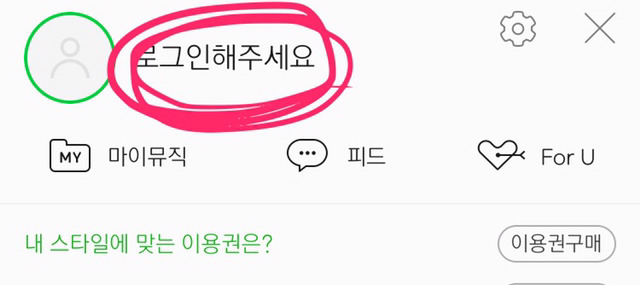
3. Click "회원가입" on the bottom. It will bring you to the registration page.
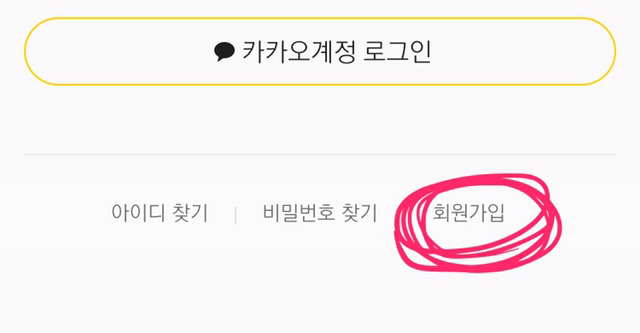
4. On the top, click "이메일 인증 가입".
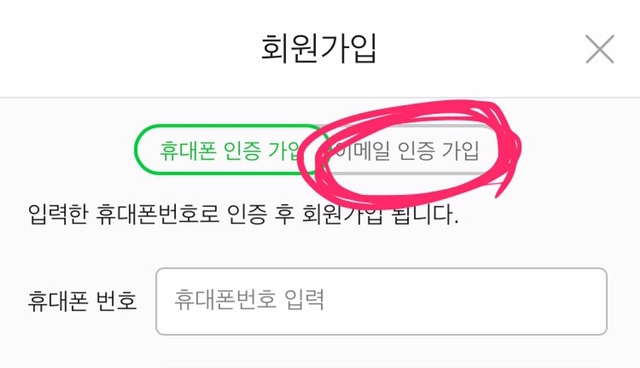
5. Put your email address in the top bar and put your name on the bottom bar. Then click the box next to "전체동의". Click the green button on the bottom ("다음 단계").
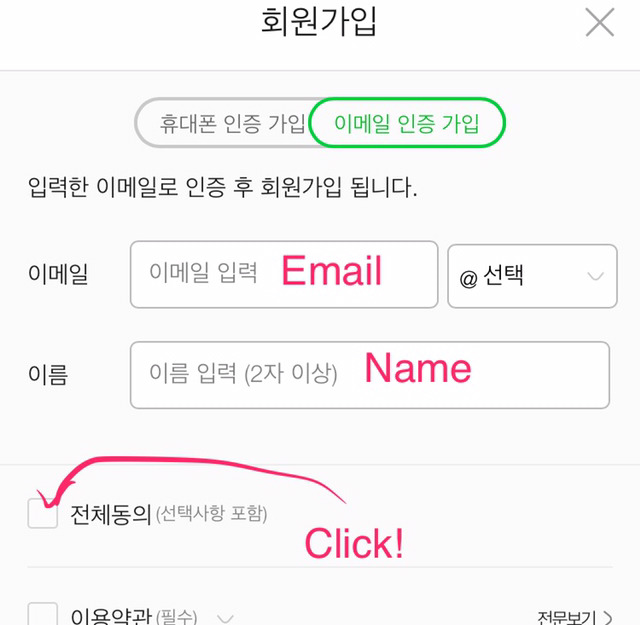
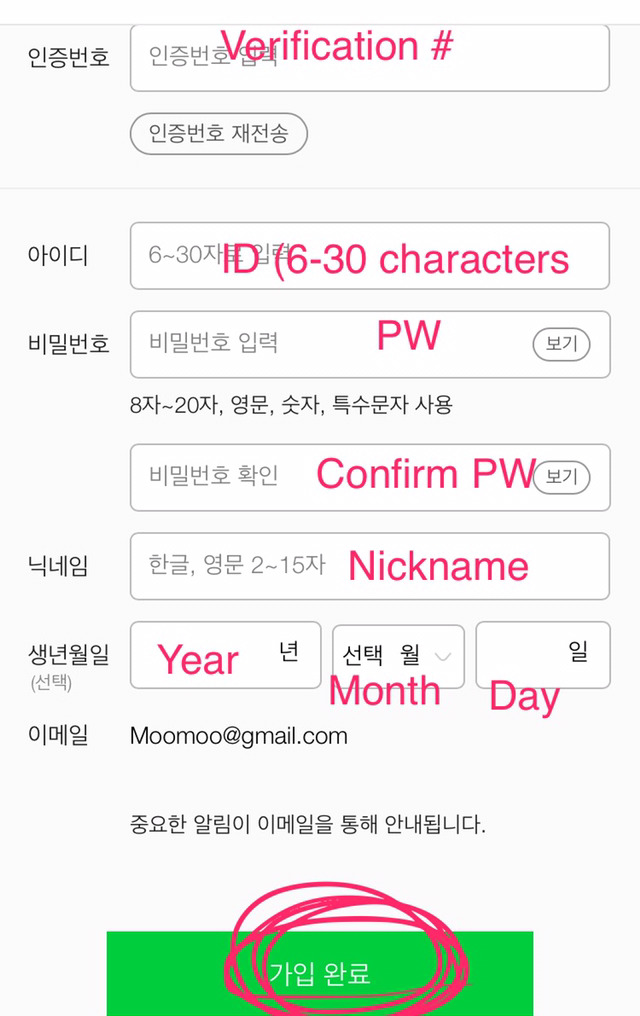
6. Melon will send you an email with a verification number. Put that number into the top box ("인증번호").
7. Then put in: your id (아이디), password (비밀번호)(it has to be 8-20 characters in English with numbers and special characters), confirm your password ("비밀번호 확인"), a nickname (닉네임), your birthday ("생년월일") (YYYY/MM/DD).
8. Click the green button ("가입완료") and you should now have an account with Melon.
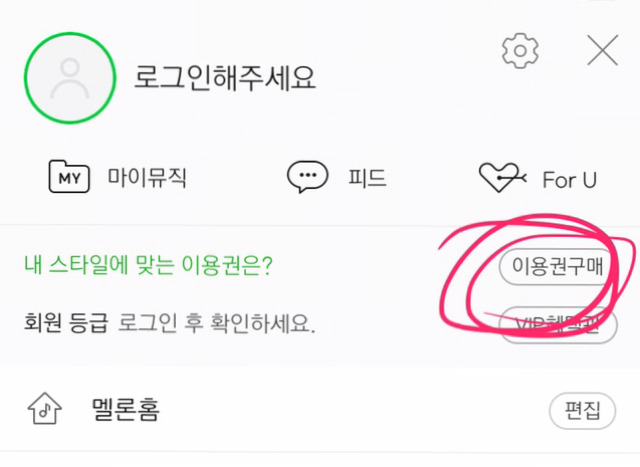
9. To listen to music on Melon, you need to buy a subscription. To do this, click the menu button again on the homepage.
10. Click "이용권구매". (please see bottom for payment info!!!). Melon gives you options: i-스마트 프리 lets you stream (the most basic); i-MP3 30 플러스 lets you stream and download up to 30 songs (50 allows 50 songs and 100 allows 100 songs). All are good for one month. Choose one of the options and you can now stream on Melon! Hallelujah~
STREAMING ON MELON:
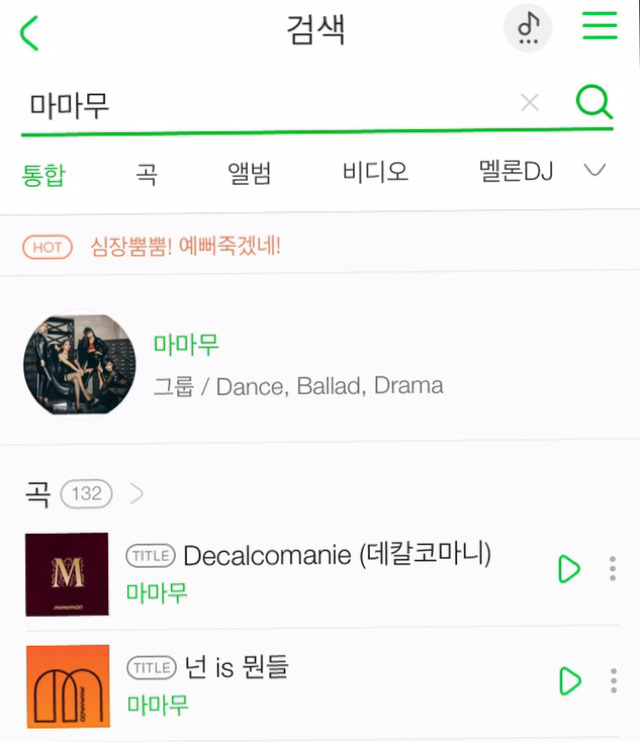
1. In the search bar, type in 마마무. Their songs will come out in a list.
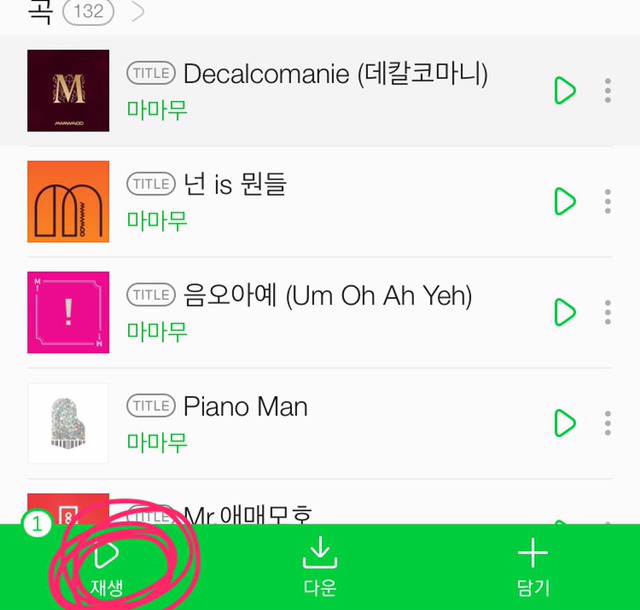
2. Click on a song and a green menu bar will come up on the bottom. 재생 lets you play the song right away. 다운 lets you download (if you bought the package), and "담기" allows you to add the song to a list.
3. Please click the first option. The song will begin playing. Select a number of songs just like that. (*NOTE* if you keep playing the song over and over, it doesnt count! You have to have different songs playing in a row).
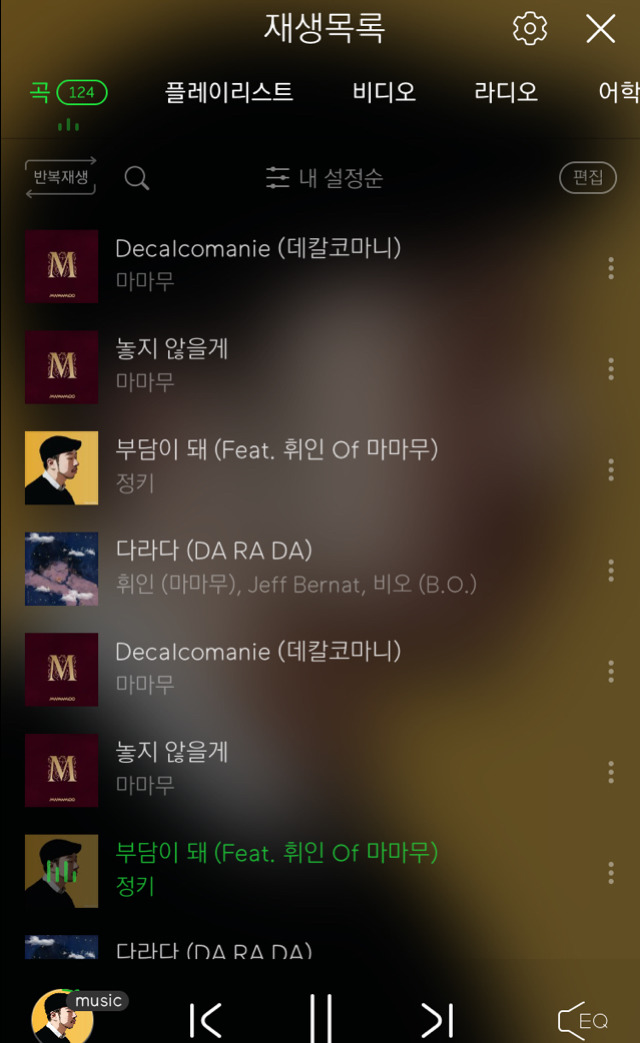
4. Once you've clicked a number of songs, you'll have a playlist made. DON'T PUT THE LIST ON REPEAT ("반복재생")! Melon does not count your stream if you put your list on repeat! So please just repeat the steps above for streaming and you'll create a long streaming list (over an hour of music; lost for the purple album is provided at the bottom!). Your Melon list should look something like the picture below now.
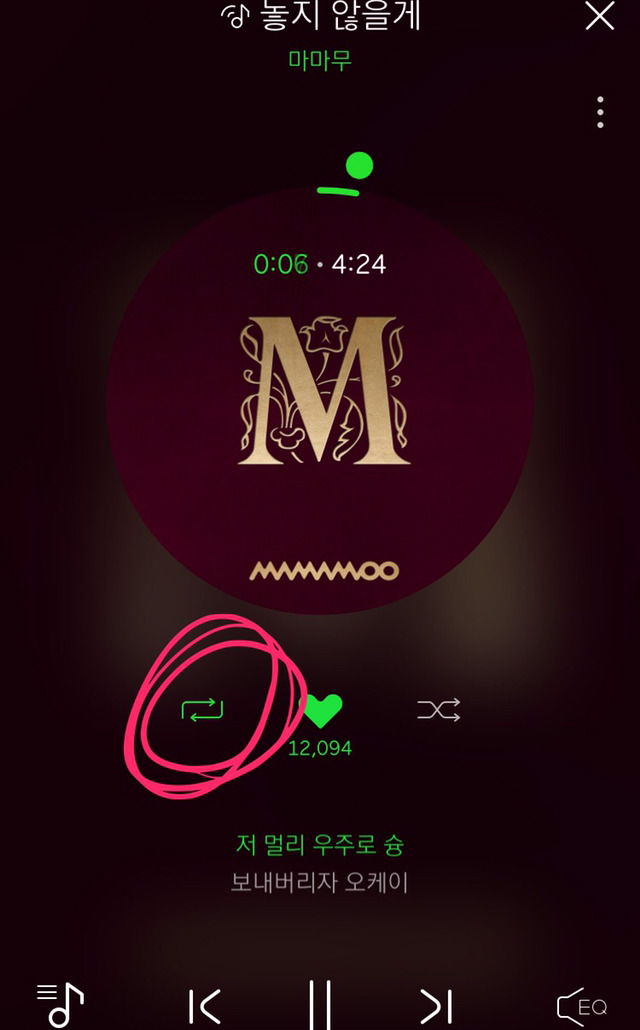
6. Now, click on the bottom left button (little circle with the album art). Then click on the square arrow shape, as shown below. It should turn green when you click it, as shown below.
7. That's it! leave your phone to play the music.
2 IMPORTANT THINGS TO NOTE:
1. Your volume can be on mute and it will still count!!!
2. Don't touch the progress bar in the song. Leave the song to play fully or else it won't count as a stream.
PAYMENT:
1. credit card is the best in my opinion. i entered in my credit card info into my korean apple id info. for the billing address of the account, I put in a Korean address.
2. Warning: if you buy an itunes card, it is only good for the country that you purchased it in!!! (aka US itunes card can only be used for the US store). Thank you to the moomoo who informed me of this!
Thats it!!!! You've done it :) Melon counts a lot for streaming and this matters a lot for getting them #1. Competition is tough this month so every moomoos efforts will be needed.
Thanks for reading through this entire thing :3 You guys are the best!
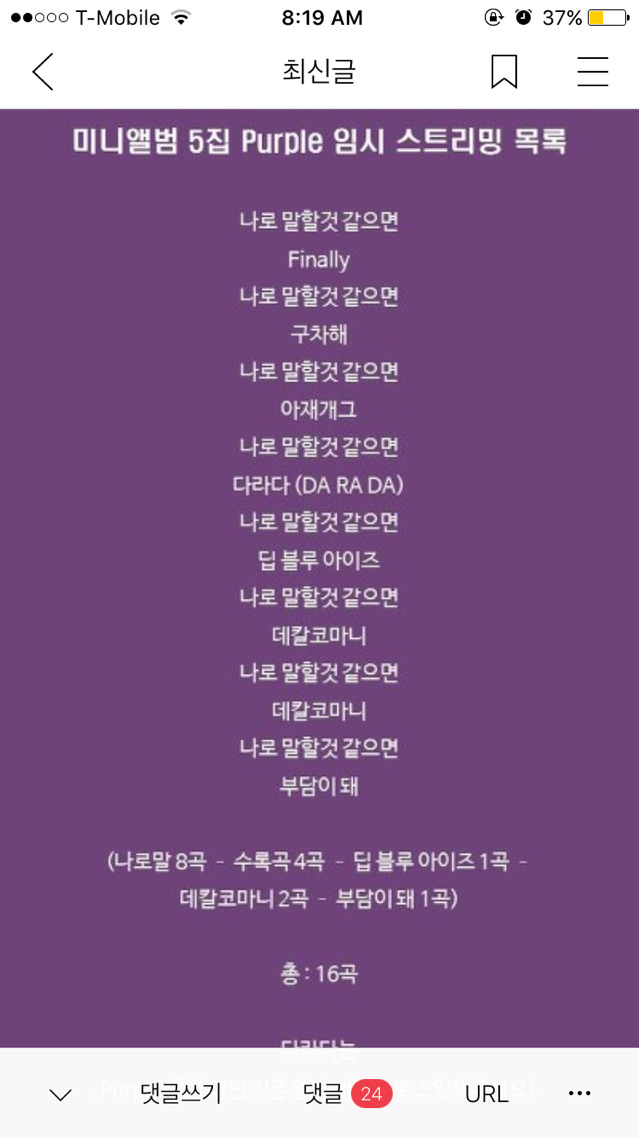
I've edited to add the suggested playlist that kmoomoos will be playing. Please do this if you can! Although Melon only counts one stream an hour, the Gaon chart (overall chart combining all music players) counts overall number of streams alone, which is why the playlist looks like it does.
Let's get Mamamoo those trophies!
댓글
댓글 리스트-
답댓글 작성자다니엘라 작성시간 17.06.23 믿듣무무 no don't worry, you help me a lot, both help me, I do it from my IPad so I can stream for mamamoo all night ahahahaha thanks fam!
-
작성자jazlyn9 작성시간 17.06.23 But because you had entered your credit card info, so they'll bill it together with your credit card bill. For me it appeared as I did not use a credit card to pay...
-
답댓글 작성자다니엘라 작성시간 17.06.24 hey, I have another question, if I do this and replay all night and day, count?
이미지 확대
-
답댓글 작성자믿듣무무 작성자 본인 여부 작성자 작성시간 17.06.24 다니엘라 Yes! :) just make sure you click the circle at the bottom with the picture of the album, and then click the little square below the circle and it should play all night (like in the picture)! We really need people to stream, MMMs been slipping to second :(
이미지 확대
-
답댓글 작성자다니엘라 작성시간 17.06.24 믿듣무무 yes I know!! that's why asking because I really want help the girls