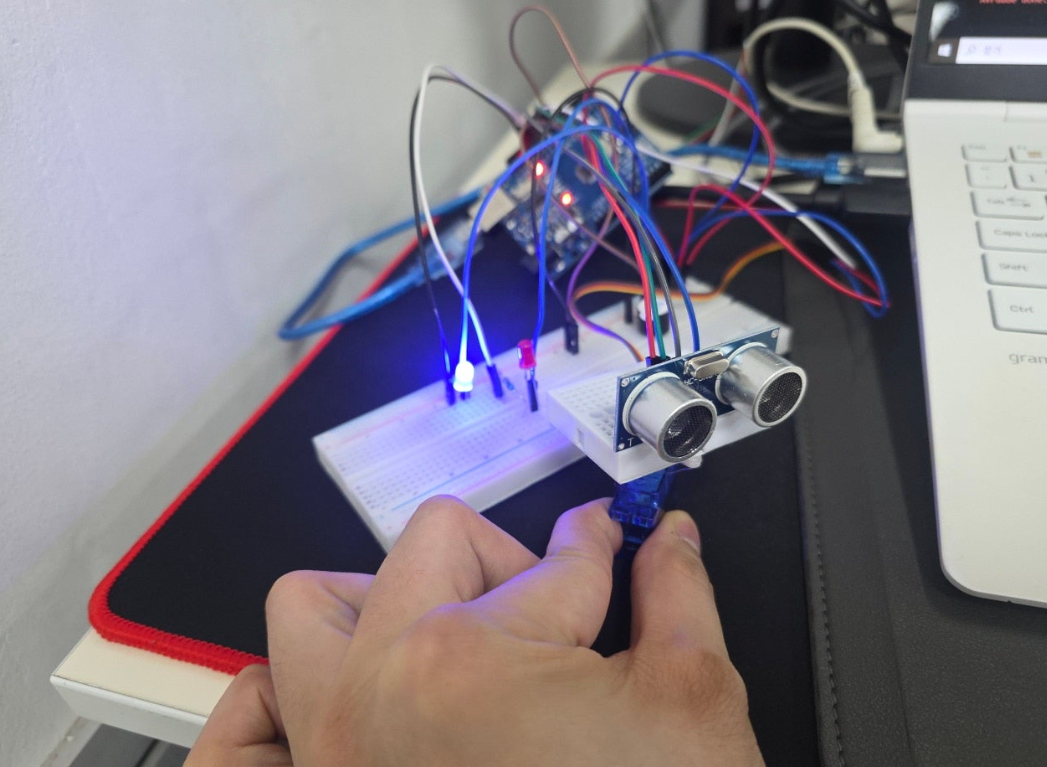
레이더 하드웨어
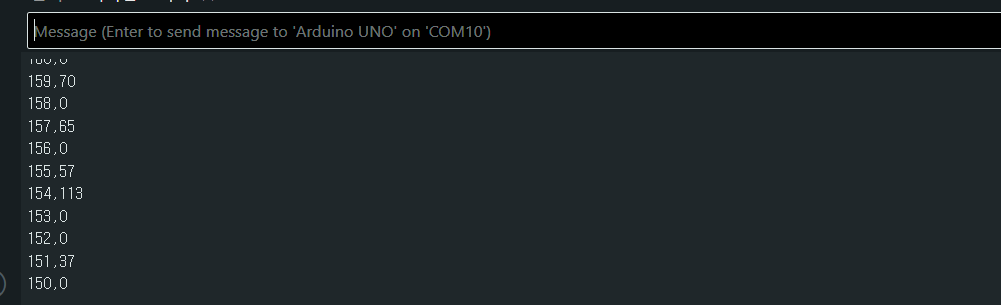
mm단위로 거리 측정
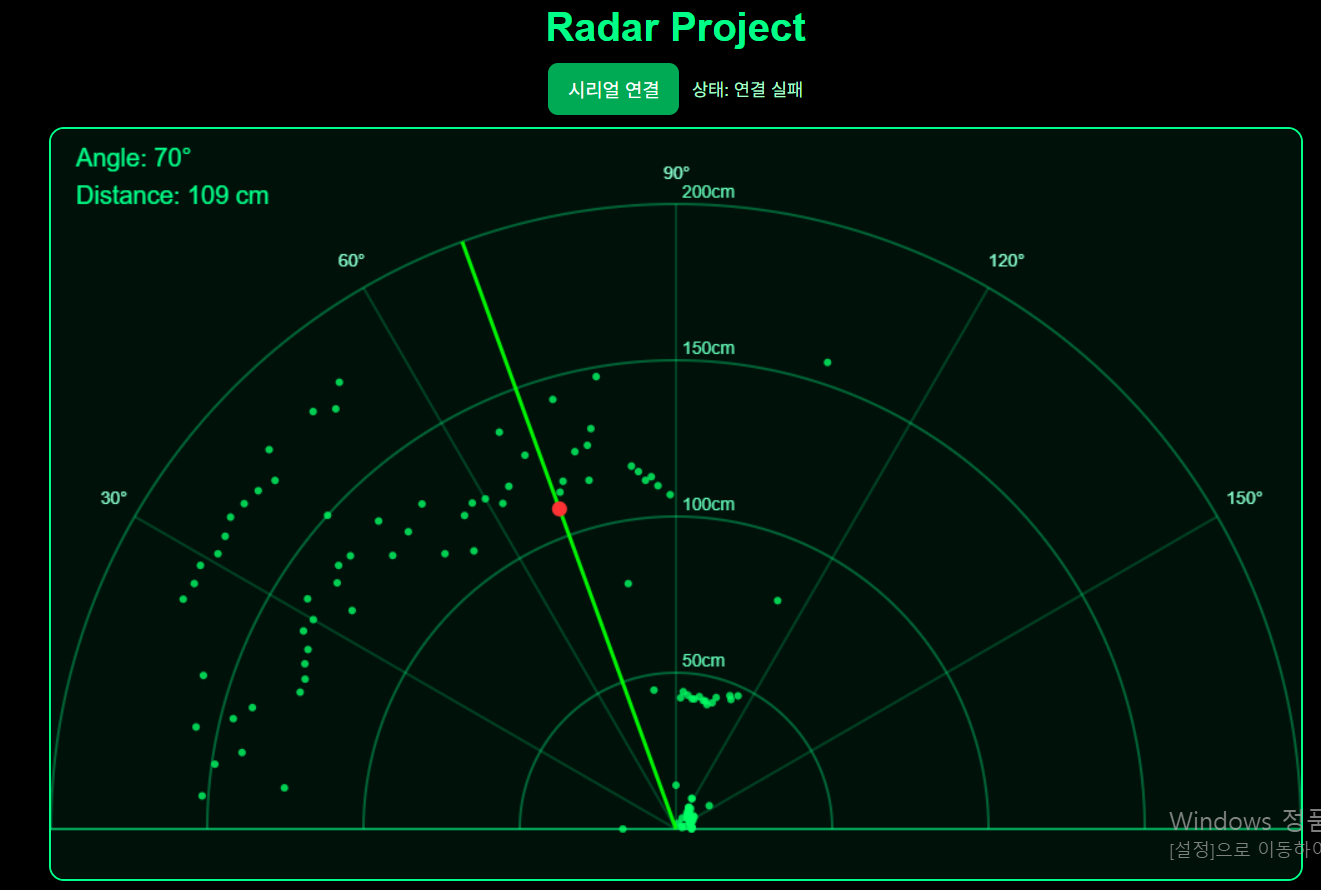
아두이노 HTML에 연결하여 실행하는 장면
아두이노 코드
#include <Servo.h>
#define bz 8
const int tgr = 10;
const int echo = 11;
const int servo_m = 9;
const int redLed = 12;
const int blueLed = 13;
Servo myServo;
int angle = 0;
int direction = 1;
unsigned long lastTime = 0;
const int interval = 30;
void setup() {
pinMode(tgr, OUTPUT);
pinMode(echo, INPUT);
pinMode(bz, OUTPUT);
pinMode(redLed, OUTPUT);
pinMode(blueLed, OUTPUT);
Serial.begin(115200);
myServo.attach(servo_m);
}
void loop() {
unsigned long currentTime = millis();
if(currentTime - lastTime >= interval)
{
lastTime = currentTime;
angle += direction;
myServo.write(angle);
if(angle <= 0 || angle >= 180)
{
direction *= -1;
}
myServo.write(angle);
int distance = getDistance();
if(distance > 0 && distance <= 20)
{
tone(bz, 1000);
if(angle % 2 == 0)
{
digitalWrite(redLed, HIGH);
digitalWrite(blueLed, LOW);
}
else
{
digitalWrite(redLed, LOW);
digitalWrite(blueLed, HIGH);
}
}
else
{
noTone(bz);
digitalWrite(redLed, LOW);
digitalWrite(blueLed, LOW);
}
if(distance > 0 && distance <= 20)
{
tone(bz, 1000);
}
else
{
noTone(bz);
}
Serial.print(angle);
Serial.print(",");
Serial.println(distance);
}
}
int getDistance()
{
digitalWrite(tgr, LOW);
delayMicroseconds(2);
digitalWrite(tgr, HIGH);
delayMicroseconds(10);
digitalWrite(tgr, LOW);
long duration = pulseIn(echo, HIGH);
int d = duration / 58;
if(d > 200 || d < 2)
{
return 0;
}
return d;
}
레이더 HTML
<!DOCTYPE html>
<html lang="ko">
<head>
<meta charset="UTF-8" />
<meta name="viewport" content="width=device-width, initial-scale=1.0" />
<title>Arduino Radar</title>
<style>
body {
margin: 0;
background: #000;
color: #00ff88;
font-family: Arial, sans-serif;
display: flex;
flex-direction: column;
align-items: center;
}
h1 {
margin: 20px 0 10px;
color: #00ff88;
}
.topbar {
display: flex;
gap: 10px;
align-items: center;
margin-bottom: 10px;
flex-wrap: wrap;
justify-content: center;
}
button {
background: #00aa55;
color: white;
border: none;
padding: 10px 16px;
border-radius: 8px;
cursor: pointer;
font-size: 15px;
}
button:hover {
background: #00cc66;
}
.info {
font-size: 14px;
color: #aaffcc;
}
canvas {
background: #00110a;
border: 2px solid #00ff88;
border-radius: 12px;
margin-bottom: 20px;
}
</style>
</head>
<body>
<h1>Radar Project</h1>
<div class="topbar">
<button id="connectBtn">시리얼 연결</button>
<span class="info" id="status">상태: 연결 안 됨</span>
</div>
<canvas id="radarCanvas" width="1000" height="600"></canvas>
<script>
const canvas = document.getElementById("radarCanvas");
const ctx = canvas.getContext("2d");
const statusEl = document.getElementById("status");
const connectBtn = document.getElementById("connectBtn");
let port;
let reader;
let inputDone;
let inputStream;
const maxDistance = 200; // Arduino 코드 기준 최대 200cm
let currentAngle = 0;
let currentDistance = 0;
// 각도별 최신 거리 저장
const points = new Array(181).fill(0);
// 잔상 효과용 최근 감지 데이터
let echoes = [];
function degToRad(deg) {
return deg * Math.PI / 180;
}
function getRadarXY(angle, distance) {
// 캔버스 아래 중앙을 기준점으로 사용
const originX = canvas.width / 2;
const originY = canvas.height - 40;
// 화면에 맞게 거리 스케일
const radius = (distance / maxDistance) * (canvas.height - 100);
// 레이더는 반원이라 0~180도를 좌우로 표현
const rad = degToRad(180 - angle);
const x = originX + radius * Math.cos(rad);
const y = originY - radius * Math.sin(rad);
return { x, y };
}
function drawBackground() {
ctx.clearRect(0, 0, canvas.width, canvas.height);
// 배경
ctx.fillStyle = "#00110a";
ctx.fillRect(0, 0, canvas.width, canvas.height);
const originX = canvas.width / 2;
const originY = canvas.height - 40;
const maxR = canvas.height - 100;
// 격자 반원
ctx.strokeStyle = "rgba(0,255,136,0.35)";
ctx.lineWidth = 2;
for (let d = 50; d <= maxDistance; d += 50) {
const r = (d / maxDistance) * maxR;
ctx.beginPath();
ctx.arc(originX, originY, r, Math.PI, 2 * Math.PI);
ctx.stroke();
ctx.fillStyle = "#66ffbb";
ctx.font = "14px Arial";
ctx.fillText(`${d}cm`, originX + 5, originY - r - 5);
}
// 각도선
for (let a = 0; a <= 180; a += 30) {
const rad = degToRad(180 - a);
const x = originX + maxR * Math.cos(rad);
const y = originY - maxR * Math.sin(rad);
ctx.beginPath();
ctx.moveTo(originX, originY);
ctx.lineTo(x, y);
ctx.strokeStyle = "rgba(0,255,136,0.2)";
ctx.stroke();
const labelX = originX + (maxR + 20) * Math.cos(rad);
const labelY = originY - (maxR + 20) * Math.sin(rad);
ctx.fillStyle = "#88ffcc";
ctx.font = "14px Arial";
ctx.fillText(`${a}°`, labelX - 10, labelY);
}
// 바닥선
ctx.beginPath();
ctx.moveTo(originX - maxR, originY);
ctx.lineTo(originX + maxR, originY);
ctx.strokeStyle = "rgba(0,255,136,0.5)";
ctx.stroke();
}
function drawStoredPoints() {
for (let angle = 0; angle <= 180; angle++) {
const d = points[angle];
if (d > 0) {
const p = getRadarXY(angle, d);
ctx.beginPath();
ctx.arc(p.x, p.y, 3, 0, Math.PI * 2);
ctx.fillStyle = "rgba(0,255,100,0.8)";
ctx.fill();
}
}
}
function drawEchoes() {
const now = Date.now();
echoes = echoes.filter(e => now - e.time < 1200);
for (const e of echoes) {
const age = now - e.time;
const alpha = 1 - age / 1200;
const p = getRadarXY(e.angle, e.distance);
ctx.beginPath();
ctx.arc(p.x, p.y, 8, 0, Math.PI * 2);
ctx.fillStyle = `rgba(0,255,80,${alpha * 0.5})`;
ctx.fill();
ctx.beginPath();
ctx.arc(p.x, p.y, 4, 0, Math.PI * 2);
ctx.fillStyle = `rgba(100,255,150,${alpha})`;
ctx.fill();
}
}
function drawSweepLine() {
const originX = canvas.width / 2;
const originY = canvas.height - 40;
const maxR = canvas.height - 100;
const rad = degToRad(180 - currentAngle);
const x = originX + maxR * Math.cos(rad);
const y = originY - maxR * Math.sin(rad);
// 스캔 라인
ctx.beginPath();
ctx.moveTo(originX, originY);
ctx.lineTo(x, y);
ctx.strokeStyle = "rgba(0,255,0,0.95)";
ctx.lineWidth = 3;
ctx.stroke();
// 현재 감지점
if (currentDistance > 0) {
const p = getRadarXY(currentAngle, currentDistance);
ctx.beginPath();
ctx.arc(p.x, p.y, 6, 0, Math.PI * 2);
ctx.fillStyle = "#ff3333";
ctx.fill();
}
// 상태 텍스트
ctx.fillStyle = "#00ff88";
ctx.font = "20px Arial";
ctx.fillText(`Angle: ${currentAngle}°`, 20, 30);
ctx.fillText(`Distance: ${currentDistance} cm`, 20, 60);
}
function animate() {
drawBackground();
drawStoredPoints();
drawEchoes();
drawSweepLine();
requestAnimationFrame(animate);
}
async function connectSerial() {
try {
if (!("serial" in navigator)) {
alert("이 브라우저는 Web Serial API를 지원하지 않습니다.\nChrome 또는 Edge를 사용하세요.");
return;
}
port = await navigator.serial.requestPort();
await port.open({ baudRate: 115200 });
statusEl.textContent = "상태: 연결됨";
const textDecoder = new TextDecoderStream();
inputDone = port.readable.pipeTo(textDecoder.writable);
inputStream = textDecoder.readable;
reader = inputStream.getReader();
let buffer = "";
while (true) {
const { value, done } = await reader.read();
if (done) break;
buffer += value;
const lines = buffer.split("\n");
buffer = lines.pop();
for (let line of lines) {
line = line.trim();
if (!line) continue;
const parts = line.split(",");
if (parts.length !== 2) continue;
const angle = parseInt(parts[0].trim(), 10);
const distance = parseInt(parts[1].trim(), 10);
if (isNaN(angle) || isNaN(distance)) continue;
if (angle < 0 || angle > 180) continue;
currentAngle = angle;
currentDistance = distance;
points[angle] = distance;
if (distance > 0) {
echoes.push({
angle,
distance,
time: Date.now()
});
}
}
}
} catch (err) {
console.error(err);
statusEl.textContent = "상태: 연결 실패";
alert("시리얼 연결 중 오류가 발생했습니다.");
}
}
connectBtn.addEventListener("click", connectSerial);
animate();
</script>
</body>
</html>