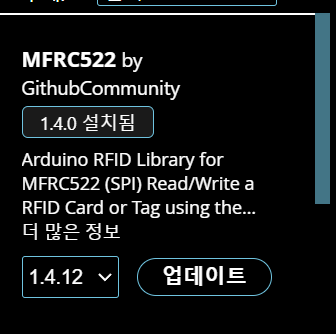
RFID 라이브러리 버전을 1.4.0 버전을 설치해야만 제대로 동작합니다.
반드시 1.4.0 버전을 설치하시기 바랍니다.
RFID 라이브러리 이름 : MFRC522
버전 : 1.4.0
버전 : 1.3.5, 1.3.6 버전도 된다고 합니다.
참고로 7대 법통분은 1.4.12 최신버전도 동작합니다. == 7대 법통
RFID에서는 Sensor 쉴드를 가급적 사용하지마세요
== Sensor 쉴드를 사용할 경우는 최신버전에서는 안되는 경향이 있습니다.
/*
* Initial Author: ryand1011 (https://github.com/ryand1011)
*
* Reads data written by a program such as "rfid_write_personal_data.ino"
*
* See: https://github.com/miguelbalboa/rfid/tree/master/examples/rfid_write_personal_data
*
* Uses MIFARE RFID card using RFID-RC522 reader
* Uses MFRC522 - Library
* -----------------------------------------------------------------------------------------
* MFRC522 Arduino Arduino Arduino Arduino Arduino
* Reader/PCD Uno/101 Mega Nano v3 Leonardo/Micro Pro Micro
* Signal Pin Pin Pin Pin Pin Pin
* -----------------------------------------------------------------------------------------
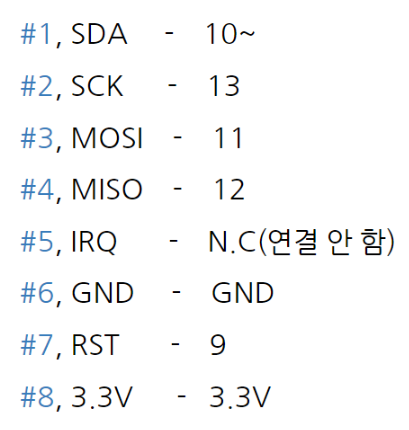
* RST/Reset RST 9 5 D9 RESET/ICSP-5 RST
* SPI SS SDA(SS) 10 53 D10 10 10
* SPI MOSI MOSI 11 / ICSP-4 51 D11 ICSP-4 16
* SPI MISO MISO 12 / ICSP-1 50 D12 ICSP-1 14
* SPI SCK SCK 13 / ICSP-3 52 D13 ICSP-3 15
*
* More pin layouts for other boards can be found here: https://github.com/miguelbalboa/rfid#pin-layout
*/
#include <SPI.h>
#include <MFRC522.h>
#define RST_PIN 9 // Configurable, see typical pin layout above
#define SS_PIN 10 // Configurable, see typical pin layout above
MFRC522 mfrc522(SS_PIN, RST_PIN); // Create MFRC522 instance
//*****************************************************************************************//
void setup() {
Serial.begin(9600); // Initialize serial communications with the PC
SPI.begin(); // Init SPI bus
mfrc522.PCD_Init(); // Init MFRC522 card
Serial.println(F("Read personal data on a MIFARE PICC:")); //shows in serial that it is ready to read
}
//*****************************************************************************************//
void loop() {
// Prepare key - all keys are set to FFFFFFFFFFFFh at chip delivery from the factory.
MFRC522::MIFARE_Key key;
for (byte i = 0; i < 6; i++) key.keyByte[i] = 0xFF;
//some variables we need
byte block;
byte len;
MFRC522::StatusCode status;
//-------------------------------------------
// Reset the loop if no new card present on the sensor/reader. This saves the entire process when idle.
if ( ! mfrc522.PICC_IsNewCardPresent()) {
return;
}
// Select one of the cards
if ( ! mfrc522.PICC_ReadCardSerial()) {
return;
}
Serial.println(F("**Card Detected:**"));
//-------------------------------------------
mfrc522.PICC_DumpDetailsToSerial(&(mfrc522.uid)); //dump some details about the card
//mfrc522.PICC_DumpToSerial(&(mfrc522.uid)); //uncomment this to see all blocks in hex
//-------------------------------------------
Serial.print(F("Name: "));
byte buffer1[18];
block = 4;
len = 18;
//------------------------------------------- GET FIRST NAME
status = mfrc522.PCD_Authenticate(MFRC522::PICC_CMD_MF_AUTH_KEY_A, 4, &key, &(mfrc522.uid)); //line 834 of MFRC522.cpp file
if (status != MFRC522::STATUS_OK) {
Serial.print(F("Authentication failed: "));
Serial.println(mfrc522.GetStatusCodeName(status));
return;
}
status = mfrc522.MIFARE_Read(block, buffer1, &len);
if (status != MFRC522::STATUS_OK) {
Serial.print(F("Reading failed: "));
Serial.println(mfrc522.GetStatusCodeName(status));
return;
}
//PRINT FIRST NAME
for (uint8_t i = 0; i < 16; i++)
{
if (buffer1[i] != 32)
{
Serial.write(buffer1[i]);
}
}
Serial.print(" ");
//---------------------------------------- GET LAST NAME
byte buffer2[18];
block = 1;
status = mfrc522.PCD_Authenticate(MFRC522::PICC_CMD_MF_AUTH_KEY_A, 1, &key, &(mfrc522.uid)); //line 834
if (status != MFRC522::STATUS_OK) {
Serial.print(F("Authentication failed: "));
Serial.println(mfrc522.GetStatusCodeName(status));
return;
}
status = mfrc522.MIFARE_Read(block, buffer2, &len);
if (status != MFRC522::STATUS_OK) {
Serial.print(F("Reading failed: "));
Serial.println(mfrc522.GetStatusCodeName(status));
return;
}
//PRINT LAST NAME
for (uint8_t i = 0; i < 16; i++) {
Serial.write(buffer2[i] );
}
//----------------------------------------
Serial.println(F("\n**End Reading**\n"));
delay(1000); //change value if you want to read cards faster
mfrc522.PICC_HaltA();
mfrc522.PCD_StopCrypto1();
}
//*****************************************************************************************//