// sys Lib
#include <stdio.h>
#include <string.h>
#include <stdlib.h>
// Arduino API
#include <SoftwareSerial.h>
// My Lib
#include <value.h>
#include <My_Arduino_GPIO_Lib_V1_8.h>
// Prj Lib
#include "sw_uart_prj.h"
void setup() {
// put your setup code here, to run once:
Serial.begin(57600);
// SW Serial Init
rx_pin_init(My_Rx_Pin);
tx_pin_init(My_Tx_Pin);
My_Port_Init(57600);
WiFi_Port_Init(19200);
Bt_Port.begin(9600); //Bt_Port_Init(9600)
}
char rx_buf[10];
// 시리얼통신 활성화
// Serial.begin(전송속도 bps)
// 송신
// print() // 아스키 코드로 전송 == 주로PC 전송용, BIN, DEC, HEX, OCT
// println() // 아스키 코드로 전송 == 주로PC 전송용 == \r\n포함, BIN, DEC, HEX, OCT
// write() // Low Lable data TX = PC로 전송시 ascii Code 변환필요
// 수신
// read() // 1byte rx
// readBytes(수신Data 배열저장버퍼(변수), 수신 Byte수)
// readByteUntil('체크수신문자', 저장변수버퍼(배열), 수신 Byte수(Max값))
// readString() // 문자열로 수신 == 자료형 String
// readStringsUntil('체크수신문자') == 자료형 String
// 수신된 Byte 수 체크
// if(available() > 0){}
// 수신방식 2개 == 폴링방식, 이벤트(인터럽트) 방식
String song;
void loop() {
// put your main code here, to run repeatedly:
if(Serial.available() > 0) // SW UART
{
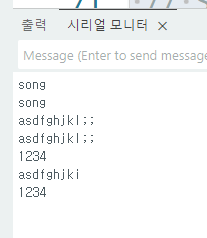
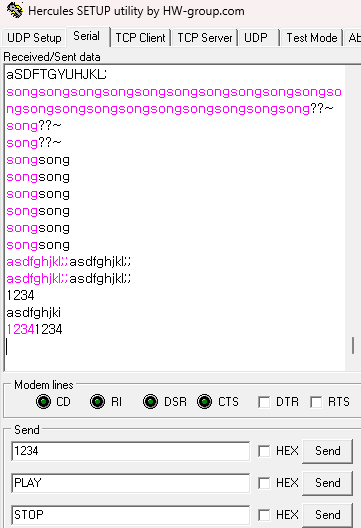
song = Serial.readString(); //readBytesUntil("\n", rx_buf, 5);
My_Port.println(song);
Serial.println(song);
memset(rx_buf, 0, 10 *sizeof(uint8_t));
}
// 송신
// HW Serial Out
// Serial.print("Cnt= ");
//Serial.println(ct -> cnt16);
// SW Serial Out
// My_Port.print("Cnt= ");
// My_Port.println(ct1 -> cnt16);
// delay(1000);
ct -> cnt16 = ct1 -> cnt16++;
}