스케일러(Scaler)는 화면의 확대/축소시에 사용이 되는 일종의 비디오 필터입니다. 하드웨어 방식으로도 소프트웨어 방식으로도 사용할 수 있습니다. 대게의 경우 소프트웨어의 방식(CPU를 사용하는)이 좀 더 고급 필터를 사용할 수가 있습니다. 이걸 그래픽 카드의 쉐이더 유닛을 이용해 실시간으로 연산 처리하도록 기존의 필터(주로 avisynth)를 GPU용으로 변환한 것이 madVR입니다.
스케일링 동작은 그래픽 카드의 기본적인 동작입니다. 이는 동영상 재생시에도 마찬가지인데, 동영상을 재생하고 창 크기를 조정하면 그 크기가 변동이 되는데 이 때 H/W 방식의 기본적인 스케일러가 동작이 됩니다. 이 스케일러의 기본 품질은 GPU 벤더마다 다르고 세대별 칩마다 또 해상도마다 적용되는 H/W 스케일러의 종류가 다릅니다. 이것에 대해 해당 업체의 명시적인 자료는 없지만 검색을 해보면 테스트 자료가 넷상에 종종 떠돌아 다닙니다.
기본적으로 동영상 스케일러는 100% 크기에서는 동작하지 않습니다. 다시 말해 스케일러를 아무리 좋은 걸 사용했다 하더라도 동영상 크기가 100%면 동작이 안됩니다. 예를 들어 1080p를 FullHD 모니터에서 전체화면으로 재생하면 스케일러는 동작이 안됩니다. DxVA 스케일러나 madVR의 스케일러도 전혀 동작이 안되죠.
그럼, 이제 팟플에서 DxVA 스케일러 동작 여부를 판별하는 아주 간단한 방법을 알아보겠습니다. 라데온에서의 동작입니다. 다른 그래픽 카드도 유사할 것입니다.
일단 바로 아래 게시물에서 DxVA 스케일러로 설정하는 법을 따라서 하고 동영상을 재생한 다음 탭을 눌러보세요.
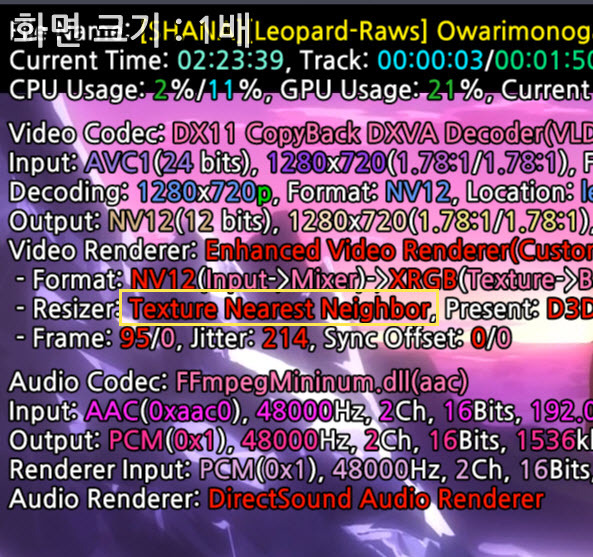
팟플은 동영상을 재생하면 창이 100% 상태가 되는데 일단 스샷을 봅시다.
DxVA Video Processor로 설정이 된 상태인데 아래 스샷의 Resizer 부분을 잘 보면 Texture Nearest Neighbor로 나오지요?
라데온의 경우 저렇게 표시가 되면 스케일러가 꺼진 상태가 됩니다.
아래는 단축키로 화면을 1.5배로 만들어서 스샷을 찍은 것입니다. DxVA Video Processor(DxVA 스케일러)가 동작을 하고 있지요?
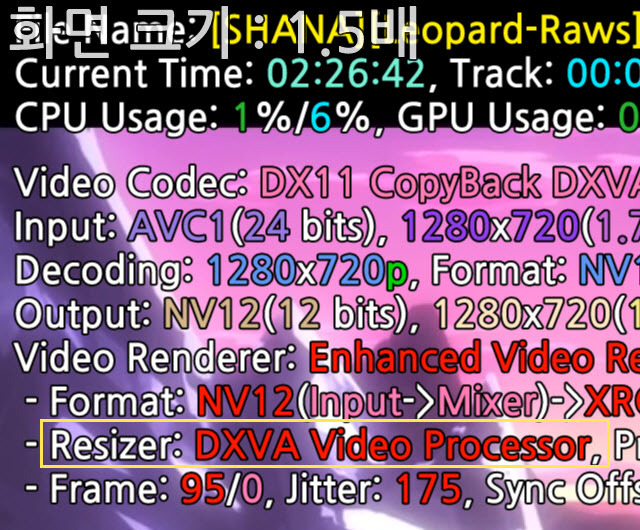
잘 생각해 보면 당연한 동작이지만 많은 사람들이 헷갈려하는 것 같아서 적어 봤습니다.
madVR도 이런 식으로 확인할 수 있는 방법이 있습니다.
댓글
댓글 리스트-
작성자WANEZHILING 작성시간 16.04.04 Current PotPlayer uses dxva scaler by default on intel gpus, how wise :)
-
작성자WANEZHILING 작성시간 16.04.04 And I hope our developer could let NV12 be the default colorspace on all platforms one day, like what current mpc-be/hc do:)
Current PotPlayer is too complex:
On ATI: YUY2, regardless of OS (Reason is that ATI enables lots of 'shit' in CCC by default and YV12 is incompatible with EVR on ATI)
On Intel: YV12, regardless of OS (Reason is same as ATI but the good thing is YV12 can be used at least. ps: when horizontal resolution is not 16 integer times 1080x1920 eg YUY2 will be the default too)
On Nvidia: NV12 on win8 above; YUY2 on Win7 and below (Reason is that some people said NV12 is not good) -
답댓글 작성자WANEZHILING 작성시간 16.04.04 As we all know NV12 is the best/premier choice for 8-bit 4:2:0 videos, has the best compatibility with GPU features, the biggest problem of NV12 is that it will apply those image features in gpu driver control panel (most of them are totally shit) with VMR/EVR renderers, and unfortunately ATI and Intel enable those shit by default...... This explains why PotPlayer does such complex choices...
PS: since native dxva always means NV12, we don't need bother too much, just let NV12 be the default colorspace. If ATI/Intel guys complain image quality issue, teach them to disable those shit :) -
답댓글 작성자킹팟 작성자 본인 여부 작성자 작성시간 16.04.04 WANEZHILING Forcing NV12 could cause a problem on legacy video cards but I agree it's time to try NV12 again by default setting. As you may know, d3d9ex flip mode is the best presenter recommended by dev. but it is not default one for the same reason.
-
답댓글 작성자WANEZHILING 작성시간 16.04.04 킹팟 I knew. Balance is always tough :)