General display options
|
Field name |
Description |
Value range |
|
CWIDTH_OPT |
If this field is set, the ALV Grid Control optimizes the column width. You can then see the column header and the contents of the cells of this column. |
SPACE, 'X' |
|
SMALLTITLE |
If this field is set, the title size in the grid control is set to the font size of the column header. |
SPACE, 'X' |
Grid customizing
|
Field name |
Description |
Value range |
|
GRID_TITLE |
Title between grid control and toolbar |
Character string of 70 characters at most |
|
NO_HEADERS |
If this field is set, column headers are hidden. |
SPACE, 'X' |
|
NO_HGRIDLN |
If this field is set, columns are displayed without horizontal grid lines. |
SPACE, 'X' |
|
NO_MERGING |
If this field is set, cells are not merged when a column is sorted. |
SPACE, 'X' |
|
NO_ROWMARK |
If this field is set, the button at the beginning of a row is hidden in selection modes cell selection ( SEL_MODE = 'D' ) and column/row selection ( SEL_MODE = 'A' ). |
SPACE, 'X' |
|
NO_TOOLBAR |
If this field is set, the toolbar is hidden. |
SPACE, 'X' |
|
NO_VGRIDLN |
If this field is set, columns are displayed without vertical grid lines. |
SPACE, 'X' |
|
SEL_MODE |
Set the selection mode (see table below). |
SPACE, 'A', 'B', 'C', 'D' |
Selection modes for SEL_MODE
|
Value |
Mode |
Possible selections |
Comment |
|
SPACE |
same as 'B' |
see 'B' |
Default setting |
|
'A' |
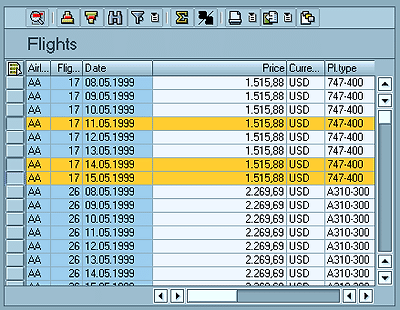
Column and row selection (see graphic) |
|
The user selects the rows through pushbuttons at the left border of the grid control. |
|
'B' |
Simple selection, list box |
|
|
|
'C' |
Multiple selection, list box |
|
|
|
'D' |
Cell selection |
|
The user selects the rows through pushbuttons at the left border of the grid control. |
ALV Grid Control with column and row selection
=====