|
WPF 학습 문서 |
학습 날짜 |
2013-03-13 |
|
기술 제목 |
WPF style |
|
|
WPF style 실습 |
작 성 자 |
장혜지 |
Title과 SubTitle은 공유하고 있는 Style이 있으며 Title에만 글씨크기와 색상을 적용한다.
ListBox에 있는 ListBoxItem에 마우스가 올라 갔을 때 마우스가 올라간 ListBoxItem만 투명도와 글씨체, 글씨 크기가 변한다.
|
실행화면 |
|
(마우스 올라가기 전) (마우스 올라간 후) |
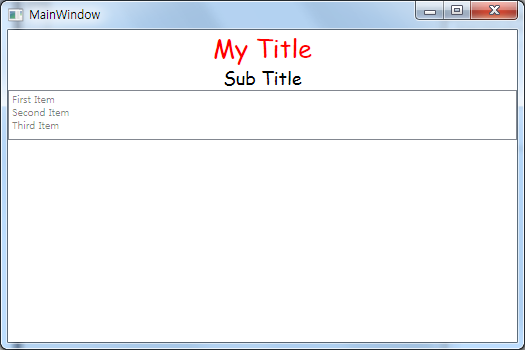
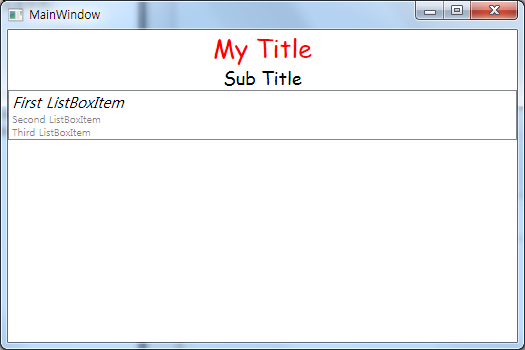
|
TextBlock Style |
|
<!—Xaml--> <Style TargetType="TextBlock"> <Setter Property="HorizontalAlignment" Value="Center" /> <Setter Property="FontFamily" Value="Comic Sans MS" /> <Setter Property="FontSize" Value="18" /> </Style>
|
|
//Behind Code Style tbSt = new Style(); tbSt.TargetType = typeof(TextBlock); tbSt.Setters.Add(new Setter(HorizontalAlignmentProperty, HorizontalAlignment.Center)); tbSt.Setters.Add(new Setter(FontFamilyProperty, new FontFamily("Comic Sans MS"))); tbSt.Setters.Add(new Setter(FontSizeProperty, 18.0)); Resources.Add("TextBoxST", tbSt);
title.Style = tbSt; subtitle.Style = tbSt;
|
|
Setter의 Property는 항상 의존 Property를 참조하기 때문에 “속성명Property”로 의존 Property를 얻어온다. 기본 TextBlock Style로 Resource에서 참조하여 사용 할 수 있도록 Resource에 추가한다. |
|
Title TextBlock Style |
|
<!—Xaml--> <Style BasedOn="{StaticResource {x:Type TextBlock}}" TargetType="TextBlock" x:Key="TitleSt"> <Setter Property="FontSize" Value="25"/> <Setter Property="Foreground" Value="Red" /> </Style>
|
|
//Behind Code Style ttSt = new Style(); ttSt.TargetType = typeof(TextBlock); ttSt.BasedOn = FindResource("TextBoxST") as Style; ttSt.Setters.Add(new Setter(FontSizeProperty,25.0)); ttSt.Setters.Add(new Setter(ForegroundProperty,Brushes.Red));
title.Style = ttSt;
|
|
기본 Style을 얻어오기 위해 Key값으로 등록 된 Resource에서 Style을 찾아온다. |
|
ListBoxItem Trigger Style |
|
<!—Xaml--> <Style TargetType="ListBoxItem"> <Setter Property="FontSize" Value="10" /> <Setter Property="Opacity" Value="0.5" /> <Style.Triggers> <Trigger Property="IsMouseOver" Value="true" > <Setter Property="FontStyle" Value="Italic" /> <Setter Property="FontSize" Value="15" /> <Setter Property="Opacity" Value="1.0" /> </Trigger> </Style.Triggers> </Style>
|
|
//Behind Code Style lbiSt = new Style(); lbiSt.TargetType = typeof(ListBoxItem); lbiSt.Setters.Add(new Setter(FontSizeProperty,10.0)); lbiSt.Setters.Add(new Setter(OpacityProperty,0.5));
Trigger tg = new Trigger(); tg.Property = IsMouseOverProperty; tg.Value = true; tg.Setters.Add(new Setter(FontStyleProperty,FontStyles.Italic)); tg.Setters.Add(new Setter(FontSizeProperty,15.0)); tg.Setters.Add(new Setter(OpacityProperty, 1.0));
lbiSt.Triggers.Add(tg);
listbox.ItemContainerStyle = lbiSt;
|
|
ListBoxItem에 마우스가 올라갔을 때 Property의 변화를 주기 위한 Triggers 생성 한 후 Triggers에 Setter를 추가한다. 지정 된 ListBoxItem Style에 생성 한 Triggers를 추가한다. |
|
MainWindow Control 생성 |
|
<!—Xaml--> <StackPanel> <TextBlock Style="{StaticResource TitleSt}" Name="title" Text="My Title" /> <TextBlock Name="subtitle" Text="Sub Title"/> <ListBox Name="listbox"> <ListBoxItem Content="First Item" /> <ListBoxItem Content="Second Item" /> <ListBoxItem Content="Third Item" /> </ListBox> </StackPanel>
|
|
//Behind Code StackPanel stp = new StackPanel(); this.Content = stp;
TextBlock title = new TextBlock(); title.Text = "My Title";
TextBlock subtitle = new TextBlock(); subtitle.Text = "Sub Title";
ListBox listbox = new ListBox(); listbox.Items.Add("First ListBoxItem"); listbox.Items.Add("Second ListBoxItem"); listbox.Items.Add("Third ListBoxItem");
stp.Children.Add(title); stp.Children.Add(subtitle); stp.Children.Add(listbox);
|
|
Window에 기본적으로 생성시켜 준 Control이다. |
|
전체 MainWindow.xaml.cs |
|
using System; using System.Collections.Generic; using System.Linq; using System.Text; using System.Windows; using System.Windows.Controls; using System.Windows.Data; using System.Windows.Documents; using System.Windows.Input; using System.Windows.Media; using System.Windows.Media.Imaging; using System.Windows.Navigation; using System.Windows.Shapes;
namespace WpfStyle { /// <summary> /// MainWindow.xaml에 대한 상호작용 논리 /// </summary> public partial class MainWindow : Window { public MainWindow() { InitializeComponent(); }
private void Window_Loaded(object sender, RoutedEventArgs e) { StackPanel stp = new StackPanel(); this.Content = stp;
TextBlock title = new TextBlock(); title.Text = "My Title";
TextBlock subtitle = new TextBlock(); subtitle.Text = "Sub Title";
ListBox listbox = new ListBox(); listbox.Items.Add("First ListBoxItem"); listbox.Items.Add("Second ListBoxItem"); listbox.Items.Add("Third ListBoxItem");
stp.Children.Add(title); stp.Children.Add(subtitle); stp.Children.Add(listbox);
//----------------------------------------------------------------- // <!—전체 TextBlock--> // <Style TargetType="TextBlock"> // <Setter Property="HorizontalAlignment" Value="Center" /> // <Setter Property="FontFamily" Value="Comic Sans MS" /> // <Setter Property="FontSize" Value="18" /> // </Style> //-----------------------------------------------------------------
Style tbSt = new Style(); tbSt.TargetType = typeof(TextBlock); tbSt.Setters.Add(new Setter(HorizontalAlignmentProperty, HorizontalAlignment.Center)); tbSt.Setters.Add(new Setter(FontFamilyProperty, new FontFamily("Comic Sans MS"))); tbSt.Setters.Add(new Setter(FontSizeProperty, 18.0)); Resources.Add("TextBoxST", tbSt);
title.Style = tbSt; subtitle.Style = tbSt;
//------------------------------------------------------------- // <!--Title TextBlock--> // <Style BasedOn="{StaticResource {x:Type TextBlock}}" // TargetType="TextBlock" x:Key="TitleSt"> // <Setter Property="FontSize" Value="25"/> // <Setter Property="Foreground" Value="Red" /> // </Style> //-------------------------------------------------------------
Style ttSt = new Style(); ttSt.TargetType = typeof(TextBlock); ttSt.BasedOn = FindResource("TextBoxST") as Style; ttSt.Setters.Add(new Setter(FontSizeProperty,25.0)); ttSt.Setters.Add(new Setter(ForegroundProperty,Brushes.Red));
title.Style = ttSt;
//------------------------------------------------------------- // <!--ListBox Trigger--> // <Style TargetType="ListBoxItem"> // <Setter Property="FontSize" Value="10" /> // <Setter Property="Opacity" Value="0.5" /> // <Style.Triggers> // <Trigger Property="IsMouseOver" Value="true" > // <Setter Property="FontStyle" Value="Italic" /> // <Setter Property="FontSize" Value="15" /> // <Setter Property="Opacity" Value="1.0" /> // </Trigger> // </Style.Triggers> // </Style> //-------------------------------------------------------------
Style lbiSt = new Style(); lbiSt.TargetType = typeof(ListBoxItem); lbiSt.Setters.Add(new Setter(FontSizeProperty,10.0)); lbiSt.Setters.Add(new Setter(OpacityProperty,0.5));
Trigger tg = new Trigger(); tg.Property = IsMouseOverProperty; tg.Value = true; tg.Setters.Add(new Setter(FontStyleProperty,FontStyles.Italic)); tg.Setters.Add(new Setter(FontSizeProperty,15.0)); tg.Setters.Add(new Setter(OpacityProperty, 1.0));
lbiSt.Triggers.Add(tg);
listbox.ItemContainerStyle = lbiSt; } } }
|
|
Window 창이 Loaded 될 시 Content와 Style을 적용시키기 위해 Loaded 이벤트를 xaml에 추가했다. |