|
기술문서 |
작성일 : 2011-04-08 |
|
작성자 : 유미영 | |
|
주제 : XmlWriter Class | |
|
XmlWriter Class | ||
|
XML 데이터가 포함된 스트림 또는 파일을 생성할 수 있도록 빠르고, 앞으로만 이동 가능하고, 캐시되지 않은 방법을 제공하는 작성기를 나타낸다.
XmlWriter메서드를 사용하여 XML을 출력하는 경우엔 Close메서드를 호출할 때 까지 요소 및 특성이 쓰여지지 않는다. 예 : XmlWriter를 사용하여 XmlDocument를 채우는 경우, XmlWriter를 닫을 때까지 대상 문서에 쓰여진 요소 및 특성을 확인할 수 있다. |
|
XmlWriter 멤버 | |
|
|
|
XmlWriter Method |
| |
|
Method Name |
Description | |
|
Close |
파생 클래스에서 재정의되면 이 스트림 및 내부 스트림을 닫는다. | |
|
Create |
새 XmlWriter 인스턴스를 만든다. | |
|
Dispose |
XmlWriter에서 사용하는 관리되지 않는 리소스를 해제하고, 관리되는 리소스를 선택적으로 해제할 수 있다. | |
|
Flush |
버퍼에 있는 항목을 내부 스트림으로 플러시하고 내부 스트림도 플러시한다. | |
|
GetHashCode |
특정 형식에 대한 해시 함수 역할을 한다.(Object에서 상속됨) | |
|
GetType |
현재 인스턴스의 Type을 가져온다(Object에서 상속됨) | |
|
WriteAttributes |
XmlReader의 현재 위치에 있는 모든 특성을 작성한다. | |
|
WriteAttributeString |
오버로드 되었다. 파생 클래스에서 재정의되면 지정된 값이 있는 특성을 작성 | |
|
WriteCData |
파생클래스에서 재정의되면 지정된 텍스트가 들어 있는 <![CDATA[…]]>블록을 작성 | |
|
WriteCharEntity |
파생 클래스에서 재정의되면 지정된 유니코드 문자 값의 문자 엔터티를 생성하게 함 | |
|
WriteChars |
파생 클래스에서 재정의 되면 한 번에 한 버퍼씩 텍스트를 작성한다. | |
|
WriteComment |
파생 클래스에서 재정의되면 지정된 텍스트가 들어 있는 주석 <!--…-->을 작성 | |
|
WriteDocType |
파생 클래스에서 재정의되면 지정된 이름 및 선택적 특성이 있는 DOCTYPE 선언을 작성 | |
|
WriteElementString |
오버로드되었다. 파생 클래스에서 재정의되면 문자열 값이 들어 있는 요소를 작성 | |
|
WriteEndDocument |
파생 클래스에서 재정의되면 열려 있는 모든 요소나 특성을 닫고 작성기를 다시 시작 상태로 설정 | |
|
WriteEndAttribute |
파생 클래스에서 재정의 되면 이전 WriteStartAttribute호출을 닫음 | |
|
WriteEndElement |
파생 클래스에서 재정의되면 한 요소를 닫고 해당 네임스페이스 범위를 팝한다. | |
|
WriteNode |
오버로드되었다. 소스 개체 전체를 현재 작성기 인스턴스에 복사함 | |
|
WriteStartElement |
오버로드 되었다. 파생된 클래스에서 재정의되면 지정된 시작 태그를 작성함 | |
|
WriteStartDocument |
오버로드되었다. 파생 클래스에서 재정의되면 XML선언을 작성 | |
|
WriteStartAttribute |
오버로드되었다. 파생 클래스에서 재정의될 때 특성의 시작을 작성 | |
|
WriteString |
파생 클래스에서 재정의되면 지정된 텍스트 콘텐츠를 작성함. | |
|
WriteName |
파생 클래스에서 재정의되면 W3C XML 1.0권장 사항(http://www.w3.org/TR/1998/REC-xml-19980210#NT-Name)에 따라 유효한 이름이 되도록 지정된 이름을 작성 | |
|
XmlWriter.WriterAttribute메서드 public virtual void WriteAttributes(XmlReader reader,bool defattr) reader [ 형식: System.Xml.XmlReader ] 특성을 복사할 원본 XmlReader defattr [ 형식: System.Boolean] XmlReader에서 기본 특성을 복사하려면 true, 그렇지 않으면 false |
|
XmlWriter.WriteAttributeString메서드 public void WriteAttributeString(string localName,string value)
localName [ 형식: System.String ] 특성의 로컬 이름 value [ 형식: System.String ] 특성 값
public void WriteAttributeString( string localName, string ns,string value)
localName [형식: System.String]특성의 로컬 이름 ns [형식: System.String] 특성에 연결할 네임스페이스 URI value [형식: System.String] 특성 값
|
|
XmlWriter.WriteEndElement메서드 public abstract void WriteEndElement()
|
|
예제 using System; using System.IO; using System.Xml;
public class TestXml {
public static void Main() {
XmlWriter xw = null;
xw = XmlWriter.Create("mydata.xml"); //Create메서드를 사용해서 새로운 인스턴스를 생성 // Write the root element. xw.WriteStartElement("book"); //book이 시작태그가 됨
// Write the xmlns:bk="urn:book" namespace declaration. xw.WriteAttributeString("xmlns","bk", null,"urn:book"); //지정텍스트의내용작성
// Write the bk:ISBN="1-800-925" attribute. xw.WriteAttributeString("ISBN", "urn:book", "1-800-925");
xw.WriteElementString("price", "19.95");
// Write the close tag for the root element. xw.WriteEndElement(); //태그를 닫아줌
// Write the XML to file and close the writer. xw.Flush(); //버퍼를 닫아줌 xw.Close(); //스트림,내부스트림을 닫아줌
} } |
|
XmlWriter Property | |
|
속성 Name |
Description |
|
Settings |
이 XmlWriter 인스턴스를 만드는 데 사용되는 XmlWriterSettings개체를 가져옴 |
|
WriteState |
파생 클래스에서 재정의되면 작성기의 상태를 가지고 옴 |
|
XmlLang |
파생 클래스에서 재정의되면 현재 xml:lang범위를 가져옴 |
|
XmlSpace |
파생 클래스에서 재정의되면 현재 xml:space 범위를 나타내는 XmlSpace를 가져옴 |
|
BaseStream |
내부 스트림 개체를 가져옴 |
|
Formatting |
출력의 형식이 지정되는 방법을 나타냄 |
|
Indentation |
Formatting이 Formatting.Indented로 설정될 때 계층구조의 각 수준에 작성할 IndentChar수를 가져오거나 설정함 |
|
IndentChar |
Formatting이 Formatting.Indented로 설정 된 경우 들여쓰기에 사용할 문자를 가져오거나 설정 |
|
Namespaces |
네임스페이스 지원 여부를 나타내는 값을 가져오거나 설정 |
|
QuoteChar |
특성 값을 인용하는 데 사용할 문자를 가져오거나 설정 |
|
예제 | ||||||||
|
|
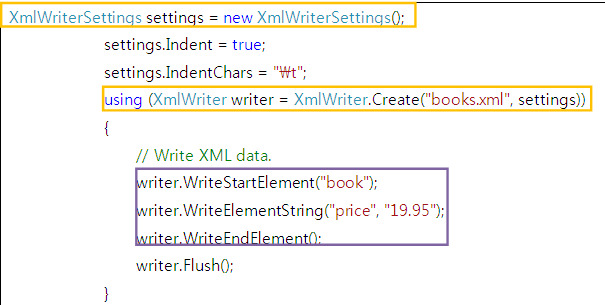
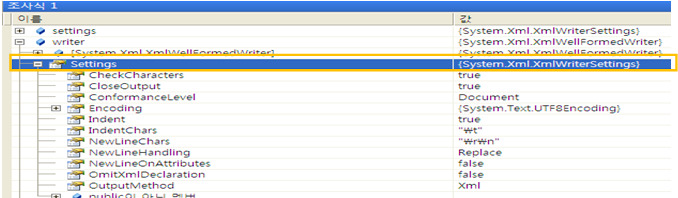
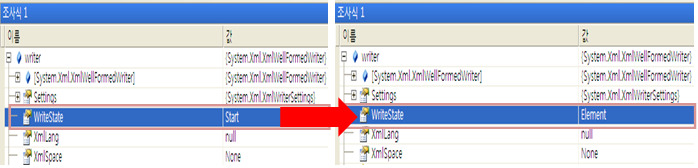
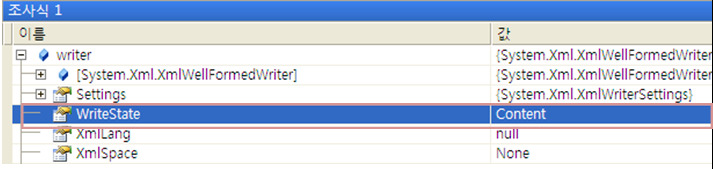


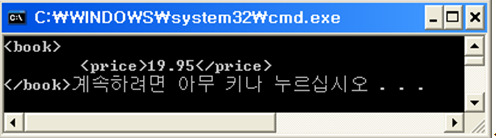

|
명시적 인터페이스 구현 IDisposable.Dispose : 이 멤버는 명시적 인터페이스 멤버 구현이며, XmlWriter 인스턴스가 IDisposable인터페이스로 캐스팅된 경우에만마 사용할 수 있다. |
|
XmlTextWriter Class | |||||||
|
상속 계층 구조 System.Object
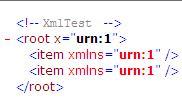
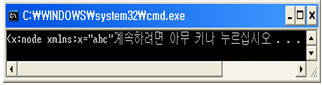
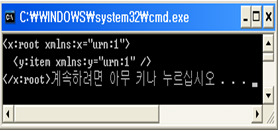
XmlTextWriter는 현재 요소 스택에 정의된 모든 네임스페이스에 해당하는 네임스페이스 스택을 유지한다. XmlTextWriter를 사용하면 네임스페이스를 직접 선언 할 수 있다.
r 현재 네임스페이스 선언을 재정의 예를 들어 네임스페이스 URI”123”을 “abc”로 재정의하여 XML텍스르를 생성
r 접두사 지정 접두사를 인수로 사용하는 쓰기 메서드를 사용하면 사용할 접두사를 지정 예를 들어, 두 가지 다른 접두사가 동일한 네임스페이스 URI로 매핑되어 XML 텍스트를 생성
|
|
XmlTextWriter 에서는 다음을 확인하지 않는다. · 특성 및 요소 이름 내의 잘못된 문자 · 지정된 인코딩에 맞지 않는 유니코드 문자. 유니코드 문자가 지정된 인코딩에 맞지 않으면 XmlTextWriter는 유니코드 문자를 문자 엔터티로 이스케이프하지 않습니다. · 중복된 특성 · DOCTYPE 공용 식별자 또는 시스템 식별자의 문자
★보안 고려 사항 XmlTextWriter 클래스를 사용할 때는 다음 사항을 고려해야 한다. · 응용 프로그램에 버블링하지 않을 경로 정보가 XmlTextWriter에서 throw하는 예외에 의해 노출될 수 있습니다. 응용 프로그램에서 예외를 catch하여 적절하게 처리해야 합니다. · 다른 응용 프로그램에 XmlTextWriter를 전달하면 내부 스트림이 해당 응용 프로그램에 노출됩니다. 부분적으로 신뢰할 수 있는 응용 프로그램에 XmlTextWriter를 전달하려면 Create 메서드로 생성한 XmlWriter 개체를 대신 사용해야 합니다. · XmlTextWriter 는 WriteDocType 또는 WriteRaw 메서드에 전달되는 데이터의 유효성을 검사하지 않습니다. 따라서 이러한 메서드에 임의의 데이터를 전달해서는 안 됩니다. · 기본 설정을 변경한 경우 생성된 출력이 올바른 형식의 XML 데이터가 아닐 수도 있습니다. · 신뢰할 수 없는 소스의 Encoding 개체와 같은 지원 개체는 사용하지 마십시오.
|
|
[참고문헌] MSDN 사이트 : Click^^ 소설같은 C# about ADO.net |