출처 : 여성시대 Oh My Girl

예전에 잇게에 한번 쓴 적이 있는데 에디터가 바뀌면서 안 된다는 여시들이 많더라구ㅠㅠ
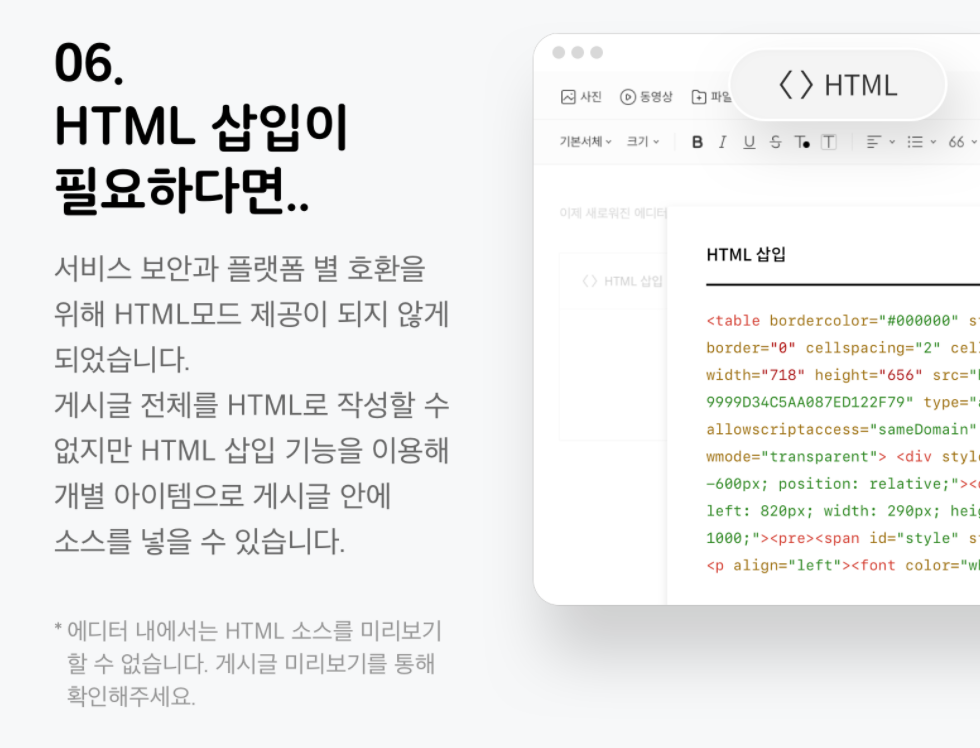
이러한 이유로 3월 2일 후로는 새로 HTML복사 할 수 있게 하는 글 작성과
이 글의 수정도 어려울 것 같아서 다시 한번 써봐
(새 에디터로 글작성 시도해봤는데 HTML소스 일부분이 날아가더라고ㅠㅠ)
내가 혼자 눈치껏 소스 떼다가 쓰는 거라서
오류사항에 있어서 바로바로 피드백 해줄 수 없다는 거 넘 미안하지만 이해해줬으면 좋겠어....,,,
HTML 코딩 공부한 여시들이 보면 넘넘 허접하고 부끄러운 솜씨라
이 글에서 보완할 점이나 더 좋은 방법을 아는 여시는 제발 알려주라ㅠㅠ
3월2일 전까지 알려주면 바로 글 수정할게
+특별하게 달라진 게 없는 부분은 이전글에서 차용했어
순서는
1.배경넣기
- 움짤배경넣기 -단색배경넣기
2.글자 색 바꾸기
3.폰트 바꾸기
4. 상단바에 움직이는 글자 넣기
5. 글 내용안에서 움직이는 글자 넣기
6. BGM 넣기
순으로 넣었어!
이 글처럼 하고 싶을 땐 움짤 써용
<div><p style="text-align: center;"><br></p>
<p style="text-align: center;">
<span style="color: rgb(93, 93, 93);font-family: Dotum, 돋움, sans-serif; font-size: 9pt;">
</span><br></p></div><p><br></p><style>
div {background-image: url('https://t1.daumcdn.net/cafeattach/1YyQp/6a28a832a1645df0712238e1eaeaad1fabbd497a');}
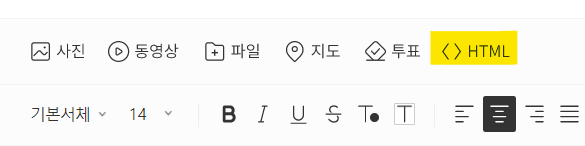
투표 옆에 있는 <>HTML을 클릭하고 나오는 창에 위에 있는 소스를 긁어서 붙여넣어줘
(앞으로 나오는 소스 입히는 방법들이 이거랑 다 똑같아
복사하고 HTML에서 붙여넣기하기!
글 색바꾸기 부터는 언급 안 할게)
그리고 여시가 배경으로 넣고 싶은 사진 링크를 내가 노란색 으로 해놓은 자리에 대신 삽입해
사진 링크 따는 방법은 그냥 사진에 대고 우클릭-이미지 주소 복사 하면 돼
근데 사진 첨부되어있는 원본 글이 삭제되면 배경효과도 사라지니까 본인이 글 써서 사용하는 걸 추천해
<style>div {margin:0 auto; background: linear-gradient(to right, rgb(200, 213, 245), rgb(200, 213, 245)); float:center;}p {background-color: transparent;}img {border: 0;}</style><div>
rgb에 해당하는 숫자 두부분(200, 213, 245) 각각에 원하는 색상 숫자를 채워줘
이렇게하면 단색배경이 되고
만약 각각 다른 숫자를 넣는다면 ex (200, 213, 245)(240, 200, 245) 그라데이션으로 나와

<form name="formBGM2"><input type="hidden" name="vol2" size="3" value="30" xxxxxxxxxxxxxxxxxxxxxxxxxxxxxxxxxxxxxxxxxxxxxxxxxxxxxxxxxxxxxxxxxxxxxxxxxxxxxxxxxxxxxxxxxxxxonchange="setVolume2()">
<xmp id="template_xmp" name="template_xmp" style="display:none;"> <style type="text/css">p,br,body,table,td,input,form,textarea {color:#★; letter-spacing:-1; opacity:1; text-align:center; text-shadow:-1px 0 #★, 0 1px #★,1px 0 #★, 0 -1px #★,-1px 0px 20px #★, 0 1px #★,1px 0 #★, 0 -1px #★,-1px 0px 20px #★, 0 1px #★,1px 0 #★, 0 -1px #★;}</style><p><br></p>
<!-- --></xmp>
</form>
노란색으로 칠한 부분 : 글색깔
연두색으로 칠한 부분 : 제목, 본문, 댓글창 모두 가운데 정렬하는 건데 하기 싫으면 지우는 것도 가능
나머지 별 부분 : 글씨의 그림자 색 / 모두 같은 색으로 넣어주기
(폰트 바꿀 경우 )모두 수정 후 굵은 글씨 폰트바꾸는 소스 colcr자리에 넣어주기
색상코드는 #772763 이런 식으로 된 거 말하는 거야
첫 번째 소스
<style type="text/css">p,br,body,table,td,input,form,textarea {color:#★; 두 번째 CSS 소스}</style>
https://fonts.google.com/?subset=korean
^여기 들어가서
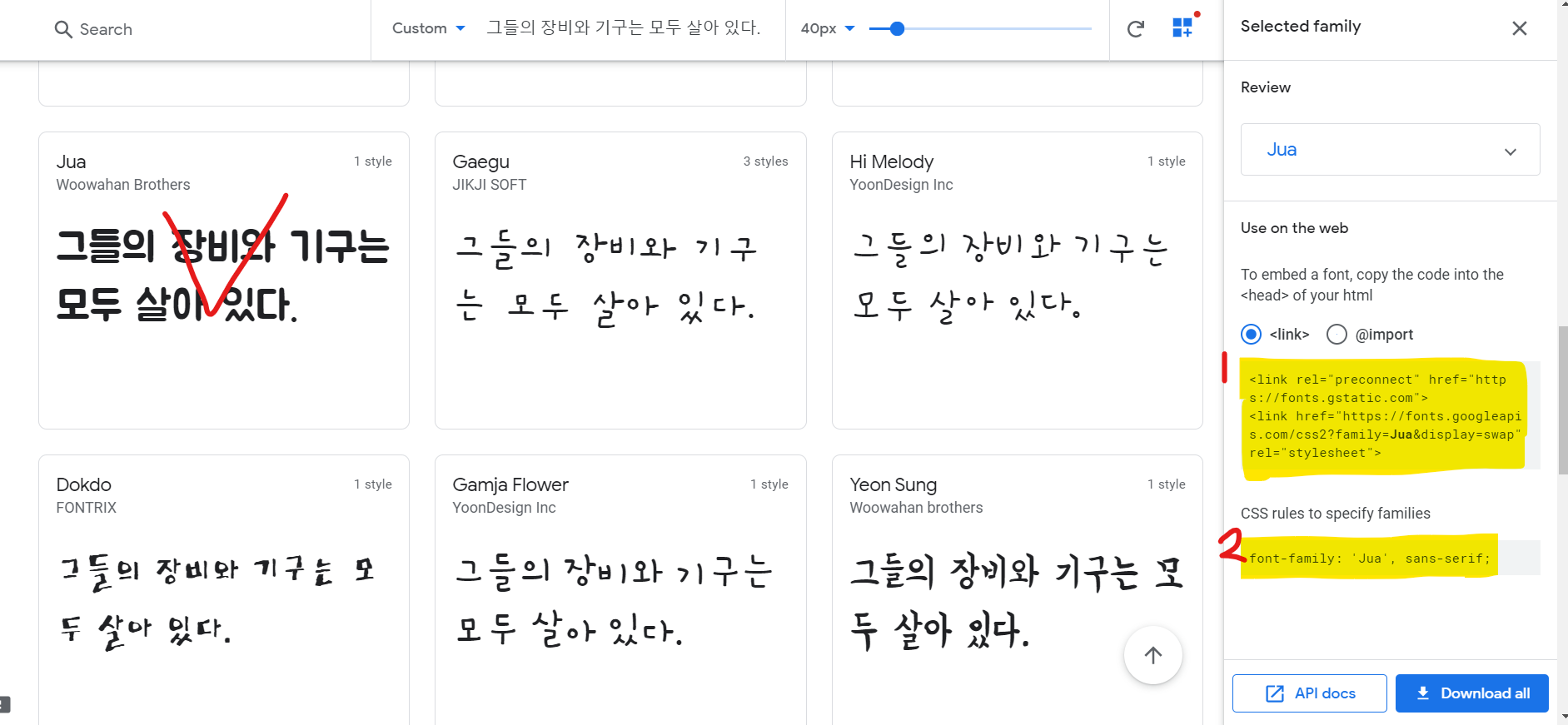
원하는 폰트를 누르면 옆에 작은 창이 뜨는데
1을 첫 번째 소스 자리에 붙여넣고
2는 두 번째 CSS 소스 자리에 넣는거야
노란색엔 2번 글 색깔 바꾸기에서 나왔던 굵은 글씨 부분을 그대로 떼다가 붙여넣어줘 (이래야 그림자 나옴)
<link href="/favicon.ico" rel="shortcut icon"> <link href="//i1.daumcdn.net/cafeimg/161017_mw/cafe-mw-homescreen.png" rel="apple-touch-icon-precomposed">
<link href="//t1.daumcdn.net/cafe_cj/mobileweb/css/89/mobile_cafe.css" rel="stylesheet" type="text/css">
<link href="//t1.daumcdn.net/cafe_cj/mobileweb/css/15/custom.css" rel="stylesheet" type="text/css"><p> </p><xscript>
</xscript><div class="cafe_type3" id="daumWrap">
<header class="fixed" id="daumHead">
<div class="cafe_head">
<!-- 네비게이션바 -->
<div class="d_head #cafe_home_gnb">
<div class="wrap_tit">
<h1 class="tit_daum">
<a class="tit_service link_service" id="daumServiceLogo" href="/_myCafe?t__nil_logo=cafe">
<span class="cafe_logo"><span class="sr_only">cafe</span></span>
</a>
</h1>
<h2 class="tit_cafename" style="text-align: center;"><font color="#EAEAEA"><span style="font-size: 10.66px;"><marquee behavior="scroll"><span style="font-size: 10pt;">상단바에 쓸 말</span> </marquee></span></font></h2></div></div></div></header></div><p><br></p>
<div><p style="text-align: center;"><br></p></div><p><br></p>
연두색 #EAEAEA에는 색상코드, 노란색 상단바에 쓸 말에 여시가 넣고 싶은 말 넣으면 돼!
이때 여시가 넣은 배경이 투명한 움짤이라면 상단바 배경이 빨갛게 나오고 색깔이 있는 배경이라면 그 색깔로 배경이 나와
그 예시로 지금 이 글은 별무늬 움짤이라 이런 상단바로 뜨는거야
만약 투명이었다면 빨간배경에 글씨만 움직이겠지?
<marquee behavior="alternate"> 좌우로 왔다가 갔다가</marquee>
<marquee direction="right">오른쪽</marquee>
<marquee direction="left">왼쪽</marquee>
챠란~! 말 안 해도 알겠지??
글자만 바꾸면 끝이야~!~!~!!!!
사클에서 원하는 노래를 찾아! 그리고 Share > Embed 에서 아래 캡쳐 참고해서 코드를 복사해줘
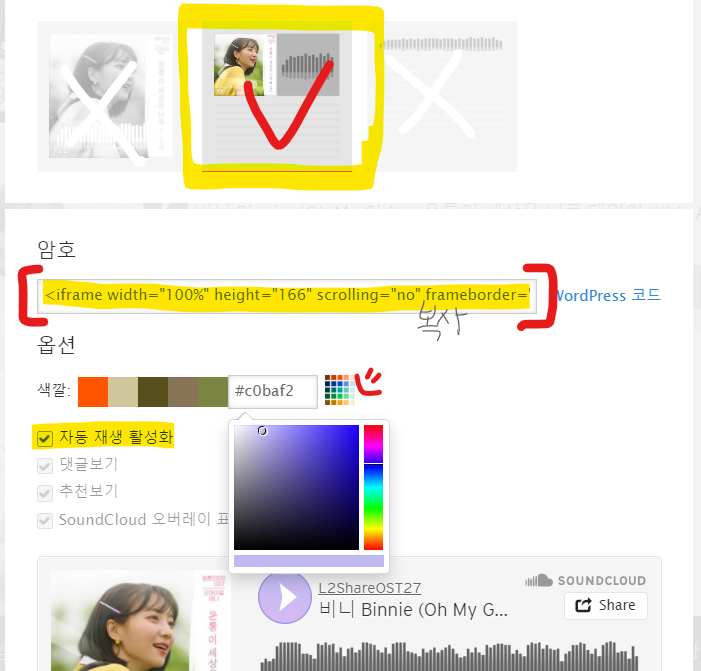
(플레이버튼 색 고르는 거에서 색상코드 뽑아도 돼!)
그리고 코드 붙여넣기하기!
재생 버튼만 나오게 하고 싶다면
<iframe width="100%" height="166" scrolling="no" frameborder="no" allow="autoplay" src="https://w.soundcloud.com/player/?url=https%3A//api.soundcloud.com/tracks/841327000&color=%23caa6d3&auto_play=true&hide_related=false&show_comments=true&show_user=true&show_reposts=false&show_teaser=true"></iframe><div style="font-size: 10px; color: #cccccc;line-break: anywhere;word-break: normal;overflow: hidden;white-space: nowrap;text-overflow: ellipsis; font-family: Interstate,Lucida Grande,Lucida Sans Unicode,Lucida Sans,Garuda,Verdana,Tahoma,sans-serif;font-weight: 100;"><a href="https://soundcloud.com/l2shareost27" title="L2ShareOST27" target="_blank" style="color: #cccccc; text-decoration: none;">L2ShareOST27</a> · <a href="https://soundcloud.com/l2shareost27/binnie-oh-my-girl-its-all-about-you-sometoon-2020-ost" title="비니 Binnie (Oh My Girl) – 온통 이 세상은 너로 돼 있어 (It's All About You) [썸툰2020 (Sometoon 2020 OST)]." target="_blank" style="color: #cccccc; text-decoration: none;">비니 Binnie (Oh My Girl) – 온통 이 세상은 너로 돼 있어 (It's All About You) [썸툰2020 (Sometoon 2020 OST)].</a></div>
연두색으로 색칠한 숫자를 6 / 20으로 바꿔주면 재생버튼만 노출돼
</iframe> 뒤부터 줄 그어둔 부분 안 지우면 노래 제목 가수 설명 나와ㅠ
여기까지 차근차근 했다면 글 확인해도돼
대신 미리보기로는 어떻게 설정됐는지 안 보이니까 백업해두고 더 필요한 부분 차근차근 수정해보길 바라
귀찮은 여시들을 위해 이 글 설정 남겨둘게 가즈가~!
<div><p style="text-align: center;"><br></p>
<p style="text-align: center;">
<span style="color: rgb(93, 93, 93);font-family: Dotum, 돋움, sans-serif; font-size: 9pt;">
</span><br></p></div><p><br></p><style>
div {background-image: url('https://t1.daumcdn.net/cafeattach/1YyQp/6a28a832a1645df0712238e1eaeaad1fabbd497a');}
<form name="formBGM2">
<input type="hidden" name="vol2" size="3" value="30" xxxxxxxxxxxxxxxxxxxxxxxxxxxxxxxxxxxxxxxxxxxxxxxxxxxxxxxxxxxxxxxxxxxxxxxxxxxxxxxxxxxxonchange="setVolume2()">
<xmp id="template_xmp" name="template_xmp" style="display:none;"> <style type="text/css">p,br,body,table,td,input,form,textarea { color:#EAEAEA; letter-spacing:-1; opacity:1; text-align:center; text-shadow:-1px 0 #005766, 0 1px #005766,1px 0 #005766, 0 -1px #005766,-1px 0px 20px #005766, 0 1px #005766,1px 0 #005766, 0 -1px #005766,-1px 0px 20px #005766, 0 1px #005766,1px 0 #005766, 0 -1px #005766; }</style><p><br></p>
<!-- --></xmp>
</form>
<link rel="preconnect" href="https://fonts.gstatic.com">
<link href="https://fonts.googleapis.com/css2?family=Jua&display=swap" rel="stylesheet">
<style type="text/css">p,br,body,table,td,input,form,textarea {color:#EAEAEA; letter-spacing:-1; opacity:1; text-align:center; text-shadow:-1px 0 #005766, 0 1px #005766,1px 0 #005766, 0 -1px #005766,-1px 0px 20px #005766, 0 1px #005766,1px 0 #005766, 0 -1px #005766,-1px 0px 20px #005766, 0 1px #005766,1px 0 #005766, 0 -1px #005766; font-family: 'Jua', sans-serif;}</style>
<link href="/favicon.ico" rel="shortcut icon"> <link href="//i1.daumcdn.net/cafeimg/161017_mw/cafe-mw-homescreen.png" rel="apple-touch-icon-precomposed">
<link href="//t1.daumcdn.net/cafe_cj/mobileweb/css/89/mobile_cafe.css" rel="stylesheet" type="text/css">
<link href="//t1.daumcdn.net/cafe_cj/mobileweb/css/15/custom.css" rel="stylesheet" type="text/css"><p> </p><xscript>
</xscript><div class="cafe_type3" id="daumWrap">
<header class="fixed" id="daumHead">
<div class="cafe_head">
<!-- 네비게이션바 -->
<div class="d_head #cafe_home_gnb">
<div class="wrap_tit">
<h1 class="tit_daum">
<a class="tit_service link_service" id="daumServiceLogo" href="/_myCafe?t__nil_logo=cafe">
<span class="cafe_logo"><span class="sr_only">cafe</span></span>
</a>
</h1>
<h2 class="tit_cafename" style="text-align: center;"><font color="#fff179"><span style="font-size: 10.66px;"><marquee behavior="scroll"><span style="font-size: 10pt;">본새달주 되기 대.작.전!</span> </marquee></span></font></h2></div></div></div></header></div><p><br></p>
<div><p style="text-align: center;"><br></p></div><p><br></p>
<iframe width="6%" height="20" scrolling="no" frameborder="no" allow="autoplay" src="https://w.soundcloud.com/player/?url=https%3A//api.soundcloud.com/tracks/841327000&color=%23e6baf2&auto_play=true&hide_related=false&show_comments=true&show_user=true&show_reposts=false&show_teaser=true"></iframe><div style="font-size: 10px; color: #cccccc;line-break: anywhere;word-break: normal;overflow: hidden;white-space: nowrap;text-overflow: ellipsis; font-family: Interstate,Lucida Grande,Lucida Sans Unicode,Lucida Sans,Garuda,Verdana,Tahoma,sans-serif;font-weight: 100;"></div>
문제시 죄송강쥐 후다닥 수정함