1) Install NX8.0.0.25 and UGSLicensing
2) When acked for license point to .NX8.0.lic supplied in a folder ..\UGSLicensing
3) Copy folders "DRAFTINGPLUS, NXCAE_EXTRAS, NXNASTRAN, NXPLOT and UGII" from crack to <NX8.0 progdir> (by default C:\Program Files\Siemens\NX 8.0\) and overwrite original ones
4) Go to <UGSLicensing progdir> (by default: C:\Program Files\UGS\UGSLicensing\) and run lmtools.exe
5) Select "Configuration using Services"
6) Select "UGS License Server (ugslmd)" in the list of servers
7) Select "Start/Stop/Reread" tab
8) Select "Force Server Shutdown"
9) Press "Stop Server"
10) Replace <UGSLicensing progdir>\ugslmd.exe with one from folder ..\UGSLicensing
11) Press "Start Server"
12) Enjoy :)
Cracked by Team-SolidSQUAD (SSQ)
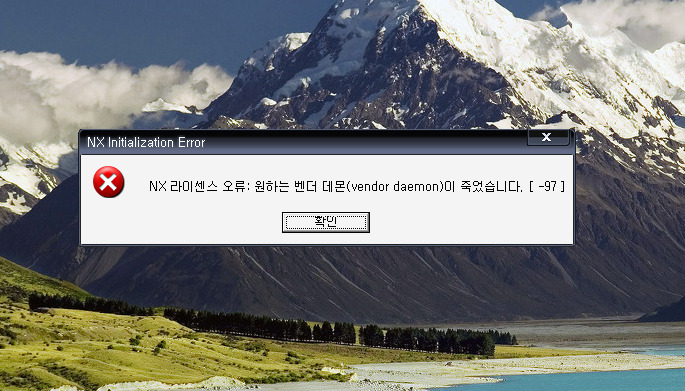
위와 같이 설치하고 실행하니 저놈이 죽었다고 하니 미치겠네요
뭐가 잘못됐을까요??
SERVER this_host ID=201105555 28000@12ho
댓글
댓글 리스트-
작성자하고지비 작성시간 11.10.04 제 경험으로는 컴퓨터 이름과 사용하는 USB의 이름이 같으면 위와같은 에러가 발생합니다. USB이름을 바꾸거나 컴퓨터의 이름을 바꾸세요.
-
작성자육현 작성시간 11.10.11 7.5 도 안되서 고민인데 ...하이턴 성공하길 바랍니다.
-
작성자들소 작성시간 11.10.17 win7 기준 설명 드리면
제어판-시스템및보완-관리도구-서비스
UGS 라이센스 서버(ugslmd) 을 시작 설정하세요 -
작성자은사랑 작성시간 11.12.19 설치후 lmtools실행 - start/stop/reread에서 sopt server 누른후 ugslmd.exe 붙여넣기 후 컴퓨터를 다시시작이 아닌 완전히
끈다음에 재부팅 후 lmtools실행 - start/stop/reread에서 start server - ug 실행 -
작성자귀공자 작성시간 12.07.10 nx8.0부탁 드립니다 pksu8923@hanmail.net 행복하고 행운 가득하세요...^^